Multiple studies concur that listening to music has a powerful impact on the brain. In fact, it's been shown to reduce things like anxiety, stress, blood pressure, pain, and improve sleep quality, mood, alertness, immune function, memory, and so much more. In the past year, new literature has brought to light the music's impact on cognitive ability and brain plasticity, in particular. In this blog, we’ll dive into the market outlook, innovation activity within the space, and recent scientific literature centered on how music improves cognitive abilities, particularly in relation to playing musical instruments, listening to your favorite music, and dancing.
Market outlook:
We used the Cypris Innovation Dashboard to pull data on the research area of music and the brain. According to our report, 15 new organizations entered the space last year, the majority of which were based in USA. Of the 15 organizations, 11 were startups. Below, you can see the funding breakdown for startups by industry.

Scientific literature in the field saw the addition of 4,382 new research papers in the last year, while only 64 new patents were published in the space. Most of the patent activity centered on medical applications, with computing software coming in second.

News coverage in the space boomed—with 89,798 news articles written in the last year, 71.05% of which were in the New Product category.

Research on music’s impact on cognitive ability
Let's take a look at the recent research studies examining the connection between music and brain function:

Playing a musical instrument in childhood improves cognitive ability in older age
The University of Edinburgh tested the cognitive ability of participants twice in their lives—at age 11 and age 70—using questions that included verbal reasoning, spatial awareness and numerical analysis portions. Out of the 366 study participants, 117 reported some experience of playing a musical instrument primarily during childhood and adolescence. Most commonly participants played the piano, but the instruments were wide ranging.
The results revealed that people with more experience of playing a musical instrument showed greater lifetime improvement on a test of cognitive ability than those with less or no experience. Researchers found that this was the case even when accounting for their socio-economic status, years of education, childhood cognitive ability, and their health in older age.
However, the researchers did note that the results don’t prove musical training boosts cognitive ability due to other confounding factors like parental influence, which could play a role.
Emeritus Professor Ian Deary, formerly Director of the Centre for Cognitive Ageing and Cognitive Epidemiology at the University of Edinburgh, said: “We have to emphasize that the association we found between instrument-playing and lifetime cognitive improvement was small, and that we cannot prove that the former caused the latter.
“However, as we and others search for the many small effects that might contribute toward some people’s brains aging more healthily than others, these results are worth following up.”

Listening to your favorite music improves brain plasticity
Patients in Toronto experiencing early-stage cognitive decline participated in a study where they each listened to a curated playlist that featured music that held significant meaning in their lives. The 14 participants, six of whom were musicians and eight non-musicians, listened to their playlist for an hour per day for three weeks.
MRI scans taken before and after the listening period compared their responses to new music they hadn't previously heard, and the long-known music they were attached to. Music, in general, activated the brain’s auditory cortex, but the familiar music lit up significant regions of the brain, including the prefrontal cortex. The prefrontal cortex is responsible for higher order executive functioning like decision-making, personality expression, and regulating emotions. Whether they were musicians or not, all participants demonstrated improved cognition.
Dr Michael Thaut is the senior author of the study, as well as being the director of the Music and Health Science Research Collaboratory, Tier One Canada Research Chair in Music, Neuroscience and Health, and professor at the University of Toronto's Faculty of Music and Temerty Faculty of Medicine.
"We have new brain-based evidence that autobiographically-salient music—that is, music that holds special meaning for a person, like the song they danced to at their wedding—stimulates neural connectivity in ways that help maintain higher levels of functioning," says Dr. Thaut.

Dancing to groovy music improves cognitive function
Researchers from University of Tsukuba in Japan performed functional near-infrared spectroscopy (fNIRS) with a color-word matching task on participants to examine inhibitory executive function before and after listening to music, as well as conducted a survey about the subjective experience of listening to groove music. Their goal was to examine the effect of groove music on executive function or brain activity in regions associated with executive function, such as the left dorsolateral prefrontal cortex (l-DLPFC).
Their findings revealed that dancing to ‘music with a groove’ can boost cognition, executive function and overall brain performance, as well as prevent diseases like dementia.
“The results were surprising,” explains lead author Professor Hideaki Soya. “We found that groove rhythm enhanced executive function and activity in the l-DLPFC only in participants who reported that the music elicited a strong groove sensation and the sensation of being clear-headed.”
Notably, those who were most familiar with the music experienced more improved brain function.
Whether it comes to playing an instrument as a child, listening to your favorite tunes, or dancing to groovy music, music has a profound impact on cognitive ability and brain plasticity. If you're curious to learn more about another topic of interest using data from our innovation dashboard, visit cypris.ai to get started.
Sources:
Cypris Innovation Dashboard, query: Music and the brain
https://www.nature.com/articles/s41598-022-11324-3
https://www.ed.ac.uk/news/2022/music-in-childhood-boosts-brains-in-later-life
https://www.mirror.co.uk/news/uk-news/learning-play-musical-instrument-child-28199852
https://www.abc.net.au/classic/read-and-watch/news/favourite-music-can-boost-brain-function/13661074
https://www.sciencedaily.com/releases/2022/05/220527101244.htm
Music's Impact on the Brain

Multiple studies concur that listening to music has a powerful impact on the brain. In fact, it's been shown to reduce things like anxiety, stress, blood pressure, pain, and improve sleep quality, mood, alertness, immune function, memory, and so much more. In the past year, new literature has brought to light the music's impact on cognitive ability and brain plasticity, in particular. In this blog, we’ll dive into the market outlook, innovation activity within the space, and recent scientific literature centered on how music improves cognitive abilities, particularly in relation to playing musical instruments, listening to your favorite music, and dancing.
Market outlook:
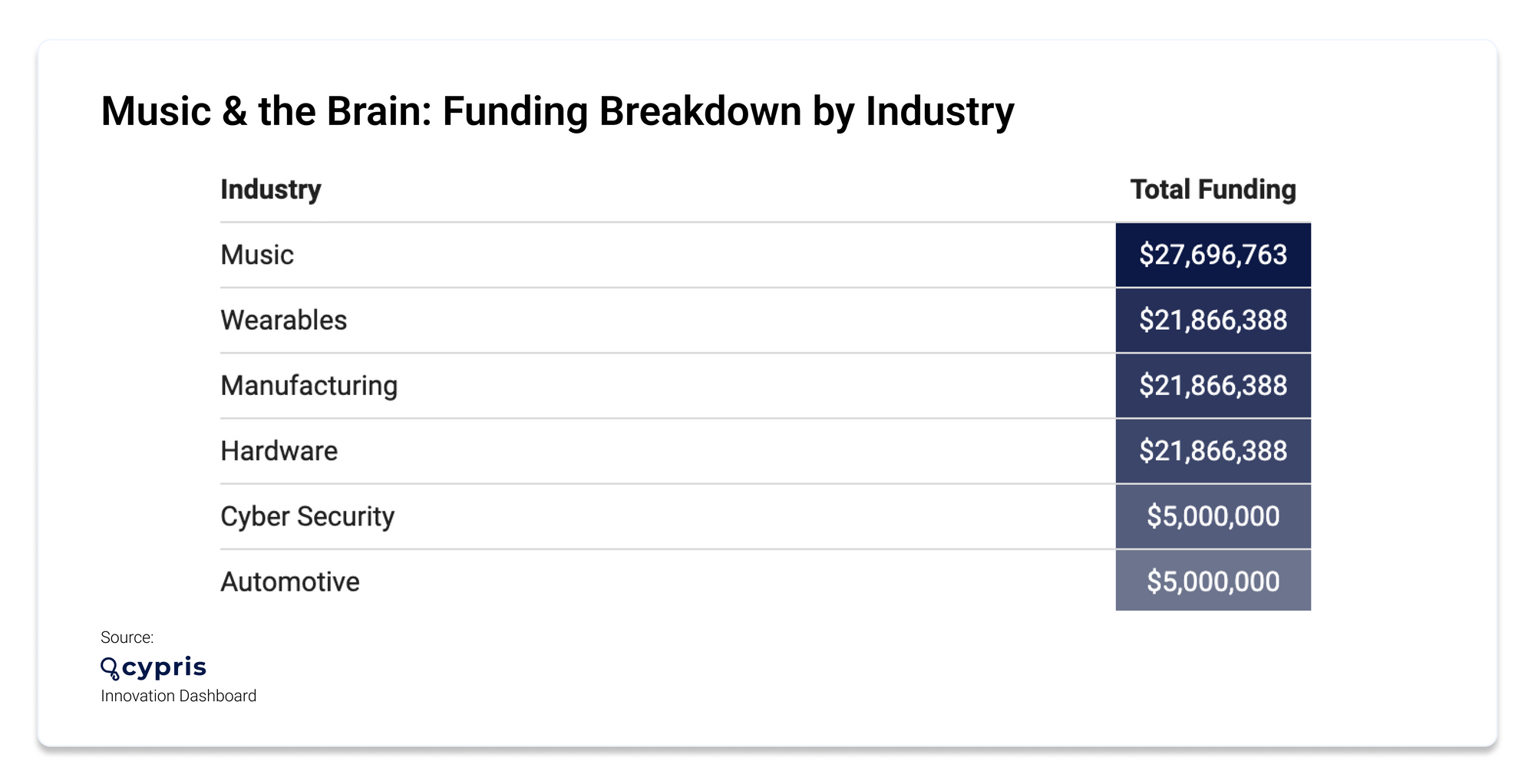
We used the Cypris Innovation Dashboard to pull data on the research area of music and the brain. According to our report, 15 new organizations entered the space last year, the majority of which were based in USA. Of the 15 organizations, 11 were startups. Below, you can see the funding breakdown for startups by industry.
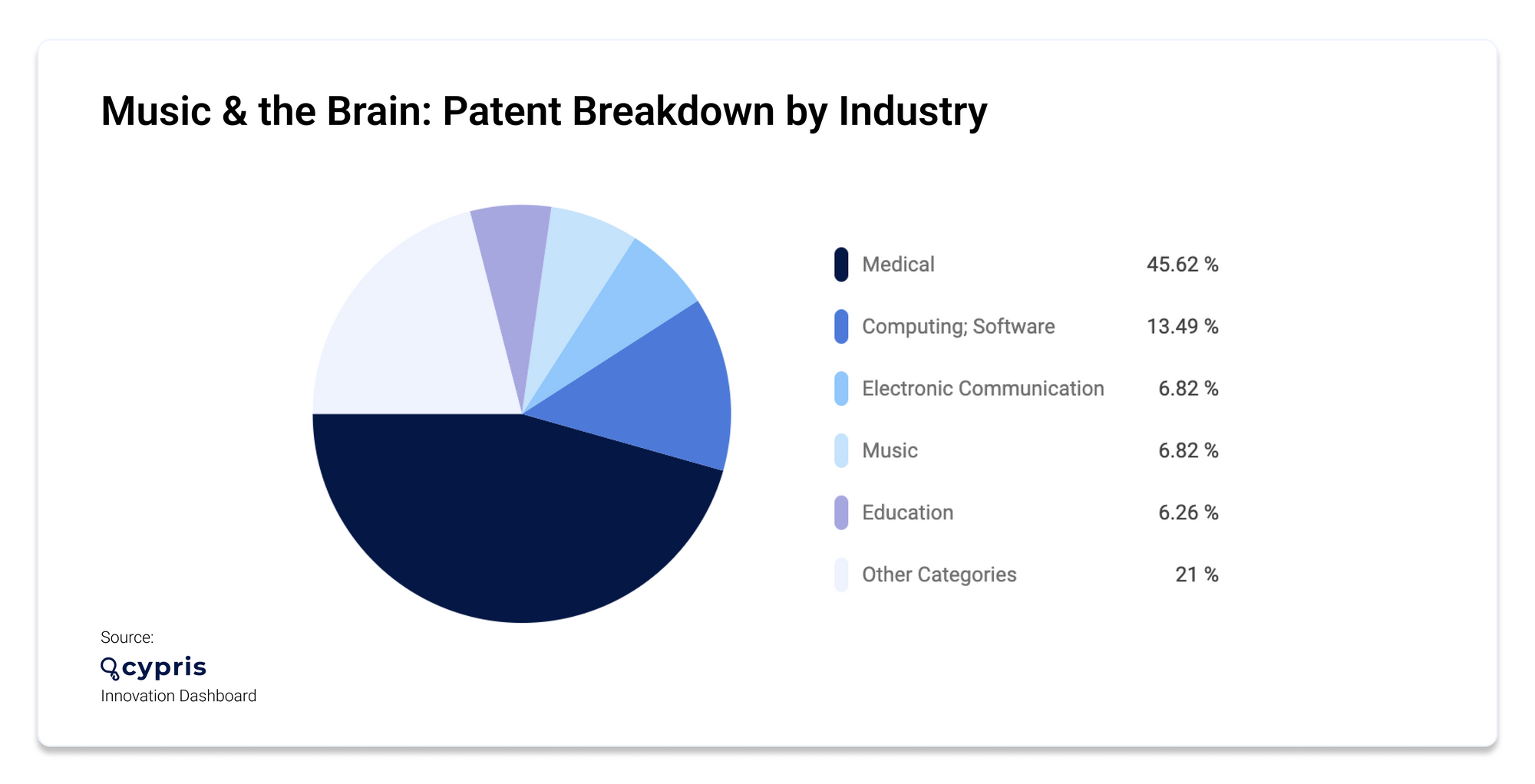
Scientific literature in the field saw the addition of 4,382 new research papers in the last year, while only 64 new patents were published in the space. Most of the patent activity centered on medical applications, with computing software coming in second.
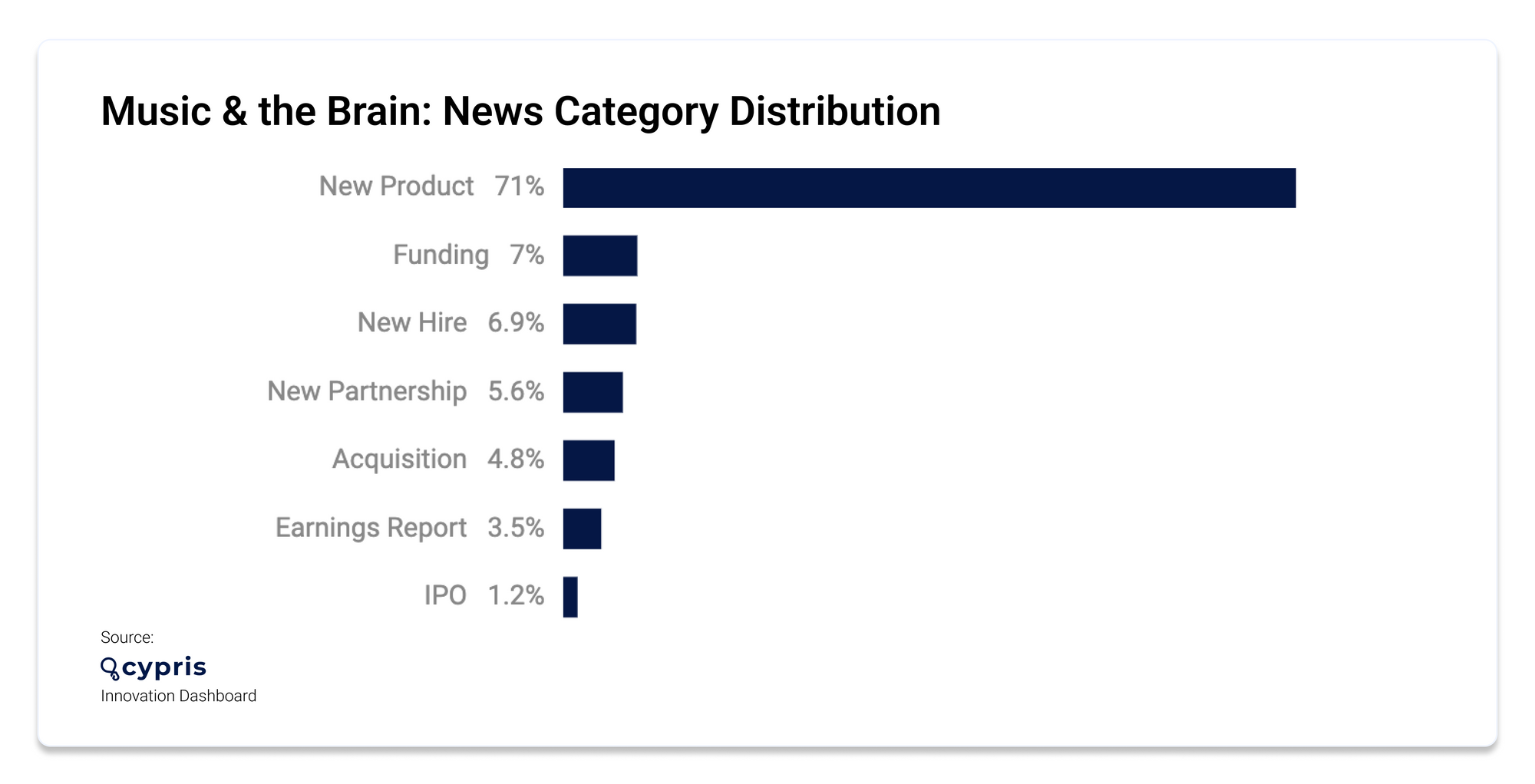
News coverage in the space boomed—with 89,798 news articles written in the last year, 71.05% of which were in the New Product category.
Research on music’s impact on cognitive ability
Let's take a look at the recent research studies examining the connection between music and brain function:

Playing a musical instrument in childhood improves cognitive ability in older age
The University of Edinburgh tested the cognitive ability of participants twice in their lives—at age 11 and age 70—using questions that included verbal reasoning, spatial awareness and numerical analysis portions. Out of the 366 study participants, 117 reported some experience of playing a musical instrument primarily during childhood and adolescence. Most commonly participants played the piano, but the instruments were wide ranging.
The results revealed that people with more experience of playing a musical instrument showed greater lifetime improvement on a test of cognitive ability than those with less or no experience. Researchers found that this was the case even when accounting for their socio-economic status, years of education, childhood cognitive ability, and their health in older age.
However, the researchers did note that the results don’t prove musical training boosts cognitive ability due to other confounding factors like parental influence, which could play a role.
Emeritus Professor Ian Deary, formerly Director of the Centre for Cognitive Ageing and Cognitive Epidemiology at the University of Edinburgh, said: “We have to emphasize that the association we found between instrument-playing and lifetime cognitive improvement was small, and that we cannot prove that the former caused the latter.
“However, as we and others search for the many small effects that might contribute toward some people’s brains aging more healthily than others, these results are worth following up.”

Listening to your favorite music improves brain plasticity
Patients in Toronto experiencing early-stage cognitive decline participated in a study where they each listened to a curated playlist that featured music that held significant meaning in their lives. The 14 participants, six of whom were musicians and eight non-musicians, listened to their playlist for an hour per day for three weeks.
MRI scans taken before and after the listening period compared their responses to new music they hadn't previously heard, and the long-known music they were attached to. Music, in general, activated the brain’s auditory cortex, but the familiar music lit up significant regions of the brain, including the prefrontal cortex. The prefrontal cortex is responsible for higher order executive functioning like decision-making, personality expression, and regulating emotions. Whether they were musicians or not, all participants demonstrated improved cognition.
Dr Michael Thaut is the senior author of the study, as well as being the director of the Music and Health Science Research Collaboratory, Tier One Canada Research Chair in Music, Neuroscience and Health, and professor at the University of Toronto's Faculty of Music and Temerty Faculty of Medicine.
"We have new brain-based evidence that autobiographically-salient music—that is, music that holds special meaning for a person, like the song they danced to at their wedding—stimulates neural connectivity in ways that help maintain higher levels of functioning," says Dr. Thaut.

Dancing to groovy music improves cognitive function
Researchers from University of Tsukuba in Japan performed functional near-infrared spectroscopy (fNIRS) with a color-word matching task on participants to examine inhibitory executive function before and after listening to music, as well as conducted a survey about the subjective experience of listening to groove music. Their goal was to examine the effect of groove music on executive function or brain activity in regions associated with executive function, such as the left dorsolateral prefrontal cortex (l-DLPFC).
Their findings revealed that dancing to ‘music with a groove’ can boost cognition, executive function and overall brain performance, as well as prevent diseases like dementia.
“The results were surprising,” explains lead author Professor Hideaki Soya. “We found that groove rhythm enhanced executive function and activity in the l-DLPFC only in participants who reported that the music elicited a strong groove sensation and the sensation of being clear-headed.”
Notably, those who were most familiar with the music experienced more improved brain function.
Whether it comes to playing an instrument as a child, listening to your favorite tunes, or dancing to groovy music, music has a profound impact on cognitive ability and brain plasticity. If you're curious to learn more about another topic of interest using data from our innovation dashboard, visit cypris.ai to get started.
Sources:
Cypris Innovation Dashboard, query: Music and the brain
https://www.nature.com/articles/s41598-022-11324-3
https://www.ed.ac.uk/news/2022/music-in-childhood-boosts-brains-in-later-life
https://www.mirror.co.uk/news/uk-news/learning-play-musical-instrument-child-28199852
https://www.abc.net.au/classic/read-and-watch/news/favourite-music-can-boost-brain-function/13661074
https://www.sciencedaily.com/releases/2022/05/220527101244.htm
Keep Reading

Are you looking for a way to add patent information to your research? Google Scholar is an invaluable tool that can help R&D and innovation teams find the insights they need quickly. Want to learn how to add patent to Google scholar? Adding patents to Google Scholar allows users to search through millions of documents, including both published literature and issued patents.
In this blog post, we’ll discuss what Google Scholar is, how to add patent to Google scholar, and provide tips on analyzing results in the platform. So let’s get started by exploring what adding patent data to google scholar means.
Table of Contents
Adding Patents to Google Scholar
Analyzing Your Results in Google Scholar
FAQs in Relation to How to Add Patent to Google Scholar
How do I add a patent in Google Scholar?
What does ‘include patents’ mean on Google Scholar?
How does an article get into Google Scholar?
What is Google Scholar?
Google Scholar is a free, powerful search engine that allows users to quickly find scholarly literature worldwide. It indexes millions of articles, books, and other sources across a variety of disciplines. With Google Scholar, researchers can easily locate relevant research material in one place and access it from any device with an internet connection.
The benefits of using Google Scholar are numerous. By utilizing its sorting capabilities, Google Scholar enables users to quickly access relevant research material for their needs. Additionally, its ability to sort results by relevance makes finding specific information easier than ever before. Finally, the advanced search capabilities allow users to refine their searches even further by narrowing down results based on author names or publication dates.
Accessing Google Scholar is simple; simply type your query into the search bar at scholar.google.com or download the mobile app for iOS or Android devices directly from their respective app stores. Once you have logged in, you can immediately begin your search.
Google Scholar is a powerful tool for researchers to access relevant scholarly literature and can be used as an invaluable resource in the research process. Gaining an appreciation of patents and the potential advantages they can offer to businesses or organizations will help determine when it’s suitable to include them in Google Scholar.
Unlock the power of research with Google Scholar. Easily locate relevant scholarly material, refine searches by author or date & access it from any device. #GoogleScholar #ResearchMadeEasy Click to Tweet
What is a Patent?
A patent grants exclusive rights to a creator or their assignee for an established period, safeguarding the invention from unauthorized utilization, selling, duplication, and more. Patents protect the underlying invention from being copied, used, sold, or otherwise exploited without the permission of the patent holder. Generally speaking, patents are granted by governments and provide protection in exchange for disclosing information regarding the invention.
Patents can be acquired both domestically and internationally, depending on the intended market for the invention or product. There are three main types of patents: utility patents, design patents, and plant patents. Utility patents cover inventions that involve new processes or machines; design patents cover ornamental designs for products; and plant patents cover newly discovered varieties of plants.
Benefits of patenting include safeguarding against infringement from rivals, plus elevating public consciousness of your product or service by means of publication on official government websites such as the USPTO. Additionally, having a patent may help attract investors who want to fund further development and commercialization efforts related to your invention. Finally, obtaining a patent may also increase the value of your business should you decide to sell it down the line since potential buyers will be able to see how much effort went into protecting your idea with legal protections such as those provided by patented technology.
A patent is a legal instrument that grants an inventor exclusive rights to their innovation, which can be highly beneficial for any entity. Adding patents to Google Scholar can help increase the visibility of your research and discoveries, allowing them to reach wider audiences.
Key Takeaway: Patents provide a legal shield to inventors and their assignees by granting exclusive rights over an invention for a limited period of time. Obtaining patents can bring multiple benefits such as preventing competitors from infringing upon the underlying invention, increasing public awareness through publication in official records like USPTO website, attracting investors who are willing to fund further development or commercialization efforts and adding value if you decide to sell your business down the line.
Adding Patents to Google Scholar
Adding patents to Google Scholar can be a great way for R&D and innovation teams to gain insights into the latest research in their field. By adding patent information, teams can quickly search and analyze data related to their products or services. This process involves understanding how patents work, as well as taking the necessary steps to add them to Google Scholar.
Realizing the significance of a patent for R&D groups is the first step. A patent is an exclusive right granted by a government that allows inventors to protect their inventions from being copied or used without permission. Obtaining a patent also provides companies with legal protection against competitors who may try to copy their invention or use it without authorization. R&D teams should be knowledgeable about the various patent types in order to decide which is most suitable for their new products or services when filing applications.

(source)
Go to your Google Scholar profile page, open “Scholar Settings,” and select “Add Patent” in the “Patent Search Settings” section. Input all pertinent details about your patent – title, abstracts, citations (if applicable) – and hit “Save Changes” at the bottom of the page for it to appear in searches with relevant keywords related to your invention/patent topic area(s). By inputting your patent details into Google Scholar, you are giving research teams a useful resource to expeditiously explore and evaluate data connected with their offerings or services.
In order to optimize the results when searching through these added patents via keyword queries on Google Scholar, it is advisable to ensure that all relevant terms are incorporated into each query and include synonyms associated with keywords. Additionally, narrowing down results based on date range parameters, setting filters according to language preferences, sorting results by relevance rather than chronology, reviewing publications cited within each returned result item thoroughly before deciding whether it’s applicable/relevant enough for further analysis, and utilizing advanced search operators such as quotation marks around phrases (“”), Boolean operators AND & OR, asterisks (*) between words (easter*) will be beneficial.
Adding patents to Google Scholar can be a powerful way for R&D and innovation teams to gain valuable insights into their research. With the right approach, it can help them make more informed decisions about their work. Now let’s examine how we can utilize Google Scholar to analyze these findings.
Key Takeaway: Adding patents to Google Scholar can be a great way for R&D and innovation teams to gain insights into the latest research in their field. By understanding what a patent is, inputting pertinent details about your patent on Google Scholar’s “Add Patent” page, and optimizing keyword queries with relevant terms & filters, you’re providing valuable data that could give your team an edge over competitors.
Analyzing Your Results in Google Scholar
Analyzing Your Results in Google Scholar is a critical step for any R&D and innovation team. Teams can tap into the capabilities of Google Scholar to swiftly acquire patent info from all corners of the globe, permitting them to obtain knowledge regarding their research projects in a more expeditious manner than ever before. Using Google Scholar to analyze results is an essential step for R&D and innovation teams, so here we provide some tips on how to do this effectively.
The analysis process begins with accessing Google Scholar and searching for relevant patents related to your project. Once you have identified the patents that are most relevant to your project, it’s time to analyze them further. Once the relevant patents have been identified, a detailed assessment should be undertaken to determine their relevance based on factors such as filing date, claims, and technical details that may impact your project, in addition to any competitor patents which could affect your research or IP rights. Additionally, you should also take note of any competitor patents that may affect your own research efforts or intellectual property rights.
Teams should consult experts if needed during this phase of analysis to effectively understand the bigger picture and assess how individual patents fit together within a larger context, both technically and strategically. This requires deep knowledge in areas such as engineering principles and legal precedents around intellectual property law. Therefore, it is essential to analyze what has been patented and why certain aspects were chosen over others when filing a particular application or making specific claims about an invention or idea. Keywords such as “analyze,” “individual patent,” “bigger picture,” “engineering principles,” and “intellectual property law” should be used throughout the text while maintaining proper grammar, spelling, and punctuation (but no exclamation points).
Through the use of comparison-based analysis techniques like SWOT (Strengths Weaknesses Opportunities Threats) Analysis and PESTLE (Political Economic Social Technological Legal Environmental) Analysis, teams can weigh up all data points carefully to get a better understanding of the bigger picture. With this information in hand, they can make informed decisions regarding their next steps whether that be in terms of product development strategy or risk management approaches related to existing products/technologies already on the market today which may infringe upon their own IP assets, etc. Keywords such as “analyze,” “individual patent,” “bigger picture,” “engineering principles,” and “intellectual property law” should be used throughout the text while maintaining proper grammar, spelling, and punctuation but no exclamation points.
In conclusion, analyzing Your Results in Google Scholar is essential for R&D & Innovation Teams who need quick access to Patent Information from around the globe. Having access to tools like SWOT & PESTLE Analyses can help optimize their decision-making processes when evaluating potential risks associated with new technologies being developed internally versus those already available commercially elsewhere etc. By utilizing these assessment methods, teams can gain a deeper comprehension of the overall situation and make judicious choices concerning their following steps.
Analyzing the outcomes obtained from Google Scholar is a critical process to guarantee that the most suitable information is being employed for exploration and development. With this knowledge, we can now move on to concluding our discussion about adding patent information to Google Scholar.
Gain an edge in R&D & innovation: add patents to Google Scholar. Quickly analyze results, gain insights & ensure legal protection with this simple process. #PatentProtection #GoogleScholar Click to Tweet
FAQs in Relation to How to Add Patent to Google Scholar
How do I add a patent in Google Scholar?
To add a patent to Google Scholar, first search for the patent in the main search bar. Then select “Cited by” from the options at the top of your results page. Finally, click on “Add to My Citations” and you will have successfully added a patent to Google Scholar.
What does ‘include patents’ mean on Google Scholar?
Google Scholar includes patents as part of its search results. Patent records can supply facts about inventions and the innovators behind them, such as details on how they function or what components were employed. When searching Google Scholar, patent documents may be included in the list of results along with scholarly articles and other publications related to your query.
How does an article get into Google Scholar?
Google Scholar is an online database of academic literature and research articles. To be indexed in Google Scholar, articles must meet certain criteria such as having a valid DOI or URL, being published in a reputable journal or website, and containing scholarly content that adheres to the standards set by the publication. Authors can also submit their work directly to Google Scholar for inclusion in its index. Once submitted, Google will inspect the article for precision prior to including it in its index.
Conclusion
By properly including your patent data, you can guarantee that your details are accurately reflected in search results and thus gain a competitive advantage when analyzing trends or comparing with other organizations. By learning how to add patent to google scholar, R&D, and innovation teams can benefit from gaining a better understanding of the latest trends in their field or comparing themselves with other organizations. With careful use of this powerful tool, adding patents to Google Scholar can be a valuable asset for any research team.
Unlock the power of your R&D and innovation teams with Cypris. Our platform provides a fast, efficient way to add patents to Google Scholar and access insights quickly.

Do you ever wonder, "How do I find journals in Google Scholar?" With the immense volume of data available online, it can be hard to pinpoint where to begin searching for scholarly research. Thankfully, a few helpful hints and tricks can help you swiftly uncover peer-reviewed journals on Google Scholar.
From finding specific articles to discovering new topics within your field of study, this powerful search engine provides access to millions of sources that are sure to meet your needs. Keep reading as we explore how do I find journals in google scholar and provide helpful advice on getting started.
Table of Contents
How to Find Journals in Google Scholar?
Tips for Finding Journals in Google Scholar
Examples of Popular Journals Found on Google Scholar
Science Journals on Google Scholar:
Technology Journals on Google Scholar:
Alternatives to Finding Journals on Google Scholar
FAQs in Relation to How Do I Find Journals in Google Scholar
How do I find journals in Google Scholar?
Does Google Scholar have journal articles?
How do I find journal articles?
How do I access all Google Scholar articles?
What is Google Scholar?
Google Scholar is a tool created by Google that helps people quickly and effortlessly find scholarly works such as journal articles, dissertations, books, preprints, summaries, and technical reports. It covers all disciplines of research from science and technology to social sciences and humanities. Google Scholar can be used for free by anyone with an internet connection.
The benefits of using Google Scholar are numerous. Searching for pertinent data can be expedited by Google Scholar, which furnishes a vast amount of information in one spot. Second, its advanced search options allow users to refine their searches according to specific criteria such as author name or publication year. Thirdly, its citation feature makes it easy for researchers to track down related sources or verify the accuracy of citations made in other works. Finally, its sorting capabilities enable researchers to prioritize results based on relevance or impact factor (number of times cited).
Despite its advantages, there are certain limitations to consider when relying solely on Google Scholar for research purposes, such as the potential lack of peer-reviewed content or the availability of some documents due to copyright restrictions. Although some peer-reviewed content may be indexed by Google Scholar, certain documents may not be available online due to copyright restrictions and there is a chance that smaller journals are missing from the index. Furthermore, while most major journals have been included in the index, there may still be some smaller ones missing from the list so additional resources should always be consulted when conducting thorough research on any topic area.
Google Scholar is an excellent tool for researchers and innovators to quickly access relevant journals, papers, and other resources. Utilizing the proper search techniques, it’s effortless to pinpoint what you need on Google Scholar. Next, we will explore how to refine your searches on this platform for even more targeted results.
Key Takeaway Google Scholar is an invaluable tool for research, providing access to a wealth of information at one’s fingertips. It offers advanced search options, citation tracking capabilities and the ability to sort results based on relevance or impact factor. However, it does have its limitations such as not all content being peer-reviewed and certain documents may be unavailable due to copyright restrictions – so other resources should always be consulted when conducting thorough research.
How to Find Journals in Google Scholar?
Exploring Google Scholar for pertinent scholarly works can be a straightforward and productive approach. To begin, simply type a few keywords related to your research topic into the search bar. Once you hit enter, a list of results will appear with titles and authors. You can refine this list by clicking on the “Tools” tab located at the top of the page, which allows you to narrow down results by date range or language preference. Additionally, you can click on “More,” under the tools tab to filter your search further using criteria such as subject area or article type (e.g., journal article).
Refining Your Search Results in Google Scholar is also possible using various parameters that are available within each result page. This includes sorting results by relevance or date; filtering them based on author name, year published, and source title; and limiting them according to publication type (e.g., peer-reviewed journals). You can even limit your searches geographically if needed – just select “Region/Country” from the dropdown menu under Tools and then choose one of more than 40 countries worldwide.

(source)
Advanced Search Options in Google Scholar allow users to further customize their searches for specific information or topics within their field of study. For example, if you need only articles written by a particular author or published within a certain time frame, use advanced options like Author Name/Year Published filters located under Tools when searching for journals in Google Scholar. Additionally, Advanced Search enables users to combine multiple terms together with Boolean operators such as AND/OR/NOT for more precise search queries; this feature is especially useful when attempting to locate very specific information about a given topic quickly and efficiently.
By utilizing the tips provided in this article, you can easily find journals in Google Scholar. Now let’s look at some additional strategies to help refine your search results and get even more out of Google Scholar.
Key Takeaway Using Google Scholar, one can easily and effectively locate relevant scholarly articles for research topics. With tools such as date range filters, language preferences, subject areas and article types available at the click of a button; coupled with advanced search options like author nameyear published criteria or combining multiple terms using Boolean operators; researchers are able to find precisely what they need in no time.
Tips for Finding Journals in Google Scholar
To maximize your Google Scholar search results, using specific and broad keywords related to the research topic can be beneficial. Utilizing keywords and phrases effectively is key for narrowing down results. Try using specific terms related to your research topic as well as broader terms to cast a wider net. Additionally, exploring related articles and citations can be useful for uncovering more relevant information. Taking advantage of filters and preferences allows you to refine your search results even further by sorting through content based on date or other criteria like language or publication type.
By utilizing the tips for finding journals in Google Scholar, you can quickly and easily access a wealth of information from around the world. With this knowledge, we can now explore some examples of popular journals found on Google Scholar to further our understanding.
Researching journals? Use keywords, explore related articles & citations, and refine your search with filters to find the most relevant results. #GoogleScholar Click to Tweet
Examples of Popular Journals Found on Google Scholar
Google Scholar is a great resource for finding popular journals related to science, medicine, and technology. With its expansive collection of scholarly works from all corners of the globe, Google Scholar provides a convenient way to locate pertinent studies in any discipline. Here are some examples of popular journals that can be found on Google Scholar:
Science Journals on Google Scholar:
Science magazine is one of the most widely-read scientific publications in the world. It covers topics such as biology, chemistry, physics, and mathematics. Other notable science journals include Nature and Cell.
The renowned NEJM, with a legacy of featuring pioneering studies in the medical field, is an esteemed global health journal. Other notable medical journals include The Lancet and JAMA Internal Medicine.
Technology Journals on Google Scholar:
IEEE Spectrum publishes articles about technology trends across various industries including robotics, artificial intelligence (AI), energy systems, communications networks, and more. Other well-known tech magazines published by IEEE include Computer Magazine and Transactions on Networking & Communications Systems Engineering
Discovering acclaimed periodicals on Google Scholar is an excellent approach to accessing up-to-date research in your field. However, if you wish to explore further beyond Google Scholar’s offerings, there are numerous other options for locating scholarly articles and journals.
Explore the latest research in science, medicine, and technology with Google Scholar. Get access to top journals like Science, NEJM, IEEE Spectrum & more. #Googlescholar #ResearchPlatform #RnDInnovation Click to Tweet
Alternatives to Finding Journals on Google Scholar
When researching journals, Google Scholar is a great resource for finding relevant articles and publications. Nevertheless, other options are available to those seeking more specific or in-depth material. Here we will explore some of the other online databases, traditional library resources, and professional research services that can help you find the journal articles you need.
Other digital archives providing access to a plethora of scholarly periodicals from global locations are available online. Some of these include EBSCOhost, JSTOR, ProQuest Central, ScienceDirect, Web of Science Core Collection, and others. Users can take advantage of various search functions to quickly pinpoint the desired material, such as entering a keyword or phrase. Additionally, they provide features such as citation tracking which allows researchers to trace back references made in published works as well as track their own citations over time.
Traditional Library Resources for Journal Research: Libraries still remain one of the best sources for finding journal articles on any topic imaginable due to their vast collections both digital and physical. Many libraries now offer digital copies of their print resources, allowing for remote access without having to physically go to the library. Furthermore, many librarians have extensive knowledge about specific topics so if you’re having trouble locating an article they can often point you in the right direction with helpful advice or resources that may not be immediately obvious when searching through a database alone.
If all else fails, consider working with a professional researcher who specializes in your field of study or interest area. This could either be someone employed by your university or institution, such as an archivist, or alternatively an independent consultant who offers research services on a freelance basis – often found via job boards like Upwork. This type of service might cost money but it could save valuable time spent scouring through countless search results only to come up empty-handed.
Key Takeaway Google Scholar is a great starting point for finding journal articles, however there are other options available such as online databases and traditional library resources. Additionally you can hire an independent researcher to help with your research if needed. Bottom line – don’t limit yourself when it comes to researching journals.
FAQs in Relation to How Do I Find Journals in Google Scholar
How do I find journals in Google Scholar?
To find journals in Google Scholar, start by searching for the topic you are interested in. From the search results, click “More” and select “Journals” to filter for scholarly articles from academic journals. This will display a list of scholarly articles from academic journals related to your query. You can also refine your search with options such as date range or language. Finally, use the citation tools available to access further information about each article. With these steps, you can easily find relevant journal articles for any research project.
Does Google Scholar have journal articles?
Yes, Google Scholar does have journal articles. Google Scholar is a search engine for scholarly literature, offering access to peer-reviewed documents, dissertations, books, abstracts, and court opinions from academic publishers, professional organizations, online databases, and universities. The database covers both current research topics as well as historical information going back centuries. With its advanced algorithms, it can help users quickly find relevant results from millions of sources in multiple languages.
How do I find journal articles?
Journal articles can be found by searching through scholarly databases such as PubMed, Google Scholar, and Web of Science. In addition, many scholarly journals have their own websites that provide access to the entire content of published works. It is also possible to search for journal articles in library catalogs or online libraries such as JSTOR and Project Muse. Finally, some universities may provide access to subscription-based services that offer a wide range of journal articles from multiple sources.
How do I access all Google Scholar articles?
To access Google Scholar articles, simply go to the Google Scholar website and search for your desired topics. You can also use advanced search options such as date range, author name, or article title to narrow down your results. Once you locate an article that interests you, click on it to open the full-text version. Moreover, some educational institutions offer their own subscriptions that enable users to access further content from Google Scholar without requiring a fee.
Conclusion
How Do I Find Journals in Google Scholar by using the search engine’s advanced options? To make sure you get the most relevant results, consider refining your searches with specific keywords and phrases related to your research topic. Additionally, use other databases such as JSTOR or EBSCOhost for more specialized content when “do i find journals in google scholar” does not yield sufficient results. By utilizing the provided tips and resources, one can access an extensive selection of scholarly works from various places.
Unlock the power of research with Cypris and find journals quickly in Google Scholar! Our platform simplifies data sources for R&D and innovation teams, helping you get insights faster.

Incorporating publications into Google Scholar and learning how to add papers in google scholar can be an excellent strategy for R&D and innovation teams to enhance their presence in the scholarly community. It can help optimize your profile, make it easier to find relevant information quickly, and provide insight into trends in the industry. With some tips on how to add papers in google scholar, you’ll be able to take advantage of this powerful tool with ease. In this blog post we will discuss what is Google Scholar; adding papers; optimizing your profile; using it effectively; and troubleshooting common issues associated with it. Get ready for insights that will help you maximize the potential of how to add papers in google scholar today.
Table of Contents
Adding Papers to Google Scholar
Optimizing Your Profile on Google Scholar
Tips for Using Google Scholar Effectively
Keeping Track of New Research Developments
Utilizing Advanced Search Features
Troubleshooting Common Issues with Google Scholar
FAQs in Relation to How to Add Papers in Google Scholar
How do I add a paper to Google Scholar?
Does Google Scholar automatically add papers?
Why is Google Scholar not showing my paper?
How do I import publications into Google Scholar?
What is Google Scholar?
Google Scholar is a powerful search engine for finding scholarly literature. Google Scholar grants access to a wealth of academic documents, periodicals, books, and other resources from all corners of the globe. With Google Scholar, researchers can quickly find relevant research materials related to their field of study or research topic. Google Scholar offers an advantage over regular search engines like Google or Bing in that it can quickly locate hard-to-find, peer-reviewed sources, and scientific data.
Google Scholar’s advanced search features, such as author name, publication date, subject area, and language preferences filtering make finding the right information a breeze. Moreover, its citation indexing allows users to quickly trace references made by authors in their own work without having to review each source individually – an invaluable time-saver for complex research projects. With comprehensive coverage across all disciplines and the inclusion of both open-access publications and subscription-based content from various publishers worldwide, Google Scholar is undoubtedly one of the best tools for locating scholarly material.
Google Scholar is an invaluable tool for researchers and academics, providing access to scholarly literature from around the world. With its ability to teach you how to add papers in google scholar, it allows users to create a comprehensive profile of their research work. Next, we will look at how one can use Google Scholar in order to effectively manage their publications.
Key Takeaway: Google Scholar is a one-stop shop for finding scholarly literature, offering researchers advanced search features and comprehensive coverage of both open access publications and subscription-based content from around the world. Its citation indexing makes tracking references in research projects a breeze – making it an invaluable tool for any researcher.
Adding Papers to Google Scholar
Google Scholar is a great tool for research and innovation teams to stay on top of the latest developments in their field. It allows users to easily search for relevant publications and how to add papers in google scholar, track citations and impact, create profiles to showcase their work, and even collaborate with other researchers. Adding papers to Google Scholar can be done quickly and efficiently by following these steps.
To get started in boosting the visibility of your work, one must first generate a profile on Google Scholar. To create your profile, go to scholar.google.com/citations and click “Create Profile” at the top right corner of the page, providing all required information including name and affiliation (if applicable) before clicking “Save & Continue”. Once you have created your profile, you can begin adding publications associated with it by clicking “Add Publications” under your profile picture or name in your Google Scholar dashboard.
Once all authors have been listed properly along with any co-authors who made significant contributions, titles of articles included, journal names (if applicable), and volume numbers (where available), click “Add Publication” to instantly add the publication to your list of published works. Make sure to include keywords throughout the citation in order to maximize visibility when searching through databases such as PubMed or Web of Science Core Collection (WoSCC). A couple of clicks can allow you to demonstrate your research achievements and make them visible for discovery.

(source)
Checking back on each paper’s citation count via the “My Citations” tab located under the “Tools” section in the left sidebar menu regularly is important to ensure accuracy and manage publications correctly, allowing others to access them without difficulty. If there appear to be discrepancies between the actual number of citations versus what is displayed here, contact support immediately for further investigation as it could be due to duplicate entries or typos/errors during the entry process. Keywords such as ‘accuracy’, ‘difficulty’, and ‘investigation’ should be used throughout this text while ensuring proper grammar, spelling, punctuation, and avoiding exclamation points are all adhered to.
Utilizing Google Scholar’s advanced search features, especially with the knowledge on how to add papers in google scholar can help you stay current with new research in your field, saving time and effort. These features allow users to narrow down searches using keyword phrases related to specific topics, making more efficient use of time when looking for relevant materials quickly and easily.
The implementation of how to add papers in google scholar can increase the visibility and impact of your publications. Additionally, optimizing your profile on Google Scholar will help ensure accuracy in citations and track the overall performance of each publication.
Key Takeaway Adding papers to Google Scholar can be done quickly and efficiently by creating a profile, adding publications with the correct authorship details, checking citation count regularly for accuracy, and utilizing advanced search features. By taking these steps you’ll have your research accomplishments on full display in no time.
Optimizing Your Profile on Google Scholar
It can help you enhance the visibility of your publications, improve the accuracy of citations, and track the impact of your work. To maximize the benefits of Google Scholar, here are some ways to optimize your profile.
To enhance the visibility of your publications on Google Scholar, make sure that all relevant information about them is included in the metadata – such as authors’ names, titles, abstracts, etc. This will ensure that they appear more prominently in search results and are easier to find by other researchers. Additionally, it’s important to keep up with any changes or updates made to existing papers so that these show up correctly in searches too.
Improving the accuracy of citations for your publications can also help boost their visibility on Google Scholar. Make sure that all references used are properly cited and formatted according to academic standards; this will ensure that other researchers can easily locate them when searching for related topics or materials online. Additionally, adding keywords associated with each paper can also help increase its relevance in searches conducted by others within the field. # Papers #google #googlescholars #publications Click To Tweet
Finally, tracking citations and the impact of your publications is essential if you want to maximize their reach across various platforms like Google Scholar or other databases like PubMed Central (PMC). Keeping an eye out for new articles citing yours helps identify potential opportunities for collaboration as well as areas where further research may be needed; both key elements when it comes to staying ahead in today’s competitive landscape. To do this effectively use tools such as Publish or Perish which allows users to monitor citation counts over time using data from sources including PMC and Web Of Science (WoS).
By optimizing your profile on Google Scholar, you can enhance the visibility of your publications and track their citations and impact. By utilizing the advanced search capabilities of Google Scholar, you can stay abreast of recent research developments, quickly and effortlessly uncover pertinent materials, and make the most out of this potent tool.
Key Takeaway Additionally, citing references properly and adding keywords associated with each paper will help improve accuracy of citations. Finally tracking citation counts over time using tools like Publish or Perish helps identify potential opportunities for collaboration within a competitive landscape.
Tips for Using Google Scholar Effectively
To maximize the use of Google Scholar and how to add papers in google scholar here are some tips to keep in mind.
Keeping Track of New Research Developments
To keep up with new research, set up an alert on Google Scholar. This will notify you whenever new papers related to your interests are published. You can also use Google’s advanced search feature to narrow down results by date or topic so that only relevant articles show up in your alerts.
Finding Relevant Research Materials Quickly and Easily: Using keywords, phrases, authors, journals or other criteria can make it easier for you to find what you need quickly and easily without wasting time sifting through irrelevant results. Try using Boolean operators such as AND/OR/NOT when searching multiple terms at once; this allows you to focus more precisely on exactly what it is that you’re looking for.
Utilizing Advanced Search Features
The advanced search feature offers a variety of options that allow users greater control over their searches including limiting by language or publication type (e.g., peer-reviewed journals). It also provides sorting options such as relevance or date range so that users can customize their searches even further according to their needs. Additionally, if needed, users can save their searches for future reference making it easy for them to access previously used queries without having to start from scratch each time they want information about a particular topic area or author, etc.
These tips should help R&D and innovation teams maximize the potential offered by Google Scholar, allowing them to stay informed about current trends and developments in their field quickly and efficiently. This will give them more time to spend on actual work instead of researching.
By following the tips outlined above, researchers can easily and effectively utilize Google Scholar to keep up with new research developments, find relevant materials quickly and take advantage of its advanced search features. Additionally, troubleshooting common issues such as duplicate entries in your profile or incorrect citation counts is essential for ensuring accurate results when using Google Scholar.
Key Takeaway Google Scholar is a powerful research tool for R&D and innovation teams, offering numerous features to help keep up with the latest developments in your field. With its advanced search feature, users can easily find relevant materials quickly by utilizing keywords and Boolean operators as well as sorting options such as relevance or date range. This will save time on researching so that teams have more of it to spend on actual work.
Troubleshooting Common Issues with Google Scholar
Troubleshooting issues with Google Scholar necessitates comprehending the source of each difficulty and how to manage them effectively. Resolving duplicate entries in your profile is one of the most common problems encountered when using Google Scholar. This can be caused by different versions of a publication being uploaded or incorrect metadata for an existing entry. Search Google Scholar for the paper you are trying to add and delete any duplicates that don’t belong to you before adding your own version. If there are, delete any that don’t belong to you before adding your own version of the paper.
Another issue you may encounter is incorrect citation counts. Citations should accurately reflect how often a particular work has been cited in other publications over time, but sometimes they can be inaccurate due to errors or outdated data from third-party sources such as Crossref or Web Of Science Core Collection (WOSCC). To ensure accuracy, check all citations against those found on reputable databases like WOSCC and manually update any discrepancies if necessary.
Key Takeaway Troubleshooting common issues with Google Scholar, such as duplicate entries and incorrect citation counts, can be a tricky task. Before adding your own version of the paper, ensure that any duplicates not belonging to you are deleted by searching for it on Google Scholar. Additionally, double-check citations against reputable databases like WOSCC in order to ensure accuracy.
FAQs in Relation to How to Add Papers in Google Scholar
How do I add a paper to Google Scholar?
To add a paper to Google Scholar, start by signing into your Google account. Go to ‘My Citations’ page, click the ‘Add Article’ button, and enter paper details. Enter the details of your paper including its title, author names, journal name, and year published. Finally hit submit for it to be added. It’s important that you ensure all information is accurate and you have a google scholar profile before submitting as incorrect data can lead to inaccurate citations being displayed in search results. how to add papers in google scholar is a great topic under this specific session of google scholar.
Does Google Scholar automatically add papers?
No, Google Scholar does not automatically add papers. Users can employ Google Scholar to search and acquire scholarly material from multiple sources, including educational publishers, universities, preprint repositories, and professional organizations. Users must manually upload their own documents or articles for indexing in the system.
Why is Google Scholar not showing my paper?
Google Scholar is a search engine that indexes scholarly literature from around the world. It may not be showing your paper because it has yet to index it or because the content does not meet its criteria for inclusion in its database. To ensure visibility of your work, make sure you are submitting papers to reputable journals and following all guidelines for publication. Additionally, you can use tools such as Google Alerts to monitor when new research on topics related to yours is published so that you can cite them in your own work and maximize visibility of both parties’ works.
How do I import publications into Google Scholar?
To import publications into Google Scholar, you must first create a profile and upload your publication list. Once uploaded, the platform will automatically detect citations and match them to existing works. You can also manually add new papers or edit information about existing ones. Additionally, you may use citation management tools such as EndNote or Zotero to quickly transfer data from other sources into Google Scholar for easy access and analysis.
Conclusion
Maximizing the exposure of R&D and innovation teams’ efforts can be achieved through learning on how to add papers in google scholar. By optimizing your profile, utilizing tips for effective use, and troubleshooting common issues with Google Scholar you can ensure that your research is being seen by the right people. With careful attention given to these details, you will be able to make sure that adding papers to google scholar yields maximum results.
Take control of your research with Cypris and quickly add papers to Google Scholar for faster insights. Streamline the way you manage data sources and make better decisions today!