

Insights on Innovation, R&D, and IP
Perspectives on patents, scientific research, emerging technologies, and the strategies shaping modern R&D

Executive Summary
In 2024, US patent infringement jury verdicts totaled $4.19 billion across 72 cases. Twelve individual verdicts exceeded $100million. The largest single award—$857 million in General Access Solutions v.Cellco Partnership (Verizon)—exceeded the annual R&D budget of many mid-market technology companies. In the first half of 2025 alone, total damages reached an additional $1.91 billion.
The consequences of incomplete patent intelligence are not abstract. In what has become one of the most instructive IP disputes in recent history, Masimo’s pulse oximetry patents triggered a US import ban on certain Apple Watch models, forcing Apple to disable its blood oxygen feature across an entire product line, halt domestic sales of affected models, invest in a hardware redesign, and ultimately face a $634 million jury verdict in November 2025. Apple—a company with one of the most sophisticated intellectual property organizations on earth—spent years in litigation over technology it might have designed around during development.
For organizations with fewer resources than Apple, the risk calculus is starker. A mid-size materials company, a university spinout, or a defense contractor developing next-generation battery technology cannot absorb a nine-figure verdict or a multi-year injunction. For these organizations, the patent landscape analysis conducted during the development phase is the primary risk mitigation mechanism. The quality of that analysis is not a matter of convenience. It is a matter of survival.
And yet, a growing number of R&D and IP teams are conducting that analysis using general-purpose AI tools—ChatGPT, Claude, Microsoft Co-Pilot—that were never designed for patent intelligence and are structurally incapable of delivering it.
This report presents the findings of a controlled comparison study in which identical patent landscape queries were submitted to four AI-powered tools: Cypris (a purpose-built R&D intelligence platform),ChatGPT (OpenAI), Claude (Anthropic), and Microsoft Co-Pilot. Two technology domains were tested: solid-state lithium-sulfur battery electrolytes using garnet-type LLZO ceramic materials (freedom-to-operate analysis), and bio-based polyamide synthesis from castor oil derivatives (competitive intelligence).
The results reveal a significant and structurally persistent gap. In Test 1, Cypris identified over 40 active US patents and published applications with granular FTO risk assessments. Claude identified 12. ChatGPT identified 7, several with fabricated attribution. Co-Pilot identified 4. Among the patents surfaced exclusively by Cypris were filings rated as “Very High” FTO risk that directly claim the technology architecture described in the query. In Test 2, Cypris cited over 100 individual patent filings with full attribution to substantiate its competitive landscape rankings. No general-purpose model cited a single patent number.
The most active sectors for patent enforcement—semiconductors, AI, biopharma, and advanced materials—are the same sectors where R&D teams are most likely to adopt AI tools for intelligence workflows. The findings of this report have direct implications for any organization using general-purpose AI to inform patent strategy, competitive intelligence, or R&D investment decisions.

1. Methodology
A single patent landscape query was submitted verbatim to each tool on March 27, 2026. No follow-up prompts, clarifications, or iterative refinements were provided. Each tool received one opportunity to respond, mirroring the workflow of a practitioner running an initial landscape scan.
1.1 Query
Identify all active US patents and published applications filed in the last 5 years related to solid-state lithium-sulfur battery electrolytes using garnet-type ceramic materials. For each, provide the assignee, filing date, key claims, and current legal status. Highlight any patents that could pose freedom-to-operate risks for a company developing a Li₇La₃Zr₂O₁₂(LLZO)-based composite electrolyte with a polymer interlayer.
1.2 Tools Evaluated

1.3 Evaluation Criteria
Each response was assessed across six dimensions: (1) number of relevant patents identified, (2) accuracy of assignee attribution,(3) completeness of filing metadata (dates, legal status), (4) depth of claim analysis relative to the proposed technology, (5) quality of FTO risk stratification, and (6) presence of actionable design-around or strategic guidance.
2. Findings
2.1 Coverage Gap
The most significant finding is the scale of the coverage differential. Cypris identified over 40 active US patents and published applications spanning LLZO-polymer composite electrolytes, garnet interface modification, polymer interlayer architectures, lithium-sulfur specific filings, and adjacent ceramic composite patents. The results were organized by technology category with per-patent FTO risk ratings.
Claude identified 12 patents organized in a four-tier risk framework. Its analysis was structurally sound and correctly flagged the two highest-risk filings (Solid Energies US 11,967,678 and the LLZO nanofiber multilayer US 11,923,501). It also identified the University ofMaryland/ Wachsman portfolio as a concentration risk and noted the NASA SABERS portfolio as a licensing opportunity. However, it missed the majority of the landscape, including the entire Corning portfolio, GM's interlayer patents, theKorea Institute of Energy Research three-layer architecture, and the HonHai/SolidEdge lithium-sulfur specific filing.
ChatGPT identified 7 patents, but the quality of attribution was inconsistent. It listed assignees as "Likely DOE /national lab ecosystem" and "Likely startup / defense contractor cluster" for two filings—language that indicates the model was inferring rather than retrieving assignee data. In a freedom-to-operate context, an unverified assignee attribution is functionally equivalent to no attribution, as it cannot support a licensing inquiry or risk assessment.
Co-Pilot identified 4 US patents. Its output was the most limited in scope, missing the Solid Energies portfolio entirely, theUMD/ Wachsman portfolio, Gelion/ Johnson Matthey, NASA SABERS, and all Li-S specific LLZO filings.
2.2 Critical Patents Missed by Public Models
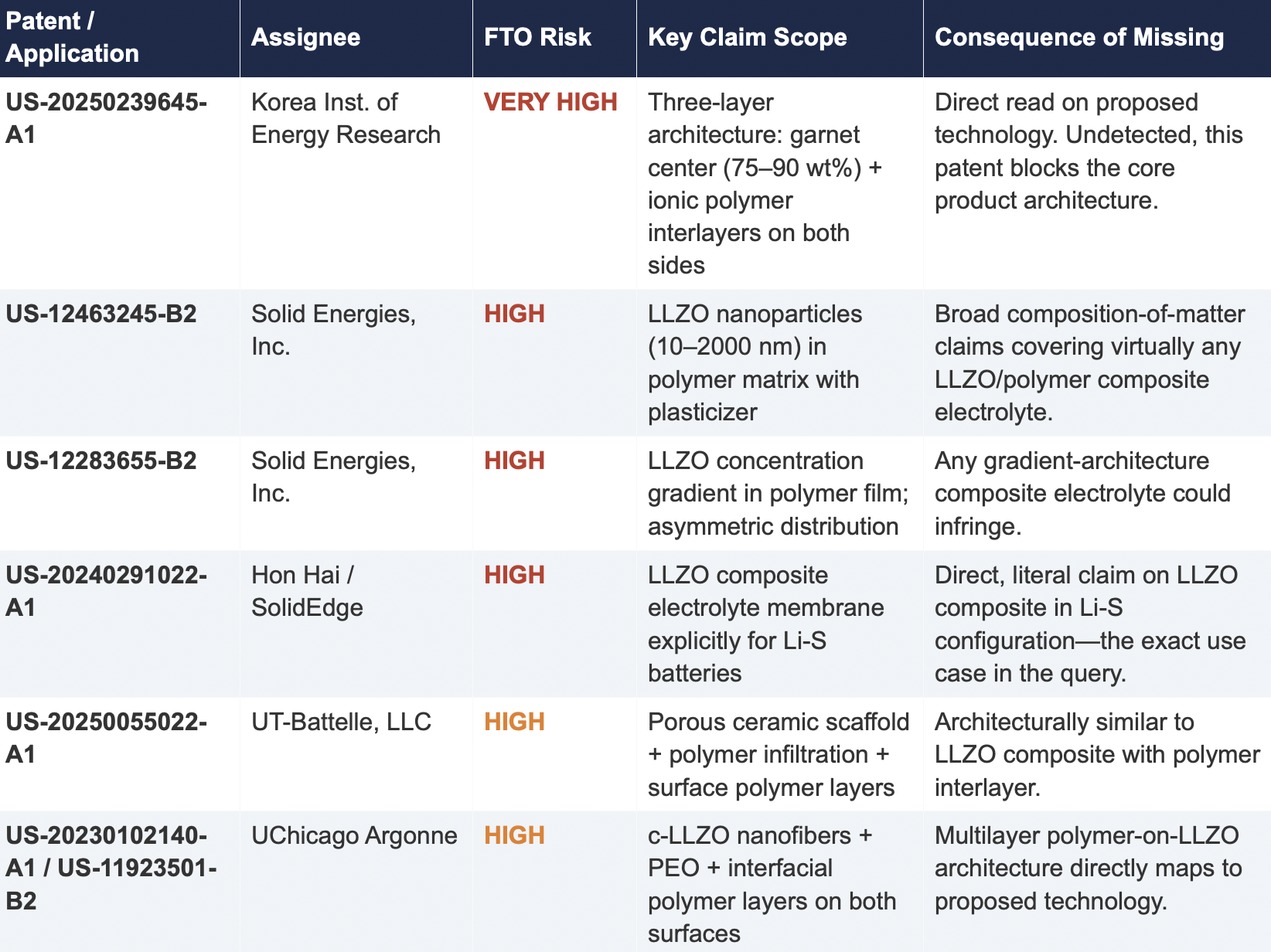
The following table presents patents identified exclusively by Cypris that were rated as High or Very High FTO risk for the proposed technology architecture. None were surfaced by any general-purpose model.
2.3 Patent Fencing: The Solid Energies Portfolio
Cypris identified a coordinated patent fencing strategy by Solid Energies, Inc. that no general-purpose model detected at scale. Solid Energies holds at least four granted US patents and one published application covering LLZO-polymer composite electrolytes across compositions(US-12463245-B2), gradient architectures (US-12283655-B2), electrode integration (US-12463249-B2), and manufacturing processes (US-20230035720-A1). Claude identified one Solid Energies patent (US 11,967,678) and correctly rated it as the highest-priority FTO concern but did not surface the broader portfolio. ChatGPT and Co-Pilot identified zero Solid Energies filings.
The practical significance is that a company relying on any individual patent hit would underestimate the scope of Solid Energies' IP position. The fencing strategy—covering the composition, the architecture, the electrode integration, and the manufacturing method—means that identifying a single design-around for one patent does not resolve the FTO exposure from the portfolio as a whole. This is the kind of strategic insight that requires seeing the full picture, which no general-purpose model delivered
2.4 Assignee Attribution Quality
ChatGPT's response included at least two instances of fabricated or unverifiable assignee attributions. For US 11,367,895 B1, the listed assignee was "Likely startup / defense contractor cluster." For US 2021/0202983 A1, the assignee was described as "Likely DOE / national lab ecosystem." In both cases, the model appears to have inferred the assignee from contextual patterns in its training data rather than retrieving the information from patent records.
In any operational IP workflow, assignee identity is foundational. It determines licensing strategy, litigation risk, and competitive positioning. A fabricated assignee is more dangerous than a missing one because it creates an illusion of completeness that discourages further investigation. An R&D team receiving this output might reasonably conclude that the landscape analysis is finished when it is not.
3. Structural Limitations of General-Purpose Models for Patent Intelligence
3.1 Training Data Is Not Patent Data
Large language models are trained on web-scraped text. Their knowledge of the patent record is derived from whatever fragments appeared in their training corpus: blog posts mentioning filings, news articles about litigation, snippets of Google Patents pages that were crawlable at the time of data collection. They do not have systematic, structured access to the USPTO database. They cannot query patent classification codes, parse claim language against a specific technology architecture, or verify whether a patent has been assigned, abandoned, or subjected to terminal disclaimer since their training data was collected.
This is not a limitation that improves with scale. A larger training corpus does not produce systematic patent coverage; it produces a larger but still arbitrary sampling of the patent record. The result is that general-purpose models will consistently surface well-known patents from heavily discussed assignees (QuantumScape, for example, appeared in most responses) while missing commercially significant filings from less publicly visible entities (Solid Energies, Korea Institute of EnergyResearch, Shenzhen Solid Advanced Materials).
3.2 The Web Is Closing to Model Scrapers
The data access problem is structural and worsening. As of mid-2025, Cloudflare reported that among the top 10,000 web domains, the majority now fully disallow AI crawlers such as GPTBot andClaudeBot via robots.txt. The trend has accelerated from partial restrictions to outright blocks, and the crawl-to-referral ratios reveal the underlying tension: OpenAI's crawlers access approximately1,700 pages for every referral they return to publishers; Anthropic's ratio exceeds 73,000 to 1.
Patent databases, scientific publishers, and IP analytics platforms are among the most restrictive content categories. A Duke University study in 2025 found that several categories of AI-related crawlers never request robots.txt files at all. The practical consequence is that the knowledge gap between what a general-purpose model "knows" about the patent landscape and what actually exists in the patent record is widening with each training cycle. A landscape query that a general-purpose model partially answered in 2023 may return less useful information in 2026.
3.3 General-Purpose Models Lack Ontological Frameworks for Patent Analysis
A freedom-to-operate analysis is not a summarization task. It requires understanding claim scope, prosecution history, continuation and divisional chains, assignee normalization (a single company may appear under multiple entity names across patent records), priority dates versus filing dates versus publication dates, and the relationship between dependent and independent claims. It requires mapping the specific technical features of a proposed product against independent claim language—not keyword matching.
General-purpose models do not have these frameworks. They pattern-match against training data and produce outputs that adopt the format and tone of patent analysis without the underlying data infrastructure. The format is correct. The confidence is high. The coverage is incomplete in ways that are not visible to the user.
4. Comparative Output Quality
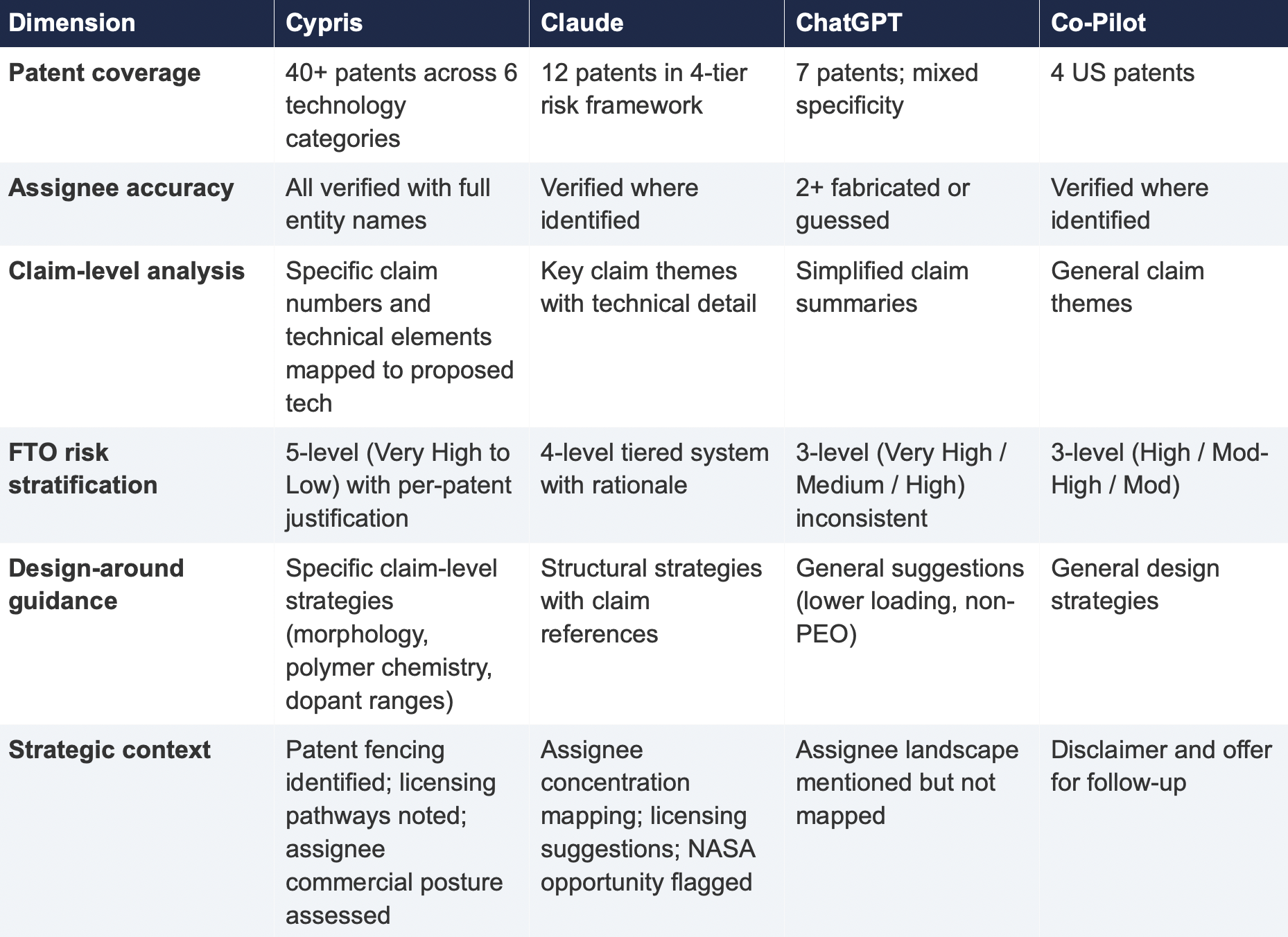
The following table summarizes the qualitative characteristics of each tool's response across the dimensions most relevant to an operational IP workflow.
5. Implications for R&D and IP Organizations
5.1 The Confidence Problem
The central risk identified by this study is not that general-purpose models produce bad outputs—it is that they produce incomplete outputs with high confidence. Each model delivered its results in a professional format with structured analysis, risk ratings, and strategic recommendations. At no point did any model indicate the boundaries of its knowledge or flag that its results represented a fraction of the available patent record. A practitioner receiving one of these outputs would have no signal that the analysis was incomplete unless they independently validated it against a comprehensive datasource.
This creates an asymmetric risk profile: the better the format and tone of the output, the less likely the user is to question its completeness. In a corporate environment where AI outputs are increasingly treated as first-pass analysis, this dynamic incentivizes under-investigation at precisely the moment when thoroughness is most critical.
5.2 The Diversification Illusion
It might be assumed that running the same query through multiple general-purpose models provides validation through diversity of sources. This study suggests otherwise. While the four tools returned different subsets of patents, all operated under the same structural constraints: training data rather than live patent databases, web-scraped content rather than structured IP records, and general-purpose reasoning rather than patent-specific ontological frameworks. Running the same query through three constrained tools does not produce triangulation; it produces three partial views of the same incomplete picture.
5.3 The Appropriate Use Boundary
General-purpose language models are effective tools for a wide range of tasks: drafting communications, summarizing documents, generating code, and exploratory research. The finding of this study is not that these tools lack value but that their value boundary does not extend to decisions that carry existential commercial risk.
Patent landscape analysis, freedom-to-operate assessment, and competitive intelligence that informs R&D investment decisions fall outside that boundary. These are workflows where the completeness and verifiability of the underlying data are not merely desirable but are the primary determinant of whether the analysis has value. A patent landscape that captures 10% of the relevant filings, regardless of how well-formatted or confidently presented, is a liability rather than an asset.
6. Test 2: Competitive Intelligence — Bio-Based Polyamide Patent Landscape
To assess whether the findings from Test 1 were specific to a single technology domain or reflected a broader structural pattern, a second query was submitted to all four tools. This query shifted from freedom-to-operate analysis to competitive intelligence, asking each tool to identify the top 10organizations by patent filing volume in bio-based polyamide synthesis from castor oil derivatives over the past three years, with summaries of technical approach, co-assignee relationships, and portfolio trajectory.
6.1 Query

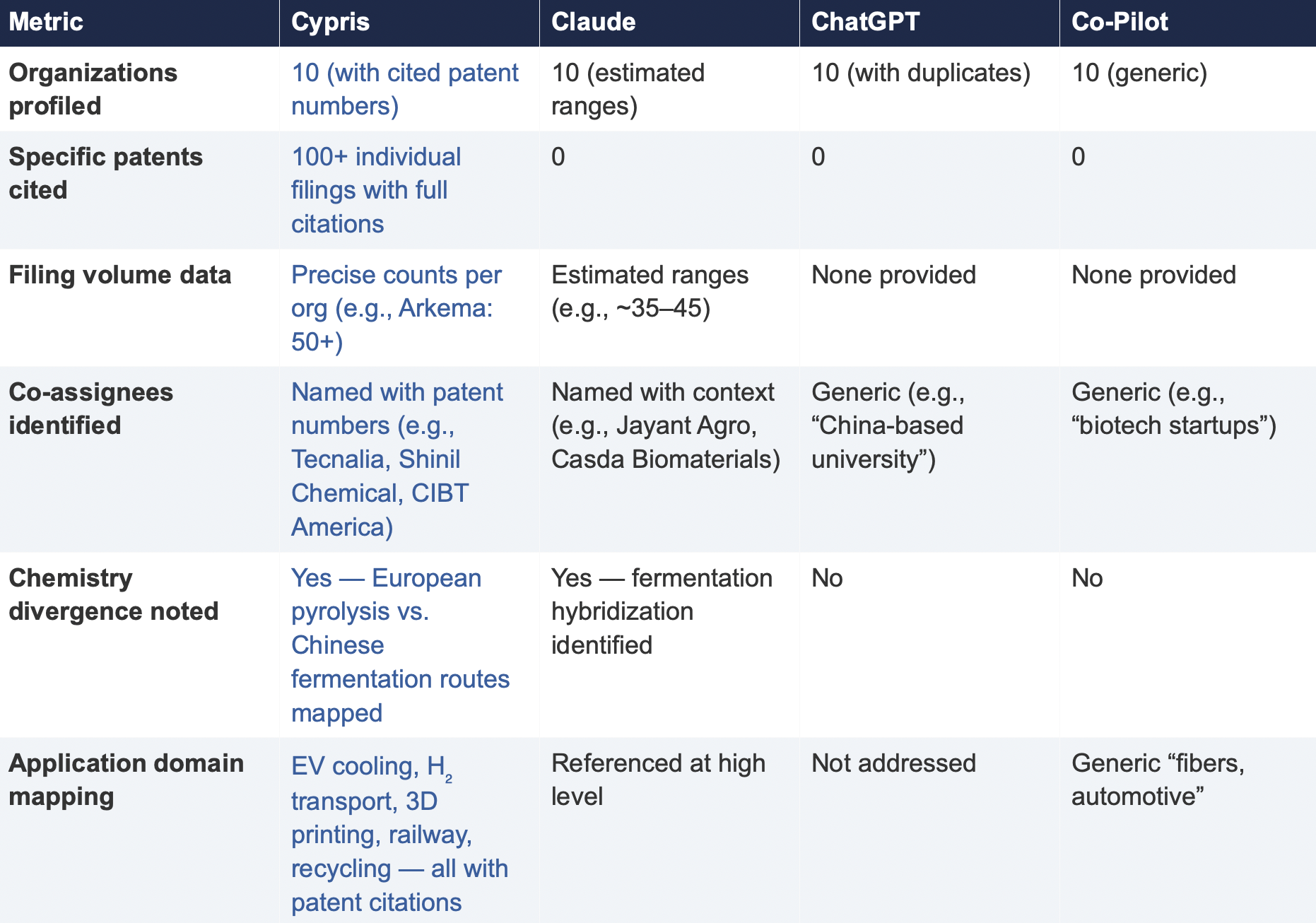
6.2 Summary of Results
6.3 Key Differentiators
Verifiability
The most consequential difference in Test 2 was the presence or absence of verifiable evidence. Cypris cited over 100 individual patent filings with full patent numbers, assignee names, and publication dates. Every claim about an organization’s technical focus, co-assignee relationships, and filing trajectory was anchored to specific documents that a practitioner could independently verify in USPTO, Espacenet, or WIPO PATENT SCOPE. No general-purpose model cited a single patent number. Claude produced the most structured and analytically useful output among the public models, with estimated filing ranges, product names, and strategic observations that were directionally plausible. However, without underlying patent citations, every claim in the response requires independent verification before it can inform a business decision. ChatGPT and Co-Pilot offered thinner profiles with no filing counts and no patent-level specificity.
Data Integrity
ChatGPT’s response contained a structural error that would mislead a practitioner: it listed CathayBiotech as organization #5 and then listed “Cathay Affiliate Cluster” as a separate organization at #9, effectively double-counting a single entity. It repeated this pattern with Toray at #4 and “Toray(Additional Programs)” at #10. In a competitive intelligence context where the ranking itself is the deliverable, this kind of error distorts the landscape and could lead to misallocation of competitive monitoring resources.
Organizations Missed
Cypris identified Kingfa Sci. & Tech. (8–10 filings with a differentiated furan diacid-based polyamide platform) and Zhejiang NHU (4–6 filings focused on continuous polymerization process technology)as emerging players that no general-purpose model surfaced. Both represent potential competitive threats or partnership opportunities that would be invisible to a team relying on public AI tools.Conversely, ChatGPT included organizations such as ANTA and Jiangsu Taiji that appear to be downstream users rather than significant patent filers in synthesis, suggesting the model was conflating commercial activity with IP activity.
Strategic Depth
Cypris’s cross-cutting observations identified a fundamental chemistry divergence in the landscape:European incumbents (Arkema, Evonik, EMS) rely on traditional castor oil pyrolysis to 11-aminoundecanoic acid or sebacic acid, while Chinese entrants (Cathay Biotech, Kingfa) are developing alternative bio-based routes through fermentation and furandicarboxylic acid chemistry.This represents a potential long-term disruption to the castor oil supply chain dependency thatWestern players have built their IP strategies around. Claude identified a similar theme at a higher level of abstraction. Neither ChatGPT nor Co-Pilot noted the divergence.
6.4 Test 2 Conclusion
Test 2 confirms that the coverage and verifiability gaps observed in Test 1 are not domain-specific.In a competitive intelligence context—where the deliverable is a ranked landscape of organizationalIP activity—the same structural limitations apply. General-purpose models can produce plausible-looking top-10 lists with reasonable organizational names, but they cannot anchor those lists to verifiable patent data, they cannot provide precise filing volumes, and they cannot identify emerging players whose patent activity is visible in structured databases but absent from the web-scraped content that general-purpose models rely on.
7. Conclusion
This comparative analysis, spanning two distinct technology domains and two distinct analytical workflows—freedom-to-operate assessment and competitive intelligence—demonstrates that the gap between purpose-built R&D intelligence platforms and general-purpose language models is not marginal, not domain-specific, and not transient. It is structural and consequential.
In Test 1 (LLZO garnet electrolytes for Li-S batteries), the purpose-built platform identified more than three times as many patents as the best-performing general-purpose model and ten times as many as the lowest-performing one. Among the patents identified exclusively by the purpose-built platform were filings rated as Very High FTO risk that directly claim the proposed technology architecture. InTest 2 (bio-based polyamide competitive landscape), the purpose-built platform cited over 100individual patent filings to substantiate its organizational rankings; no general-purpose model cited as ingle patent number.
The structural drivers of this gap—reliance on training data rather than live patent feeds, the accelerating closure of web content to AI scrapers, and the absence of patent-specific analytical frameworks—are not transient. They are inherent to the architecture of general-purpose models and will persist regardless of increases in model capability or training data volume.
For R&D and IP leaders, the practical implication is clear: general-purpose AI tools should be used for general-purpose tasks. Patent intelligence, competitive landscaping, and freedom-to-operate analysis require purpose-built systems with direct access to structured patent data, domain-specific analytical frameworks, and the ability to surface what a general-purpose model cannot—not because it chooses not to, but because it structurally cannot access the data.
The question for every organization making R&D investment decisions today is whether the tools informing those decisions have access to the evidence base those decisions require. This study suggests that for the majority of general-purpose AI tools currently in use, the answer is no.
About This Report
This report was produced by Cypris (IP Web, Inc.), an AI-powered R&D intelligence platform serving corporate innovation, IP, and R&D teams at organizations including NASA, Johnson & Johnson, theUS Air Force, and Los Alamos National Laboratory. Cypris aggregates over 500 million data points from patents, scientific literature, grants, corporate filings, and news to deliver structured intelligence for technology scouting, competitive analysis, and IP strategy.
The comparative tests described in this report were conducted on March 27, 2026. All outputs are preserved in their original form. Patent data cited from the Cypris reports has been verified against USPTO Patent Center and WIPO PATENT SCOPE records as of the same date. To conduct a similar analysis for your technology domain, contact info@cypris.ai or visit cypris.ai.
The Patent Intelligence Gap - A Comparative Analysis of Verticalized AI-Patent Tools vs. General-Purpose Language Models for R&D Decision-Making
All Blogs

Understanding how to sell a patent is indispensable for R&D Managers, Product Dev Engineers, Senior Scientists, and Commercialization squads seeking to maximize their intellectual property worth. This guide offers an in-depth look at the steps necessary to effectively sell a patent outright, from understanding its types and benefits to identifying potential buyers and negotiating for the best price.
We begin by discussing what a patent is, its types, and the benefits of obtaining one. Next, we explore practical steps in selling your patented invention – from identifying potential buyers and preparing your patent for sale to negotiating the best price and terms.
Legal considerations are critical when it comes to selling patents; therefore, our guide also covers understanding your rights as an owner of a patent, knowing about patent sale contracts, and effectively ensuring compliance with applicable laws and regulations. So let’s learn how to sell a patent!
Table of Contents
- What Is a Patent?
- Definition of a Patent
- Types of Patents
- The Benefits of Obtaining a Patent
- How to Sell a Patent
- Identifying Potential Buyers
- Preparing the Patent for Sale
- Negotiating the Sale Price and Terms
- Legal Considerations About Patent Rights
- Understanding Patent Rights
- Transferring Ownership of the Patent Rights
- Ensuring Compliance with Applicable Laws and Regulations
- Conclusion
What Is a Patent?
Before we learn how to sell a patent outright, let’s look at what it is first.
A patent is a form of IP that confers exclusive rights to the holder for creating, employing, vending, and bringing in innovation over a restricted period. In exchange for this protection, the inventor must disclose their invention in detail to the public. This encourages innovation by providing inventors with incentives while also ensuring that new knowledge becomes accessible to others.
Definition of a Patent
A patent can be defined as a set of exclusive rights granted by governments or other authorized bodies to inventors or assignees for their inventions. These rights are typically granted for 20 years from the filing date of the patent application (subject to payment of maintenance fees). The extent of the rights provided by patents differs with different national laws and international regulations.
Types of Patents
- Utility patents: Also known as “patents for invention,” utility patents protect new and useful processes, machines, articles of manufacture, compositions of matter (such as chemical compounds), or any improvements thereof.
- Design patents: Design patents protect original ornamental designs applied to manufactured products without affecting their functionality.
- Plant patents: Plant patents cover distinct and new varieties of plants that have been invented or discovered through human intervention such as breeding or genetic engineering techniques.
The Benefits of Obtaining a Patent
The primary benefits associated with obtaining a patent include:
- Incentivizing Innovation: A patent provides financial rewards by granting exclusivity over an invention’s commercialization. Encouraging inventors to invest in creating new ideas, a patent grants exclusive rights to commercialize the invention and protect intellectual property.
- Protecting Intellectual Property: A patent allows the owner to prevent others from making, using, selling, or importing their invention without permission. This protection can help maintain a competitive advantage in the market.
- Potential for Licensing and Collaboration: Patent owners may choose to license their patents to other companies or enter into partnerships that leverage their patented technology. These arrangements can generate additional revenue streams while also fostering innovation through collaboration.
For R&D teams and innovators to fully benefit from these advantages, they must understand how patents work and how best to protect their inventions throughout the entire innovation process.
A legal right to an invention or procedure, given to the inventor/creator, allowing them exclusive utilization. With this knowledge, it’s time to explore how to sell a patent.
Key Takeaway: Patents provide exclusive rights to inventors and assignees, granting them financial incentives while protecting their intellectual property. Obtaining a patent is essential for innovators looking to benefit from the competitive advantage it provides and maximize potential revenue streams through licensing or collaboration opportunities. Patents are a critical element for any R&D group hoping to attain success.
How to Sell a Patent
Let’s learn how to sell a patent. Monetizing intellectual property and generating revenue can be achieved through the sale of a patent. The process of selling a patent involves identifying potential buyers, preparing the patent for sale, and negotiating the sale price and terms.
To begin, let us dive into each step of how to sell a patent.
Identifying Potential Buyers
The first move when selling a patent is to recognize prospective purchasers who may be keen on obtaining your invention. This could include companies operating within the same industry as your patented technology or those looking to expand their product offerings by incorporating innovations.
You can start by conducting market research on competitors and other relevant players in the field using tools that centralize data sources needed for R&D teams into one platform.
- Attend industry conferences and networking events where you can connect with key decision-makers from target organizations.
- Research similar patents that have been sold recently to understand what types of companies are actively buying patents.
- Contact trade associations related to your industry for leads on interested parties or consult directories such as the Patent & Trademark Resource Centers (PTRCs).
Preparing the Patent for Sale
To make your patent more attractive to potential buyers, you must prepare it properly before initiating any negotiations:
- Demonstrate its value: Clearly articulate how owning this particular patent would benefit prospective purchasers – whether through increased revenue, cost savings, or other competitive advantages.
- Ensure legal protection: Verify that your patent is in good standing with the relevant authorities (e.g., the United States Patent and Trademark Office) and has been properly maintained to ensure enforceability.
- Create a comprehensive presentation: Develop an informative package detailing all aspects of your patent – including its technical specifications, market potential, licensing history (if any), and future opportunities for growth. This will help buyers understand the full scope of what they’re acquiring.
Negotiating the Sale Price and Terms
The final step in selling a patent involves negotiating with interested parties to arrive at mutually agreeable terms. Factors influencing these negotiations include:
- The perceived value of your invention: The more valuable it appears to prospective buyers, the higher price you can command.
- Your willingness to be flexible on payment terms: Offering options such as installment payments or royalty-based agreements may make your patent more attractive to certain buyers who are unable or unwilling to pay upfront fees.
- The level of competition among interested parties: If multiple companies express interest in purchasing your patent, this could drive up its sale price through competitive bidding dynamics.
To maximize success during negotiations, consider enlisting professional assistance from experts like intellectual property attorneys or brokers who have experience navigating complex transactions involving patents. Their expertise can prove invaluable when it comes time to close deals quickly while securing favorable outcomes for both sellers and purchasers alike.
Once you have identified possible purchasers, made the patent ready for sale, and negotiated a reasonable cost as well as conditions, it is critical to make sure that all legal matters are taken into account when selling a patent. To do this, understanding patent rights, transferring ownership legally and effectively, and ensuring compliance with applicable laws must be considered before finalizing any agreement.
Key Takeaway: Selling a patent is no small feat. It requires identifying potential buyers, preparing the patent for sale, and negotiating its price and terms. Utilizing tools to conduct market research or enlist expert help from attorneys or brokers may prove beneficial to close deals quickly while ensuring favorable outcomes on both sides of the table.
Legal Considerations About Patent Rights
As an owner of a patent, it is essential to be aware of the legal requirements associated with how to sell a patent. This article will discuss the legal elements to be aware of when selling a patent, such as transferring ownership correctly and abiding by relevant laws.
Understanding Patent Rights
As the holder of a patent, you are accorded exclusive privileges to stop others from creating, employing, or vending your innovation for a specified period (commonly 20 years) by the USPTO. The USPTO is the agency that grants you exclusive patent rights to your invention for a specified period. To ensure potential buyers understand your exclusive rights as a patent owner, it is essential to communicate them accurately.
Transferring Ownership of the Patent Rights
To sell your patent successfully, you must transfer its ownership through proper legal channels. The USPTO provides guidelines on how this should be done via their Assignment Recordation Branch. You’ll need to prepare an assignment document detailing all relevant information about the sale such as parties involved in transaction details like price/terms etc., which then needs recording at the USPTO office itself after being signed by both seller and buyer.
- Prepare Assignment Document: An assignment document contains all necessary information regarding the sale – names & addresses of sellers and buyers along with other pertinent data.
- Signatures Required: The signatures of both parties’ representatives are required to validate the document’s authenticity.
- Record Assignment with USPTO: Once completed and signed, submit the recordation branch either electronically via their website or mail a hard copy along required fee.
Failure to adhere to the outlined steps could result in an ineffective transfer of rights, potentially causing legal disputes and other problems.
Ensuring Compliance with Applicable Laws and Regulations
In addition to transferring ownership legally, you must also ensure compliance with all applicable laws and regulations when selling your patent. This includes adhering to antitrust laws, export control regulations, tax implications, and any industry-specific requirements that may apply. Consulting a patent attorney or professional familiar with these matters can help you navigate this complex landscape more effectively.
Understanding patent rights is crucial for successful sale transactions. Proper transfer procedures should be followed to avoid potential issues later on. Complying with all relevant legislation ensures a smooth process and overall experience for both parties involved.
Key Takeaway: It’s important to understand the legal implications of how to sell a patent. This includes preparing and signing an assignment document detailing all relevant information regarding the sale, recording with the USPTO office as well as adhering to any applicable laws or regulations that may apply. Ensuring a successful exchange between the parties engaged in the sale can be achieved by following all applicable rules and regulations, as well as filing with USPTO, and preparing an assignment document that contains all necessary details.
Conclusion
Learning how to sell a patent can be an intricate and drawn-out task. It is important to understand the legal considerations associated with it as well as have access to the right resources that can help guide you through this process. Ultimately, by following the necessary steps, R&D teams can confidently make an educated choice when it comes to selling their patent to get its full worth.
Unlock the potential of your R&D and innovation teams with Cypris – a research platform designed to provide rapid time-to-insights. Leverage our expertise in patent selling to maximize your return on investment and get the most out of your intellectual property.

If you’re looking to safeguard your intellectual property and ensure that others don’t profit from your creativity without due remuneration, this guide on how to patent a phrase for you. Patenting a phrase can be an essential step in protecting your intellectual property and ensuring that others cannot profit from your creativity without proper compensation.
In this blog post, we will delve into the intricacies of patenting phrases, including their benefits and requirements. We’ll guide you through the actions necessary to patent a phrase, as well as examine the cost and duration involved. Additionally, we’ll highlight common mistakes to avoid when attempting to secure protection for your unique expression.
Lastly, we’ll provide valuable resources available online or through professional services that can help simplify the process of learning how to patent a phrase.
Table of Contents
- Understanding How to Patent a Phrase
- Definition of Patenting a Phrase
- Benefits of Patenting a Phrase
- Requirements for Patenting a Phrase
- Steps on How to Patent a Phrase
- Steps Involved in the Process of Patenting a Phrase
- Cost and Time
- Common Mistakes to Avoid When Patenting a Phrase
- How to Patent a Phrase: Resources
- Professional Services
- Online Resources
- Government Agencies
- Conclusion
Understanding How to Patent a Phrase
In the world of intellectual property, protecting your unique ideas and creations is essential for maintaining a competitive edge in the market. One way to do this is by patenting a phrase that represents your brand or product.
In this section, we will explore the concept of patenting a phrase, its advantages, and the necessary criteria for doing so.
Definition of Patenting a Phrase
To patent a phrase, you need to register it as a trademark with the United States Patent and Trademark Office (USPTO). It’s important to note that phrases cannot be patented in the traditional sense like inventions, instead, they can be protected under federal trademark rules.
A trademark safeguards expressions, terms, images, or styles utilized in business to recognize and differentiate one firm’s products from those of another.
Benefits of Patenting a Phrase
- Exclusive rights: Registering your phrase as a trademark grants you exclusive rights over its use within specific industries or markets related to your business.
- Deterrent effect: A registered trademark discourages competitors from using similar phrases which could confuse consumers about their origin or affiliation with your brand.
- Easier enforcement: Owning an officially recognized trademark makes it easier for you to take legal action against infringers who attempt to profit off your hard work without permission.
- Adds value: A well-known and respected registered trademark increases consumer trust in products bearing such marks while also enhancing overall brand value.
Requirements for Patenting a Phrase
Before you can patent a phrase, it must meet certain criteria set by the USPTO. These include:
- Distinctiveness: The phrase should be unique and not commonly used in everyday speech or similar to other registered trademarks.
- No confusion with existing marks: Your proposed trademark phrase shouldn’t confuse consumers about the source of goods or services offered under that mark.
- No prohibited elements: The federal trademark rules prohibit the registration of phrases containing offensive language, government symbols, or misleading information about products’ origins.
To successfully patent your good phrase as a trademark, ensure that it meets these requirements before applying the Trademark Electronic Application System (TEAS).
Patenting a phrase is an important step in protecting intellectual property and can provide significant benefits for R&D teams. Obtaining familiarity with the process can make patenting a phrase straightforward and speedy. Next, we will discuss how to go about patenting a phrase.
Key Takeaway: Learning how to patent a phrase is essential for safeguarding intellectual property and can be accomplished by filing it as a trademark with the USPTO. The phrase must be distinctive, not confuse consumers about its origin, and have no prohibited elements to successfully register it.
Steps on How to Patent a Phrase
To protect your intellectual property and prevent others from using your unique phrase, it is essential to understand the process of patenting a phrase. This section will guide you through the steps involved in this process, as well as discuss the cost and time required for obtaining a patent on your phrase.
Steps Involved in the Process of Patenting a Phrase
- Conduct thorough research: Before applying for a patent, ensure that your phrase has not already been trademarked or patented by someone else. You can do this by searching through the United States Patent and Trademark Office (USPTO) database.
- Determine if your phrase meets federal trademark rules: To be eligible for protection under federal law, phrases must be distinctive and used in commerce. Generic or descriptive phrases are generally not eligible for protection.
- Create an account with USPTO’s Trademark Electronic Application System (TEAS): The TEAS platform allows users to submit their trademark applications online. Visit the official website at uspto.gov/teas, create an account, and follow the instructions provided.
- Select appropriate classification(s): When filing your application with TEAS, choose one or more classifications that accurately describe how you intend to use your protected phrase in everyday speech.
- Filing fee payment: Applying requires payment of fees depending on which form you select during submission: TEAS Plus ($250 per class), TEAS Standard ($350 per class), or TEAS RF ($275 per class).
- Monitor application status: After submitting your trademark application, monitor its progress through the USPTO’s online database called Trademark Status and Document Retrieval (TSDR).

Cost and Time
The cost to patent a phrase varies depending on which form you choose when filing your application with TEAS. As mentioned earlier, fees range from $250 to $350 per classification. Additionally, hiring an attorney for professional assistance can increase costs.
It may take between 6 to 12 months for the USPTO to assess and carry out a trademark application. However, this period can be altered depending on variables such as examiner workload or any legal issues that occur during the examination.
Common Mistakes to Avoid When Patenting a Phrase
- Failing to conduct thorough research before applying for a patent: This could result in wasted time and resources if someone else has already patented or trademarked your desired phrase.
- Selecting incorrect classifications: Choosing the wrong classifications can lead to delays in processing your application or even denial of registration by the USPTO.
- Neglecting maintenance requirements: Once granted federal trademark registration, you must maintain it according to specific deadlines set forth by the USPTO; failure to do so may result in the cancellation of protection rights.
By taking the steps laid out in this guide, one can effectively secure a patent for a phrase and safeguard their intellectual property. Additionally, understanding the different types of patents available will help ensure that you are adequately protecting your IP rights.
Key Takeaway: Patenting a phrase requires thorough research to ensure it is eligible for protection, applying with the USPTO’s TEAS system, and payment of fees. Additionally, one must be mindful of common mistakes such as selecting incorrect classifications or failing to meet maintenance requirements to avoid wasted time and resources.
How to Patent a Phrase: Resources
To secure a patent for your phrase, it is essential to access reliable sources that can provide guidance and ensure the protection of your intellectual property. There are various professional services, online resources, and government agencies available for assistance.
Professional Services
- Intellectual Property Attorneys: Hiring an experienced IP attorney can be invaluable in navigating the complex world of patents and trademarks. An IP lawyer can be of great aid when dealing with the intricate process of patenting a phrase, furnishing legal advice on if your expression abides by federal trademark regulations, filing applications at the USPTO, and representing you in any conflicts that could happen while registering. The American Bar Association offers a helpful resource page dedicated specifically to intellectual property law.
- Trademark Agents: A registered trademark agent specializes in preparing and submitting trademark applications on behalf of clients. While they cannot offer legal advice like an attorney, they possess extensive knowledge about federal trademark registration processes within their jurisdiction. To find qualified agents near you, consult directories such as this one from the USPTO’s Professional Directory.
Online Resources
- The USPTO Website: As mentioned earlier, applying for protection requires interacting directly with the USPTO via their website using their Trademark Electronic Application System (TEAS). The USPTO website is a treasure trove of information, providing detailed guides on trademark application procedures, fees, and resources to help you understand the process better.
- Cypris: As an R&D manager or engineer involved in product development and innovation, having access to comprehensive research platforms like Cypris can be invaluable. With its focus on rapid time-to-insights for R&D teams, Cypris centralizes data sources into one platform designed specifically for your needs. Visit the Cypris website to learn more about how this tool can assist with patenting phrases and other aspects of intellectual property management.
- Educational Resources: Numerous websites are offering educational materials related to patents and trademarks. WIPO Academy (academy.wipo.int) is a valuable resource from the World Intellectual Property Organization, offering free educational materials related to patents and trademarks. Here you’ll find courses covering various topics such as IP rights protection strategies and international registration systems.
Government Agencies
In addition to professional services and online resources mentioned above, government agencies also play an essential role in assisting individuals seeking protection for their intellectual property. Some key agencies include:
- The United States Patent & Trademark Office (USPTO): This federal agency oversees all matters related to patents and trademarks within the United States. They offer assistance through their extensive library of publications available on their website (uspto.gov), as well as their Trademark Assistance Center (TAC) which guides phone or email.
- Small Business Administration (SBA): The SBA offers resources specifically tailored for small businesses looking to protect their intellectual property. Their website (sba.gov) features a dedicated section on patents and trademarks, providing valuable information on the application process, fees, and other essential details.
- National Institute of Standards & Technology (NIST): The NIST is an agency within the U.S. Department of Commerce that promotes innovation by advancing measurement science, standards, and technology. They offer various programs aimed at helping inventors with patenting processes such as the Hollings Manufacturing Extension Partnership (nist.gov/mep). This program connects manufacturers with public-private partnerships designed to support technological advancement in manufacturing industries.
Key Takeaway: For those looking to patent a phrase, there are several reliable resources available for assistance. This includes professional services such as IP attorneys and trademark agents, online educational materials from organizations like WIPO Academy, and government agencies like the USPTO and SBA. These resources can get you well on the path to safeguarding your intellectual property in a jiffy.
Conclusion
Patenting a phrase can be an effective way to protect your intellectual property and ensure that you are the sole owner of any profits associated with it. With the right resources and guidance, patenting a phrase can be simplified to make sure innovators can confidently create their unique phrases without fear of infringement or theft.
By understanding how to patent a phrase, innovators can confidently create their unique phrases without fear of infringement or theft.
Discover the power of Cypris and get rapid insights into how to patent a phrase with our comprehensive research platform. With its streamlined data sources, you can quickly find answers to your innovation questions.

Learning how to cite a patent is essential for R&D managers, product development engineers, and other research and innovation professionals to demonstrate respect for intellectual property rights while ensuring clarity when referencing prior art or similar inventions. Properly citing patents not only demonstrates respect for intellectual property but also helps maintain clarity when referencing prior art or similar inventions in your work.
In this blog post, we will delve into the definition of a patent, its types, and benefits. We will then provide detailed guidance on how to cite a patent correctly by discussing formatting guidelines and offering examples of properly cited patents. Furthermore, we will introduce resources that can assist you with citation practices.
Table of Contents
- How to Cite a Patent in APA Style
- Inventor name(s)
- Year of Issuance
- Title of the Patent
- URL (if available)
- Accessing Patent Information Online
- U.S.Patent and Trademark Office website
- International Patent Office Search
- Shortening URLs
- Analyzing Backward and Forward Citations
- Definition of Backward Citation
- Definition Forward Citation
- Potential Time-Lag Effects when Analyzing Patent Citations
- Conclusion
How to Cite a Patent in APA Style
When working on research projects or writing articles, it is crucial to properly cite patents to give credit to the inventors and protect intellectual property rights. The American Psychological Association (APA) provides guidelines for citing patents, ensuring that all necessary information is included.
Inventor name(s)
The first element of a patent citation in APA style is the inventor’s name. List each inventor’s last name followed by their initials without periods. If there are multiple inventors, separate them with commas and use an ampersand (&) before the final author’s name.
Year of Issuance
The year when the patent was issued should be placed in parentheses after the inventor’s name. This helps readers identify how recent or dated a particular invention may be.
Title of the Patent
The title should be written in sentence case, meaning only capitalize proper nouns and words at the beginning of sentences within the title itself. Italicize the entire text and provide a concise description of what the invention entails without going into too much detail.
Patent Number
The patent number should be part of the citation. You can find the patent number with the patent office or when doing research. Enclose the patent number in parentheses.
URL (if available)
If you have access to a URL where readers can find more information about cited patents, include this link as part of your citation using the appropriate format provided by APA guidelines. Be sure to remove any hyperlinks from actual reference list entries so they do not interfere with overall formatting requirements set forth by American Psychological Association Manual 7th Edition rules governing academic citation online sources like websites databases etcetera).
An example of a complete APA-style patent citation would look like this:

By adhering to these regulations, one can guarantee that their patent citations are exact and compliant with APA style, thus making it easier for other scholars to access the referenced patents and comprehend their significance in your work.
Citing patents in APA style is an important skill for any R&D or innovation team to have, as it helps provide proper credit and recognition. Additionally, with the right tools, accessing patent information online can be a straightforward process.
Key Takeaway: We look at the APA style guidelines for how to cite a patent, which includes listing inventor names followed by a year of issuance and title in sentence case. Additionally, a URL may be included to provide more information about the patent if available. Following these rules will help ensure accurate citations that are easy for other researchers to locate and understand their relevance.
Accessing Patent Information Online
When conducting research or developing new products, it is essential to access and analyze relevant patent information. Intellectual property organizations maintain comprehensive records of their patents online, which can be accessed through various websites and databases. In this section, we will discuss how to find the necessary patent information using different resources and tips for shortening URLs when citing patents in your work.
U.S. Patent and Trademark Office website
The U.S. Patent and Trademark Office (USPTO) website provides a wealth of information on U.S. patents as well as trademark registrations. To search for specific patents or applications, you can use the PatFT (Patents Full-Text) database, which contains full-text data since 1976 along with images of each page from all issued U.S. patents dating back to 1790.
International Patent Office Search
In addition to searching national databases like USPTO’s PatFT, researchers may also need to explore international sources for similar patents filed in other countries. The Espacenet database, managed by the European Patent Office (EPO), offers free access to more than 100 million documents from over 90 countries worldwide including Europe, Asia-Pacific region nations such as Japan China South Korea India among others.
Another useful resource is the World Intellectual Property Organization’s (WIPO), PATENTSCOPE database, which covers patent applications filed under the Patent Cooperation Treaty (PCT) and various national collections.
Shortening URLs
When citing patents in your research paper or article, it is important to include the URL of the patent document if available. However, some patent databases provide long and complex URLs that may not be suitable for inclusion in a citation.
In situations where lengthy URLs are not suitable for citation, one can employ a URL shortening service such as Bitly.com to generate shorter links that are more manageable and simpler to integrate into the paper. Keep in mind that shortened URLs should still direct readers to the correct patent information without any issues.
Accessing relevant patent information online requires familiarity with different databases maintained by intellectual property organizations worldwide as well as effective strategies for managing lengthy URLs when citing patents. By leveraging these resources effectively researchers engineers product development teams alike stand a better chance of identifying key innovations within their respective fields while also ensuring proper attribution credit given where due.
Accessing patent information online is an important step in understanding the scope of existing patents and developing a comprehensive research strategy. Analyzing backward and forward citations can provide additional insight into the context surrounding each patent application, enabling researchers to make more informed decisions.
Key Takeaway: We discussed different resources available to access patent information online, as well as tips for shortening URLs when citing patents in your work. It’s a must-read for R&D and innovation teams looking to gain insights quickly and efficiently, ensuring proper attribution credit is given where due.
Analyzing Backward and Forward Citations
When conducting research on patents and learning how to cite a patent, it is essential to examine both backward citations and forward citations. These two types of patent citations provide valuable insights into the development of a particular technology or innovation.
In this section, we will discuss the definitions of backward and forward citations, their significance in understanding trends within an industry sector, as well as potential time-lag effects that may impact your analysis.
Definition of Backward Citation
A backward citation, also known as a prior art reference, refers to documents published earlier than the submission date of a new patent application. Previous intellectual property disclosed to the public, such as patents and patent applications, and articles in journals or conferences, may be cited by a patent applicant. By examining these earlier works cited by the patent applicant, researchers can gain insight into how inventions build upon existing knowledge.
Definition Forward Citation
In contrast to backward citations, forward citations are those that come after the filing period for a given patent application. They represent subsequent innovations that have built upon or referenced the original invention in question. Analyzing forward citations allows you to track developments following an initial innovation and understand its influence on future technological advancements.
Potential Time-Lag Effects when Analyzing Patent Citations
- The time between publication: When analyzing both backward and forward patent citations, it’s important to consider potential time-lag effects. The lag between publication dates could affect your overall understanding of trends within specific industries over certain periods.
- Differences in examination times: Another factor to consider is the difference in examination times between various patent offices. Some patents may be granted more quickly than others, which could impact your analysis of citation trends.
- Industry-specific factors: Certain industries may experience faster or slower rates of innovation and patenting activity. Be sure to take these industry-specific factors into account when analyzing patent citations.
A thorough understanding of both backward and forward citations can provide valuable insights into the development and influence of specific inventions within an industry sector. By considering potential time-lag effects and other relevant factors, you can ensure that your analysis accurately reflects the true nature of innovation trends.
Key Takeaway: We looked at an in-depth look at backward and forward citations, highlighting the importance of understanding both for gaining insights into innovation trends. It also stresses the need to consider potential time-lag effects when researching patents, as well as industry-specific factors that could impact analysis results. In short, a thorough grasp of these two types of patent citations can help researchers gain valuable insight into technological developments within any given sector.
Conclusion
Learning how to cite a patent is an important part of the research and innovation process. With the right tools, teams can quickly access all relevant data sources to streamline their workflow and ensure they are up-to-date on any developments related to patents.
R&D supervisors and technicians can now spend their time concentrating on creating new goods that will benefit the public in general, due to these tools bringing together these resources into one platform.
Discover the power of Cypris and simplify how you cite patents with our research platform, designed to provide rapid time to insights. Make sure your team is up-to-date on patent citations quickly and easily!

If you need help understanding how to get a design patent, we will discuss it in this article. A design patent protects unique ornamental aspects of your product, and obtaining one can be crucial in maintaining a competitive edge in today’s fast-paced market.
In this blog post, we will delve into conducting thorough patent searches by utilizing resources like the United States Patent and Trademark Office (USPTO) database and analyzing competing designs within your industry. We’ll also guide you through preparing an effective design patent application with tips on crafting abstracts or preambles, writing detailed descriptions of attributes, and creating clear illustrations using drawings or photographs.
Lastly, we’ll discuss navigating fees associated with different classifications as well as submission processes such as submitting necessary documents. By utilizing these instructions for how to get a design patent, you’ll be able to safeguard your inventive creations with intellectual property rights.
Table of Contents
- Conducting a Thorough Patent Search
- Utilizing the USPTO Database
- Analyzing Competing Designs in Your Industry
- Preparing Your Design Patent Applications
- Crafting an Effective Abstract or Preamble
- Writing Detailed Descriptions of Attributes
- Creating Clear Illustrations
- Navigating Fees and Submission Process
- Different Classifications and Their Respective Fees
- Submitting Necessary Documents
- Conclusion: How to Get a Design Patent
Conducting a Thorough Patent Search
Part of how to get a design patent is conducting a thorough patent search. It is essential to use the USPTO Database for Existing Patents to assess whether your invention or any comparable ones already exist. This step ensures that your invention improves upon previous designs and meets subject-matter requirements for novelty and non-obviousness.
Utilizing the USPTO Database
The USPTO offers a broad array of issued patents and published inspection applications. To perform an effective patent search, you should utilize tools such as the Patent Full-Text and Image Database (PatFT), which allows users to access full-text U.S. patents since 1976, or the Published Applications Full-Text Database (AppFT), where you can find published applications since March 2001.
- Prior Art: During your search, pay close attention to the prior art. Existing inventions that may be related to yours in some way. The prior art includes not only patented designs but also publications like articles or books discussing similar concepts.
- Classification System: The USPTO uses a classification system based on technical fields called Cooperative Patent Classification (CPC). Familiarize yourself with this system so you can efficiently navigate through relevant categories while searching for potential competitors’ intellectual property protection strategies.

Analyzing Competing Designs in Your Industry
In addition to searching the USPTO database, it’s essential to analyze competing designs in your industry. This will help you identify any potential infringement issues with design patents and ensure that your patented design is unique.
- Market Research: Conduct market research to determine which products are popular within your target audience and evaluate the visual ornamental characteristics embodied in these items.
- Competitor Analysis: Investigate competitors’ websites, product catalogs, or trade show exhibits for insight into their design strategies. Look for patterns or trends that may indicate a particular approach to how design patent protects specific features of their products.
Performing a comprehensive patent search is critical to verify that your design does not breach any pre-existing patents. It is also important to analyze competing designs in the industry for any similarities or potential issues with infringement. To move forward, it’s necessary to prepare and submit effective applications for design patents.
Key Takeaway: It is essential to conduct a comprehensive patent search on the USPTO website and analyze competing designs in your industry to ensure that your design meets requirements for novelty and non-obviousness, as well as avoid any potential infringement issues. Performing a patent search and studying related designs can provide you with an advantage over other businesses in the same field.
Preparing Your Design Patent Applications
In learning how to get a design patent, we need to learn how to apply for one. Successful applications for design patents include several essential elements to ensure that your invention is adequately protected.
The USPTO requires certain elements to grant a patent for an invention, which make it easier to comprehend the uniqueness of the design.
Crafting an Effective Abstract or Preamble
The abstract or preamble provides a brief overview of your design’s purpose and its distinguishing features. It should be concise yet informative, highlighting what sets your design apart from others in the market. An effective abstract can significantly impact how quickly and smoothly your design patent application progresses through the examination process.
Writing Detailed Descriptions of Attributes
In addition to an abstract, you’ll need to provide a thorough description of all attributes associated with your design. This section should detail each visual ornamental characteristic embodied in the product, including any patterns, textures, colors, shapes, or configurations that contribute to its overall appearance. Be sure not only to describe these features but also to explain their significance within the context of your invention.
- Novelty: Explain how each attribute differs from existing designs in the prior art.
- Non-obviousness: Describe why someone skilled in this field would not have easily come up with this combination of attributes before seeing yours.
- Suitability for Intellectual Property Protection: Demonstrate how these characteristics are integral parts of what makes your product innovative and worthy of intellectual property protection under US law.
Creating Clear Illustrations
Your design patent application must include at least seven drawings or photographs that show all sides of the object’s design. These illustrations should be clear, detailed, and accurately represent your invention in its entirety. It is essential to label each figure with a description detailing what it depicts.
Consider hiring an experienced design patent attorney or draftsman who specializes in creating these types of images for patent applications. They can help ensure that your drawings meet the USPTO’s strict requirements and effectively convey your design’s unique features.
Preparing a well-crafted design patent application involves writing an effective abstract, providing detailed descriptions of attributes, and including clear illustrations through drawings or photographs. By following these guidelines and working closely with experienced professionals when necessary, you increase your chances of securing intellectual property protection for your innovative designs.
To successfully prepare your design patent application, it is important to craft an effective abstract or preamble, write detailed descriptions of attributes and create clear illustrations through drawings or photographs. With this groundwork laid out, you are now ready to navigate the fees and submission process for obtaining a design patent.
Key Takeaway: There are key components necessary for a successful design patent application, including crafting an effective abstract or preamble, providing detailed descriptions of attributes, and creating clear illustrations through drawings or photographs. It is important to work with experienced professionals to ensure that all aspects are up to USPTO standards to secure intellectual property protection for your invention.
Navigating Fees and Submission Process
Learning how to get a design patent involves knowing several fees and steps to ensure your application is successful. It’s essential to understand the different classifications, their respective fees, and how to submit necessary documents.
Different Classifications and Their Respective Fees
The United States Patent and Trademark Office (USPTO) categorizes applicants into three classes: large businesses, small businesses, or individuals. Each classification has its own set of associated fees:
- Large Businesses: $2850
- Small Businesses: $2150
- Individuals:$1900
Fees cover various costs such as attorney fees, draftsman charges, and USPTO filings like examination fee searches that are necessary during the evaluation stages.
Submitting Necessary Documents
To apply for a design patent, you’ll need to submit an oath or declaration from the inventor(s), an Application Data Sheet containing information about them, and other relevant documents. These include an oath or declaration from the inventor(s) stating they believe themselves to be the original inventors of the claimed ornamental design along with an Application Data Sheet containing relevant information about them.
- Oath/Declaration: This document serves as a sworn statement by each inventor affirming that they have reviewed their invention’s content within submitted application materials and acknowledge a duty to disclose known prior art affecting eligibility claims made therein. You can find a sample Oath/Declaration form on the USPTO website.
- Application Data Sheet (ADS): The ADS is a standardized form used to provide essential information about inventors, such as their names, addresses, and citizenship status. It also includes details like correspondence address and application number if applicable. You can download an Application Data Sheet template from the USPTO’s site.
Once your design patent application has been submitted with all necessary documents in place, the USPTO will assign it a filing date and conduct searches to ensure its eligibility for protection. If granted, your patented design will be published on the USPTO website, providing you with valuable intellectual property protection against potential infringement cases.
Key Takeaway: It is important to learn about the fees and submission process involved in obtaining a design patent, including categorizing applicants into three classes with respective fees. It’s critical for those seeking protection for their designs to understand these steps so they can get their ducks in a row before filing.
Conclusion: How to Get a Design Patent
Learning how to get a design patent is an important step for any R&D or innovation team. Securing the intellectual property of one’s organization can bring assurance, and obtaining a design patent is an essential step for any R&D or creative squad.
By following these steps to get a design patent, avoiding common mistakes in the application process, and taking action after receiving it, teams will be able to take full advantage of their hard-earned protection.
Gain the insights you need quickly and easily with Cypris. Let us help you navigate the process of obtaining a design patent today.

Organizations need to learn how to accelerate innovation to thrive, and doing so expediently can be the key factor between success and failure. Doing this effectively requires leveraging data to gain insights quickly, automating processes for faster results, streamlining operations for increased efficiency, utilizing technology to enhance collaboration among teams, and developing a culture of continuous improvement.
In this article, we learn how to accelerate innovation to gain an edge over your competitors. We look at the innovation process and see how you and your team can make it quicker.
Table of Contents
The Benefits of Leveraging Data
How To Collect And Analyze Data
Automation for Faster Innovation
Streamline Processes to Increase Efficiency
Utilize Technology to Enhance Collaboration
How to Accelerate Innovation
Data is the key to learning how to accelerate innovation. By utilizing data to inform R&D and innovation, teams can rapidly progress toward the development of novel offerings, while also being able to make informed decisions that are more likely to yield positive results. Teams can utilize data-driven understanding to make judgments that result in more effective results.
The Benefits of Leveraging Data
Utilizing data gives R&D and innovation teams a competitive edge by providing them with deeper insights into their product development process. It helps identify areas for improvement and enables teams to focus on those areas for maximum efficiency. By monitoring industry trends with data, teams can stay abreast of product development strategies and remain competitive.
How To Collect And Analyze Data
There are several ways in which R&D and innovation teams can collect data from various sources such as surveys, customer feedback, and market research reports, depending on what kind of information they need. Once the data is acquired, it must be studied using suitable techniques such as statistical analysis programs or AI algorithms to extract valuable information.
Developing a Strategy
After collecting and analyzing the relevant data points, R&D and innovation teams should develop a strategy for utilizing this information effectively to achieve desired results faster. This could involve identifying patterns in customer behavior or creating predictive models based on historical trends to anticipate future demand for certain products or services being developed by the team’s organization.
Teams should contemplate merging these discoveries into their judgments so that they can consistently have the most current data during product creation sequences.
Data utilization to catalyze invention can be a potent instrument for R&D and innovation squads, offering priceless information that propels informed choices. Automation offers another way to speed up the process of innovation by streamlining processes and freeing up time for more creative pursuits.
Key Takeaway: Data is the backbone of innovation and can provide R&D and innovation teams with a competitive edge. By collecting data from various sources, analyzing it using appropriate tools, and integrating findings into decision-making processes, these teams can stay ahead of the curve when it comes to product development strategies. This allows them to accelerate their journey toward successful outcomes.
Automation for Faster Innovation
Automation can be a potent asset for R&D and innovation teams in the process of learning how to accelerate innovation.
Automation gives groups the capability to rapidly examine extensive amounts of data, detect patterns, and make decisions in a more rapid fashion than ever before. It can help reduce costs associated with manual processes and free up resources for more creative problem-solving, thus accelerating innovation.
The benefits of automation in R&D and innovation teams are numerous. Automation enables teams to find creative solutions at a faster rate, leading to disruptive innovations that drive business growth. It also helps streamline product development by automating tedious tasks like testing or analysis, allowing engineers to focus on emerging technologies or complex problems instead.
Automation can speed up the process of getting a product to market readiness by automating certain elements of its development, such as verifying design or conducting quality assurance tests. Finally, automation can be used in combination with artificial intelligence (AI) tools to further increase efficiency and effectiveness when tackling complex challenges.
To ensure a successful implementation of automation into your team’s workflow, you can follow these steps:
- Devise an action plan detailing which tasks will be automated.
- Set precise objectives for everyone to follow.
- Choose the most suitable technology depending on your specific needs.
- Construct an effective training program so that all members understand how the system works.
- Keep track of progress regularly throughout the project lifecycle to troubleshoot any possible issues swiftly.
Automation for a faster innovation process is a powerful tool that can help R&D and innovation teams achieve greater efficiency in their processes.
Key Takeaway: In learning how to accelerate innovation, teams should automate R&D and innovation tasks, set clear objectives for everyone involved, choose the best technology for our needs, provide proper training, and keep a close eye on progress to ensure smooth sailing. By automating tedious processes, teams can fast-track innovation while cutting costs – setting themselves up for success.
Streamline Processes to Increase Efficiency
In today’s competitive environment, streamlining processes is essential in learning how to accelerate innovation. Processes that are too complex or inefficient can lead to lost time, increased costs, and missed opportunities. It’s important to identify areas of improvement in your processes so you can make them more efficient and effective.
To start streamlining processes, first, identify which areas need improvement. Analyze the existing system from start to finish, scrutinizing where enhancements or streamlining could be achieved. Consider what tasks take up the most time or resources, which steps could be eliminated without compromising quality or performance, and how automation might help simplify certain aspects of the innovation process.
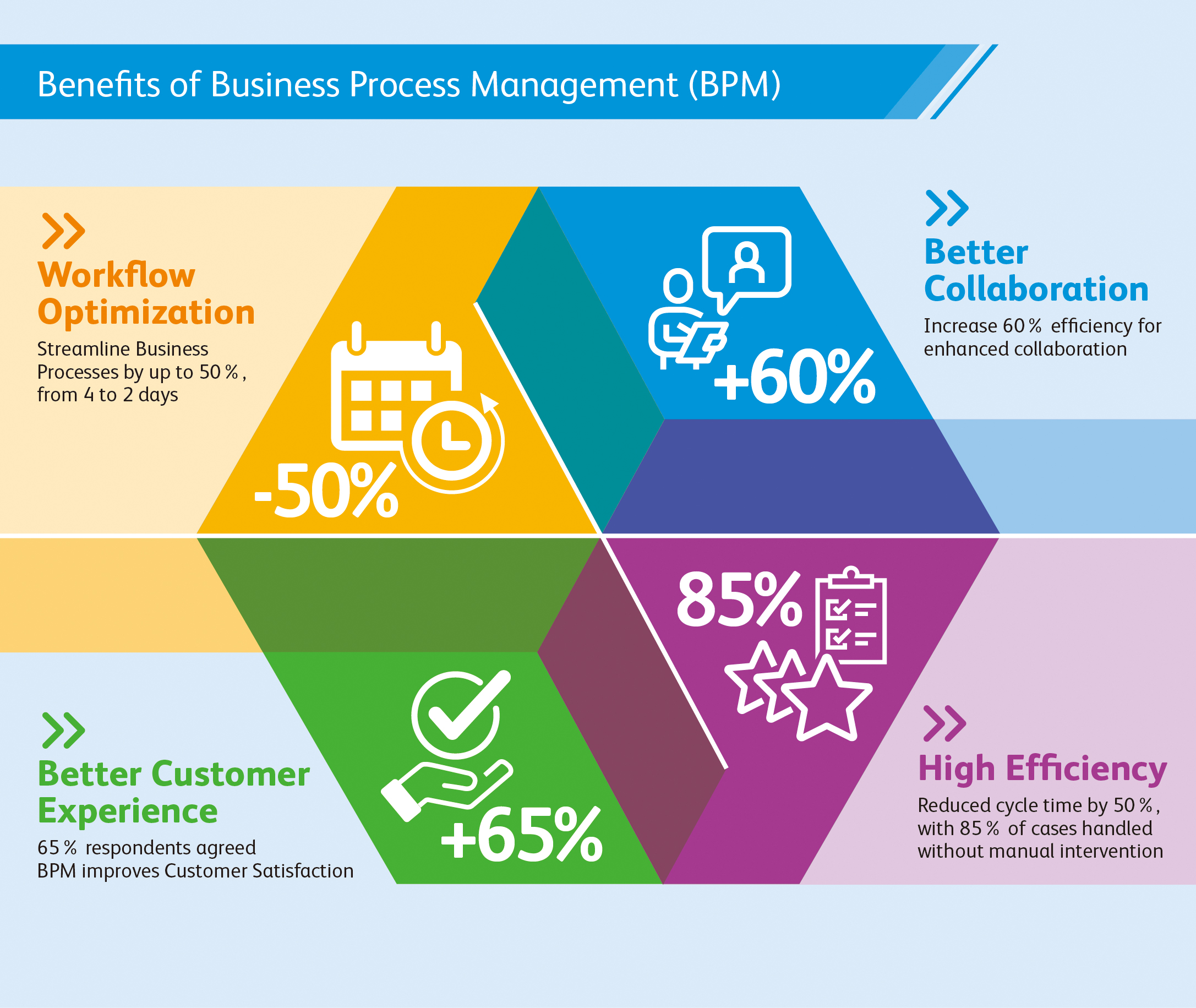
(Source)
Once you’ve pinpointed the areas of your processes that need improvement, it’s time to kick them into gear for optimal efficiency. Break down each step into bite-sized pieces so they can be better managed and tracked.
Automation can also help streamline mundane tasks such as data entry or file transfers between departments, freeing up employees’ bandwidth to focus on higher-value activities instead of manually repeating tedious workflows. Furthermore, leveraging technology solutions like project management software can facilitate collaboration across different departments while keeping documents in one central location rather than scattered around various folders on multiple computers throughout the organization.
By streamlining processes, R&D and innovation teams can increase efficiency and improve their overall performance.
Key Takeaway: To maximize efficiency and stay competitive, companies should carefully assess their processes for areas that need improvement. By breaking down tasks into smaller steps, automating mundane workflows, and utilizing technology solutions such as project management software, businesses can quickly streamline their process, accelerating innovation efforts.
Utilize Technology to Enhance Collaboration
Technology is a potent instrument for research and development squads to work together in a faster way. This is critical in learning how to accelerate innovation.
There are numerous technologies available that can be used to enhance collaboration within these teams. Examples include project management tools, communication platforms, virtual meeting solutions, and data analysis software.
Project Management Tools
Project management tools allow teams to organize their tasks efficiently. These tools often come with features such as task tracking, time tracking, resource allocation, budgeting capabilities, and more. With project management tools, teams can effectively manage tasks and adhere to deadlines and budget restrictions.
Communication Platforms
Communication platforms help keep team members connected regardless of where they are located geographically or how busy their schedules may be. Platforms like Slack or Microsoft Teams facilitate speedy file-sharing and enable instantaneous conversations between colleagues who can’t be in the same room. Virtual conferencing technology offers a substitute for those who are scattered geographically or occupied with other tasks, allowing them to connect in person without having to go long distances or take up too much time from their duties.
Data Analysis Software
Data analysis software allows teams to collect data from multiple sources into one platform so that they can better understand trends over time as well as identify opportunities for improvement faster than ever before possible through manual methods alone.
By leveraging the right technology, research and innovation teams can increase collaboration and optimize their workflows. Creating an atmosphere that promotes learning and progression is essential to maximizing team effectiveness.
Key Takeaway: Technology can be a potent aid for R&D and invention squads to interact more promptly, effectively, and resourcefully. By utilizing the various technological tools available such as project management software, communication platforms, virtual meetings solutions, and data analysis systems, collaboration is improved while also streamlining processes through automation and providing real-time data for faster decision-making.
Conclusion
Learning how to accelerate innovation is essential for maintaining an edge over rivals and improving profitability. By learning how to leverage data, automate processes, streamline operations, utilize technology for collaboration, and develop a culture of continuous improvement, accelerating innovation in your organization becomes easy.
By taking advantage of these tools and resources, organizations can take their innovation capabilities to new heights while saving time and money in the process.
Discover how Cypris can help accelerate innovation by centralizing data sources and providing rapid time to insights. Unlock the potential of your R&D team with a powerful research platform designed specifically for them.

How long does a design patent last? As an R&D manager, product developer, or innovation leader, understanding when a design patent expires is crucial for protecting your intellectual property. This post examines the intricacies of design patents and their term length, providing you with the info needed to protect your intellectual property.
We will begin by providing an overview of design patents and discussing their benefits and requirements. Next, we will specifically address the question “How long does a design patent last?” while also exploring factors that can affect its duration and renewal process.
Furthermore, we will discuss infringement issues related to design patents and outline strategies for avoiding such complications. By the end of this post, you should have a comprehensive understanding of not only how long a design patent lasts but also how to protect your patented designs effectively.
Table of Contents
- The Basics of Design Patents
- Design Patents vs Utility Patents
- Examples of Inventions Eligible for Design Patent Protection
- How Long Does a Design Patent Last?
- Filing Your Design Patent Application
- Professional Drawing Costs and USPTO Fees
- Protecting Your Designs in Today’s Competitive Market
- Benefits of Design Patents
- Advice from Reputable Patent Attorneys
- Conclusion
The Basics of Design Patents
Before we answer “How long does a design patent last,” we should learn the basics of design patents. A design patent is a form of intellectual property protection that safeguards the unique appearance or “ornamental” aspects of an invention, as opposed to its functional features.
Design patents, granted by the USPTO, can be used to protect the distinctive looks of products like lamps, app icons on mobile phones, or any other novel and attractive design.
Design Patents vs Utility Patents
- Design patents: Protect the visual elements or aesthetics of a product. They do not cover how it functions or works. For example, if you create a new shape for a water bottle that has never been seen before but does not affect its functionality in any way, this would fall under design patent protection.
- Utility patents: Cover inventions with novel functionalities or improvements over existing technology. These types of patents protect how an invention works rather than just its appearance. Examples include mechanical devices like engines or electronic gadgets such as smartphones.
In some cases, both design and utility patents may be filed for the same invention if it has both unique aesthetic qualities along with innovative functional aspects.
Examples of Inventions Eligible for Design Patent Protection
- An ergonomic computer mouse with an entirely new shape designed specifically to reduce wrist strain while maintaining all necessary buttons/functions.
- A sleek smartphone case featuring intricate patterns made from sustainable materials without compromising durability/protection capabilities against drops or scratches.
Design patent basics are essential for inventors to understand to protect their inventions and ensure they receive the full protection of a design patent. With this knowledge, applicants can move on to understanding the duration and application process required for obtaining a design patent.
Design patents protect the unique appearance of inventions, like ergonomic computer mice or smartphone cases. Utility patents cover how an invention works. #Innovation #Patents #IPRights Click to Tweet
How Long Does a Design Patent Last?
How long does a design patent last? The lifespan of a design patent is an essential factor to consider when protecting your invention’s unique appearance.
These patents are granted for 15 years, after which a design patent expires. This offers you ample time to capitalize on the market exclusivity provided by this form of intellectual property protection. However, it’s crucial to file a design patent application within 12 months after publicly disclosing your creation, or you risk losing the opportunity to secure these rights.
Filing Your Design Patent Application
Filing your design patent application promptly ensures that you don’t miss out on valuable protection for your invention. The USPTO mandates that applicants submit their applications within a year of when they initially make public disclosures regarding their designs.
This deadline helps maintain fairness in granting exclusive rights while encouraging inventors not to delay filing their applications unnecessarily.
Professional Drawing Costs and USPTO Fees
- Drawing costs: A critical component of any design patent application is submitting detailed drawings illustrating different views of your invention. These illustrations must be clear, accurate, and professional-looking since they play a significant role in determining whether or not the USPTO grants your patent request. Professional draftsmen typically charge between $50-$100 per drawing depending on complexity.
- Fees based on entity size:The cost associated with filing a design patent varies according to the applicant’s status as either micro-entity, small entity, or large entity.
- Micro-entity: $50 – For individual inventors who meet specific income requirements the USPTO sets.
- Small entity: $100 – For small businesses, nonprofit organizations, and individual inventors who do not qualify as micro-entities but meet certain criteria outlined by the USPTO.
- Large entity: $200 – For large corporations or any individual applicant that does not fall under either of the other two categories.
In addition to these costs, there may be additional fees for amendments or extensions during the application process. It’s essential to factor in all potential expenses when budgeting for your design patent protection strategy. You can find more information on filing fees at the official USPTO Fee Schedule.
Filing a design patent within 12 months of public disclosure is essential to protecting your designs in today’s competitive market. To ensure the protection of your designs, it is important to seek advice from reputable patent attorneys and understand the application process and associated costs.
Key Takeaway: How long does a design patent last? Design patents provide 15 years of market exclusivity, however, it is important to apply within 12 months after public disclosure or risk losing the opportunity. Professional drawings and USPTO fees must be factored in when budgeting for a design patent strategy. These costs can range from $50-$200 depending on entity size. All this considered, “time is of the essence” when applying for a design patent.
Protecting Your Designs in Today’s Competitive Market
Now that we have answered “how long does a design patent last,” let’s look at how having a design patent benefits R&D managers and engineers.
In today’s competitive market where innovation is key to success, protecting your designs from potential copycats becomes increasingly important. R&D Managers and Engineers should all be aware of the importance of design patents in safeguarding their creations. It’s crucial not only to act promptly but also to consult with experienced attorneys specializing in intellectual property law who can guide you through each step involved in securing these rights effectively while avoiding potential pitfalls along the way.
Benefits of Design Patents
- Exclusive Rights: A design patent grants its holder exclusive rights to make, use, sell, or import the patented design within the United States for 15 years after being granted. This allows companies and inventors to protect their investments and maintain a competitive edge over others trying to replicate their designs.
- Deterrent Effect: Design patents serve as an effective deterrent against competitors attempting to copy your unique product appearance. The threat of legal action often dissuades would-be infringers from replicating your invention without permission.
- Licensing Opportunities: Patented designs can create additional revenue streams by licensing them out for use by other companies or individuals interested in incorporating those elements into their products or services.
Advice from Reputable Patent Attorneys
To ensure that you are properly protected, you must seek advice from reputable patent attorneys who specialize in intellectual property law. They will help navigate through the complexities associated with filing a design patent application, such as ensuring proper drawings are submitted and accurately describing the unique features of your invention. Additionally, they can guide the most effective strategies for enforcing your design patent rights against potential infringers.
When selecting a patent attorney or firm to represent you, consider their experience handling design patents and their success rate in obtaining these types of protections. You may also want to ask for references from previous clients who have successfully filed design patents with their assistance.
In summary, understanding the importance of protecting your designs through design patents is crucial for R&D Managers and Engineers working on innovative products. By acting promptly and seeking expert advice from experienced intellectual property attorneys, you can ensure your unique creations are well-protected within today’s competitive market landscape.
Key Takeaway: Learning about design patents is important for R&D Managers, Engineers, and Product Development Teams to protect their inventions from potential copycats. It is also important to consult with reputable patent attorneys specializing in intellectual property law who can guide you through each step involved in protecting your creations effectively.
Conclusion
How long does a design patent last? With a maximum duration of 15 years, design patents offer an effective way to secure intellectual property and the financial rewards associated with it.
This long duration makes them an effective way of protecting intellectual property and ensuring that companies can reap the rewards of their innovation without fear of infringement. However, to make sure a design patent lasts, proper research into what types of designs may be patented must be conducted before filing any applications with the USPTO.
Discover how long a design patent lasts with Cypris, the research platform built specifically for R&D and innovation teams. Our centralized data sources provide rapid time to insights that can help you protect your designs from infringement.

When working with intellectual property, a patent citation generator is an indispensable tool for R&D Managers, Engineers, and Scientists. Accurate patent citations are crucial in maintaining the integrity of your research and ensuring that you give proper credit to inventors whose work has contributed to your innovation.
In this blog post, we will delve into the importance of adhering to APA-style guidelines when citing patents. We will also discuss essential information required for citing patents such as inventor names, year issued, country/region filed, and agency issuing the patent.
Furthermore, we will explore different citation styles including author-date systems and numerical systems for in-text citations. Finally, we’ll provide an example of how to properly cite an international European Patent using a patent citation generator. By understanding these aspects of patent citation generation, you can ensure accuracy and professionalism in your reference list.
Table of Contents
- Understanding Patent Citation Generators
- Importance of Accurate Patent Citations
- Adhering to APA Style Guidelines
- Essential Information for Citing Patents
- Inventor Names and Year Issued
- Country/Region Filed and Agency Issuing The Patent
- In-text Citations and Reference List Formatting
- Author-date Citation Styles vs Numerical Systems
- Citing a Patent: Example
- Conclusion
Understanding Patent Citation Generators
A patent citation generator is a valuable tool for professionals working in research and development or product innovation fields. It helps users accurately cite patents in their research papers and essays according to the APA (American Psychological Association) style guidelines, ensuring consistency across all references within your paper while adhering to academic standards set forth by institutions requiring APA formatting rules.
Importance of Accurate Patent Citations
In the world of R&D, accurate patent citations are crucial for several reasons. First, they help establish credibility by demonstrating that you have thoroughly researched existing inventions and technologies related to your work.
Second, proper citation practices allow others to easily locate cited patents when reviewing your work or building upon it. Finally, citing patents correctly can prevent potential legal issues arising from improper attribution of intellectual property rights.
Adhering to APA Style Guidelines
The APA style is widely used in academia and professional settings due to its clear structure and emphasis on author-date citations over numerical systems commonly found in other styles like IEEE. By following these guidelines when citing patents, you ensure that your reference list remains consistent with other sources cited throughout your paper such as journal articles or books.
- Credibility: Demonstrates thorough research into existing inventions and technologies related to one’s work.
- Ease of access: Allows others to review or build upon one’s work an easy way to locate cited patents.
- Legal protection: Properly attributing intellectual property rights prevents potential legal issues from improper attribution.
- Maintaining consistency: Adhering strictly to the APA format ensures uniformity across all references within a paper.
By understanding the importance of accurate patent citations and adhering to APA style guidelines, professionals in R&D can effectively showcase their knowledge while maintaining credibility and avoiding potential legal issues. To learn more about citing patents using the APA format, check out this comprehensive guide on patent citation examples.
Understanding patent citation generators is essential for ensuring accurate citations and adhering to APA style guidelines. With this knowledge in hand, it’s time to explore the information needed when citing patents such as inventor names and year issued, country/region filed, and agency issuing the patent.
Key Takeaway: It is important to accurately cite patents by APA style guidelines. This helps to ensure credibility and avoid any potential legal issues by properly attributing intellectual property rights. Additionally, it allows for consistency throughout one’s paper while allowing readers to easily locate cited patents if needed.
Essential Information for Citing Patents
In the world of research and development, it is crucial to have accurate citations for all your sources, including patents. To properly cite a patent using the APA format, you’ll need some basic information that ensures consistency across all references within your paper while adhering to academic standards set forth by institutions requiring APA formatting rules.
Inventor Names and Year Issued
The first piece of information required when citing a patent is the inventor’s name(s). This should be listed in the same order as they appear on the actual patent document. Additionally, include the year in which the patent was issued. Remember that this date may differ from any publication dates found in other types of sources like journal articles or books.
Country/Region Filed and Agency Issuing The Patent
Next, identify both the country or region where the patent was filed and which agency issued it. For a US-based invention, mention “United States” and the agency issuing it as “United States Patent Office (USPTO)”. Similarly, for European patents reference “European Patent Office (EPO)” alongside its corresponding country code such as EP (European) or DE (Germany).
- Title: Include either an official title provided by issuing authority or create one based on the description if no specific title exists.
- Patent Number: Provide a unique identifier assigned by the respective office; typically alphanumeric combination containing letters indicating jurisdiction followed by digits.
- URL (if applicable): If available, include a link to the patent’s online record or official document.
By understanding these requirements and using a reliable patent citation generator, users will be better equipped to correctly cite their sources while maintaining consistency throughout their work. Accurately citing sources can help ensure that your research is viewed as legitimate and avoids any issues associated with plagiarism or incorrect representation of data in the bibliography.
It is essential to include all the necessary information when citing a patent, such as inventor names and year issued, country/region filed, and agency issuing the patent.
Key Takeaway: We looked at essential information for accurately citing patents in APA format, including the inventor’s name and year issued, country region filed and agency issuing the patent, title of the invention, patent number, and URL (if available). Additionally, it recommends using a reliable citation generator to ensure proper referencing while avoiding potential issues related to plagiarism or misrepresentation.
In-text Citations and Reference List Formatting
When citing patents in your research, it is essential to follow the appropriate citation style guidelines. In this case, we will focus on the APA format, which emphasizes author-date citation styles over numerical systems commonly used by other organizations like IEEE.
This approach maintains consistency across all references within your paper while adhering to academic standards set forth by institutions requiring APA formatting rules.
Author-date Citation Styles vs Numerical Systems
The primary difference between author-date and numerical citation styles lies in how they present information about the source. Author-date citations include the inventor’s name(s) and year of issuance directly within the text, whereas numerical citations assign a number to each reference that corresponds with an entry in a numbered list at the end of your document.
For example:
- Author-Date Style: (Smith & Johnson, 2010)
- Numerical Style: [1]
In-text citations for patents should be based on their issue date rather than publication dates found in other types of sources like journal articles. By using an author-date system such as APA format for patent citations, you can ensure that all cited works are consistently presented throughout your paper.
Citing a Patent: Example
To properly structure a patent reference according to APA style guidelines, use this template provided below as a guide that can be adapted depending on specific formatting requirements from professors or supervisors:

By following these guidelines, you can create a consistent and accurate reference list for your research paper or essay that adheres to the APA format rules.
Key Takeaway: We explained the difference between author-date and numerical citation styles, and emphasizes that patent citations should be based on issue date rather than publication dates found in other sources. A template is provided for structuring references according to APA style guidelines.
Conclusion
Patent citation generators are a valuable tool for R&D and innovation teams. They can help save time by quickly generating citations to relevant patents that may have been missed during the research process.
Nonetheless, it is essential to be judicious when using them since wrong or incomplete data can lead to flawed results. With careful consideration of the types of patent citation generators available and an understanding of how they work, teams can make sure they get the most out of their chosen solution when researching new ideas.
Discover the power of Cypris and unlock your team’s innovation potential with our patent citation generator. Streamline research processes, save time, and gain insights faster than ever before.

As a crucial step in becoming a registered patent practitioner, understanding patent bar eligibility is essential for professionals seeking to represent inventors before the United States Patent and Trademark Office (USPTO). This comprehensive guide will provide an in-depth overview of patent bar eligibility requirements, exam preparation strategies, application processes, and continuing education necessities.
In this blog post, we will first explore the definition of patent bar eligibility and discuss its importance for aspiring patent practitioners. We’ll also delve into the specific qualification requirements outlined by USPTO’s General Requirements Bulletin.
Next, we’ll cover effective methods to prepare for the rigorous patent bar exam – from recommended study materials to proven strategies that can help you achieve a high score. Additionally, we’ll walk you through the steps involved in applying for the exam while highlighting the necessary documentation and fees associated with it.
Finally, maintaining your hard-earned status as a registered practitioner requires an ongoing commitment to professional development. We’ll outline continuing education requirements and suggest reliable sources for approved courses and programs so you can stay ahead in your career journey.
Table of Contents
- Overview of Patent Bar Eligibility
- Definition of Patent Bar Eligibility
- Requirements for Patent Bar Eligibility
- Benefits of Obtaining Patent Bar Eligibility
- 2. Exam Preparation for the Patent Bar
- Overview of the Exam Structure and Content
- Recommended Study Materials and Resources
- Strategies for Achieving a High Score on the Exam
- Application Process for Obtaining Patent Bar Eligibility
- Steps Involved in Applying for the Patent Bar Exam
- Required Documentation and Fees Associated with Applying for the Exam
- Deadlines and Timelines
- Continuing Education Requirements After Obtaining Patent Bar Eligibility
- Overview of Continuing Education Requirements
- Approved Continuing Education Courses and Programs
- Strategies for Meeting Continuing Education Requirements
- Conclusion
Overview of Patent Bar Eligibility
In this section, we will discuss what patent bar eligibility entails, its requirements, and the benefits it offers.
Definition of Patent Bar Eligibility
Patent bar eligibility refers to an individual’s qualification to practice before the USPTO as a registered patent agent or attorney. To become eligible, one must pass the USPTO Registration Examination commonly known as the “patent bar exam.” This exam assesses your knowledge on U.S. patent laws and regulations as well as your ability to advise clients effectively on securing patents for their inventions.
Requirements for Patent Bar Eligibility
To be eligible for taking the patent bar exam, candidates must meet certain educational and ethical requirements set by USPTO:
- Educational Requirements: Candidates should possess either a bachelor’s degree in engineering or science from an accredited institution or have equivalent technical experience that demonstrates scientific expertise.
- Ethical Requirements: Applicants must demonstrate good moral character through background checks conducted by USPTO during the application process.
- Citizenship Status: The candidate should be a U.S. citizen or permanent resident alien with authorization from the Department of Homeland Security allowing them to work within the United States without restrictions related specifically towards practicing law before federal agencies such as USPTO.
Benefits of Obtaining Patent Bar Eligibility
Becoming eligible to practice before the USPTO offers several advantages for R&D professionals, including:
- Expanded Career Opportunities: Patent bar eligibility opens up new career paths as a patent agent or attorney, allowing you to work in law firms, corporations, universities, and government agencies.
- Increase in Professional Credibility: Being able to represent clients before the USPTO is a valuable skill that enhances your professional reputation within the industry.
- Better Understanding of Intellectual Property (IP) Rights: As a registered practitioner with USPTO, you will have an in-depth understanding of IP rights which can be beneficial when working on innovative projects at your organization or advising clients on their inventions.
In order to obtain patent bar eligibility and enjoy these benefits, it’s essential for candidates to prepare well for the exam. In the next section of this blog post series, we’ll discuss strategies and resources available for effective exam preparation.
Obtaining patent bar eligibility is an important step for those seeking to practice in the field of intellectual property law. Exam preparation and familiarization with study materials are essential components for achieving a high score on the exam, which will be discussed further in the next heading.
Key Takeaway: Obtaining patent bar eligibility is a crucial step for R&D professionals who want to represent inventors before the USPTO. Candidates must meet certain educational and ethical requirements set by USPTO, as well as be U.S citizens or permanent resident aliens with appropriate authorization in order to take the exam and gain its associated benefits such as expanded career opportunities, increased professional credibility, and a better understanding of IP rights.
2. Exam Preparation for the Patent Bar
To become eligible for the patent bar, one must pass a demanding examination that evaluates their familiarity with patent law and procedures. Preparing well for this exam is crucial to achieving success and obtaining your eligibility. In this part, we’ll look at the test framework and material suggested study aids and resources, as well as techniques for achieving a top grade on the assessment.
Overview of the Exam Structure and Content
The USPTO administers the Registration Examination, also known as the patent bar exam. The test consists of 100 multiple-choice questions covering various aspects of patent law, including statutes, regulations, rules governing practice before the USPTO in patent matters, and ethics requirements related to representing clients.
- Duration: The total time allotted for completing all sections is six hours.
- Type: Computer-based testing format with two sessions – morning session (50 questions) & afternoon session (50 questions).
- Passing Score: A scaled score of at least 70% is required to pass.
Recommended Study Materials and Resources
To prepare effectively for the patent bar exam, it’s essential to have access to comprehensive study materials that cover all relevant topics tested on the examination. Some recommended resources include:
- MPEP: The primary resource used during preparation should be the Manual of Patent Examining Procedure (MPEP), which is the official USPTO publication containing guidelines for patent examiners and practitioners. It can be accessed online or purchased in print.
- Study Guides: Various commercial study guides are available that provide a comprehensive overview of the material covered on the exam, such as PLI’s Patent Office Exam Course or OmniPrep’s Patent Bar Review Course.
- Practice Exams: Taking practice exams is an excellent way to familiarize yourself with the test format and identify areas where you may need additional review. The USPTO provides some sample questions on its website, while other resources like Wysebridge offer full-length practice tests.
- Past Exams: Studying past exams can also help you understand what types of questions will appear on your test day. Past exams are available through various sources, including PatBar.com and PES-System.com.
Strategies for Achieving a High Score on the Exam
Beyond simply studying materials and taking practice tests, there are several strategies that can improve your chances of success when sitting for the patent bar examination:
- Create a study schedule: Allocate sufficient time to cover all relevant topics thoroughly before your exam date. This includes reviewing MPEP chapters multiple times, completing numerous practice questions, and identifying any weak areas needing improvement.
- Familiarize yourself with MPEP navigation: Since you’ll have access to an electronic version of MPEP during the exam itself, it’s crucial to become proficient at quickly locating information within this resource under timed conditions.
- Focus on high-yield topics: Some areas of patent law are more heavily tested than others, so prioritize your study efforts accordingly. For example, chapters related to patentability and the application process tend to be emphasized more frequently.
- Develop test-taking strategies: Learn how to manage your time effectively during the exam by practicing techniques such as skipping difficult questions initially and returning to them later if time permits.
By following these guidelines for exam preparation, you’ll be well-equipped with the knowledge and skills necessary for success on the patent bar examination and obtaining eligibility status in your field.
Studying for the patent bar exam requires dedication and discipline, but with a thorough understanding of the content and resources available to help you prepare, success is achievable. Moving on from preparation to application, it’s important to be aware of all steps involved in obtaining eligibility for taking the exam.
Key Takeaway: We looked at the patent bar exam, including its structure and content, recommended study materials and resources, as well as strategies for achieving a high score. To ace this tough test, it’s important to create a comprehensive study schedule that covers all relevant topics thoroughly; become familiar with MPEP navigation; focus on high-yield topics; and develop effective test-taking techniques.
Application Process for Obtaining Patent Bar Eligibility
In this section, we will go over the procedure for applying to take the patent bar exam, the needed paperwork and expenses connected with submitting an application for the test, as well as due dates and timelines that should be kept in mind when organizing your request.
Steps Involved in Applying for the Patent Bar Exam
- Determine eligibility: Before you can apply for the patent bar exam, ensure that you meet all of the USPTO’s General Requirements Bulletin (GRB) qualification requirements. This includes having appropriate scientific qualifications such as a degree or work experience in fields like genetic engineering or computer science.
- Gather necessary documents: You will need to provide official transcripts from your educational institutions, proof of citizenship or permanent residency status (if applicable), and any other relevant documentation that demonstrates your technical background.
- Create an account on USPTO’s website: To begin your application process, create an account on the United States Patent and Trademark Office (USPTO) website. This is where you’ll submit all required information and pay associated fees.
- Complete the online application form: Fill out all sections of USPTO’s online application form accurately and thoroughly. Be sure to include details about how you meet each requirement outlined by GRB guidelines.
- Paying examination fee: The final step is paying the examination fee which varies depending upon whether the applicant is a large entity or a small/micro-entity.
- Submit application: After completing all necessary steps, submit your application to the USPTO for review. You will receive a confirmation email upon successful submission.
Required Documentation and Fees Associated with Applying for the Exam
The following documents are typically required when applying for patent bar eligibility:
- Official transcripts from all educational institutions attended
- Evidence of U.S. citizenship or permanent residency status (if applicable)
- Affidavit or declaration supporting any work experience that is being used to satisfy scientific qualifications requirements
- Past examination results (if you have previously taken the exam)
In addition to submitting these documents, applicants must also pay an examination fee. The USPTO Fee Schedule page provides detailed information about the fees that vary depending on whether you qualify as a large entity, small entity, or micro-entity. The USPTO Fee Schedule page contains comprehensive information regarding the fees that are applicable, depending on an applicant’s entity status.
Deadlines and Timelines
The patent bar exam is offered year-round through computer-based testing centers across the United States. However, there may be specific deadlines associated with registering at certain locations due to limited availability. It’s important to plan ahead and register early if possible.
If your application is approved by USPTO, you will receive an Authorization To Test (ATT) letter via email which allows you six months from the date of issuance within which the applicant needs to take their scheduled exam.
It’s essential that applicants stay organized throughout this process so they can successfully obtain patent bar eligibility and begin their journey as patent practitioners, representing inventors in the complex world of intellectual property.
Obtaining patent bar eligibility is a complex process, but with the right guidance and resources, it can be navigated successfully. Continuing education requirements are also an important part of maintaining this status; these will now be discussed in more detail.
Key Takeaway: Submitting the patent bar exam application necessitates fulfilling USPTO prerequisites and having the necessary paperwork ready; to ensure smooth processing. Once everything is squared away, submit your application online along with the associated fees and wait for an Authorization To Test (ATT) letter before taking the exam within six months.
Continuing Education Requirements After Obtaining Patent Bar Eligibility
Once you have successfully passed the patent bar exam and obtained your eligibility, it is essential to stay updated with the latest developments in patent law and practice. Once you have obtained your patent bar eligibility, it is necessary to stay abreast of the latest developments in patent law and practice by fulfilling USPTO-set continuing education requirements. In this section, we will discuss these requirements, sources of approved courses and programs, as well as strategies for meeting them.
Overview of Continuing Education Requirements
To maintain your patent bar eligibility status, you must complete a certain number of Continuing Legal Education (CLE) credits. These CLE credits are required to ensure that registered practitioners remain competent in their field by staying informed about changes in laws or regulations related to patents.
The USPTO requires 24 hours of CLE every two years, including at least three hours dedicated specifically to ethics training.
Approved Continuing Education Courses and Programs
- American Intellectual Property Law Association (AIPLA): The AIPLA offers various CLE programs, both online and in-person events covering a wide range of topics relevant to intellectual property professionals.
- Practising Law Institute (PLI): The PLI provides an extensive selection of patent-related CLE courses, including live webcasts, on-demand programs, seminars, and more.
- Intellectual Property Owners Association (IPO): The IPO offers webinars and conferences that provide CLE credits, focusing on various aspects of intellectual property law and practice.
- Local Bar Associations: Many state or local bar associations also offer patent-related CLE courses. Check with your respective association for available programs in your area.
Strategies for Meeting Continuing Education Requirements
To ensure you meet the continuing education requirements without any hassle, consider adopting the following strategies:
- Create a plan: Develop a schedule to complete the required CLE credits within the two-year period. This will help you avoid last-minute stress and ensure timely completion of all necessary coursework.
- Select relevant courses: Choose courses that are not only approved by USPTO but also align with your professional interests or areas where you need improvement. This will make learning more enjoyable and beneficial to your career growth.
- Mix online and offline options: Utilize both online resources like webinars as well as in-person seminars or conferences to diversify your learning experience while meeting CLE requirements efficiently
Staying up-to-date with patent laws and regulations is crucial for maintaining patent bar eligibility status. By understanding the continuing education requirements set forth by USPTO, selecting appropriate sources of approved courses, and implementing effective strategies for meeting these requirements, you can ensure a successful and rewarding career in the field of patent law.
Key Takeaway: It’s essential to stay on top of the latest developments in this field by completing CLE credits every two years. By taking courses approved by USPTO and strategically mixing online and offline learning options while prioritizing ethics training, you can keep your head above water without any trouble.
Conclusion
Obtaining patent bar eligibility is a challenging process that requires significant effort and dedication. However, the rewards of becoming eligible to practice before the USPTO can be well worth it for those interested in advancing their career in research and innovation.
Studying hard for the exam, submitting all necessary documentation correctly during the application process, and staying up-to-date with continuing education requirements after passing the exam will help ensure you remain qualified as an attorney or agent to represent clients at the USPTO.
Discover how Cypris can help your R&D and innovation teams quickly gain insights into patent bar eligibility with our comprehensive data sources platform. Leverage the power of technology to make informed decisions faster than ever before.

What is innovation consulting? Innovation consulting is a powerful tool for organizations looking to unlock their full potential. It can offer teams a way to gain fresh perspectives and uncover potential avenues that may have been overlooked, enabling them to create new products or services at a faster rate.
In this article, we answer: what is innovation consulting? By utilizing a knowledgeable consultant, organizations can leverage innovation consulting services to remain competitive in the ever-evolving marketplace. So let’s take a look at what it is and how it can help your organization.
Table of Contents
What is Innovation Consulting?
Who Can Benefit from Innovation Consulting?
Product Dev Engineers and Managers
How Does an Organization Benefit from Innovation Consulting?
Identifying Opportunities for Growth and Expansion
Crafting Effective Plans to Achieve Goals
What Are the Different Types of Innovation Consulting Services?
Strategic Planning and Execution
What is Innovation Consulting?
What is innovation consulting? Innovation consulting is a specialized service that assists companies and organizations in discovering fresh possibilities, devising pioneering products/services, and forming tactics to promote expansion. It involves working with clients to understand their business goals, assess technological capabilities, and develop an actionable plan for achieving those objectives.
Innovation consultants bring an outside perspective to the table. They are experienced professionals who have extensive experience in helping businesses innovate, grow, and thrive.
Innovation consulting strives to uncover inventive answers that enable a business to stay ahead of its rivals. By leveraging data-driven insights from market research or design thinking processes such as design sprints, consultants can provide fresh perspectives that enable businesses to capitalize on untapped potential or jump-start stalled innovation efforts. A good innovation consultant understands how technology trends can impact business models while also having a keen eye for spotting emerging opportunities.
Innovation consultants can bring a wealth of benefits to the table, such as providing an impartial perspective on current operations and opportunities for growth. From uncovering new paths to success through market research or design sprints, they possess the know-how necessary to develop innovative ideas while helping create effective marketing campaigns tailored toward different markets and channels.
Furthermore, innovation consultants offer executives crucial guidance in strategizing initiatives that align with organizational objectives before committing resources or time. They essentially act as a sounding board for their ideas. All this makes them invaluable assets when it comes to assisting companies in transforming themselves into truly dynamic enterprises capable of staying ahead of the competition.
Innovation consulting offers a valuable resource to research and development teams, allowing them access to the information they need for making sound decisions. By leveraging innovation consulting services, R&D teams can gain a competitive edge over their peers by gaining insights into new technologies faster than ever before.
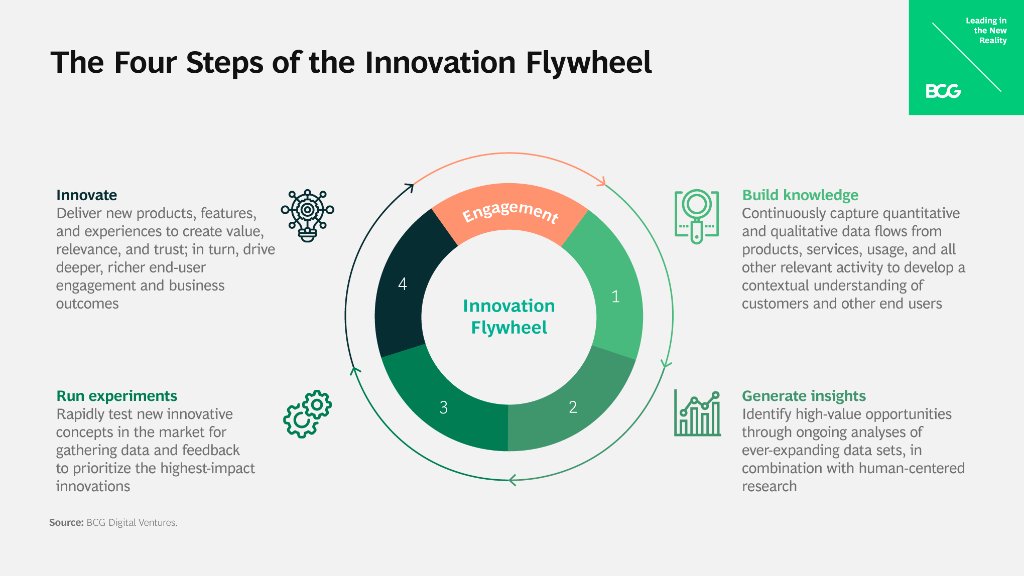
(Source)
Who Can Benefit from Innovation Consulting?
What is innovation consulting? Innovation consulting firms can assist in recognizing expansion prospects, constructing approaches to attain aims and objectives, optimizing efficacy and productivity at work, as well as utilizing the most recent technologies and trends. All of these benefits make it an invaluable resource for any organization looking to stay ahead of its competition.
R&D Managers and Engineers
R&D managers and engineers are prime candidates to benefit from innovation consulting services. With the help of an experienced consultant, they can gain insights into new technologies that could improve their products or processes, helping them stay competitive in today’s rapidly changing market.
Moreover, with the help of analytical techniques, they can more accurately discern customer requirements to generate expeditious and effective solutions that satisfy those demands.
Product Dev Engineers and Managers
Product dev engineers and managers also have much to gain from working with an innovation consultant. Strategic planning can enable product development personnel to create plans that use resources economically and minimize any potential risks when rolling out new products or services promptly.
Furthermore, finding reputable innovation consulting firms can provide valuable feedback on existing processes which will allow product development teams to streamline operations for greater efficiency without sacrificing quality standards or customer satisfaction levels.
Lead or Senior Scientists
Scientists in lead or senior roles are especially well-suited to reap the benefits of what innovation consulting has to offer. By taking advantage of data-driven research methods, they can quickly uncover correlations between variables which could potentially open up revolutionary discoveries.
Innovation consulting can be a useful aid for R&D and innovation groups to make the most of their capacity, offering advice on how best to utilize existing resources.
What is innovation consulting? Innovation consulting firms can assist in recognizing expansion prospects, constructing approaches to attain aims and objectives, optimizing efficacy and productivity at work, as well as utilizing the most recent technologies and trends. Click To Tweet
How Does an Organization Benefit from Innovation Consulting?
What is innovation consulting? Innovation consulting can aid organizations in uncovering avenues for growth, building strategies to reach objectives, and enhancing productivity. By leveraging data-driven insights, innovation consultants can help organizations uncover hidden potential within their operations.
Identifying Opportunities for Growth and Expansion
Innovation consulting helps businesses assess current market trends to determine areas of opportunity that could be leveraged for growth. Consultants are well-versed in a variety of industry best practices which allows them to provide expert guidance on new markets or products that could prove beneficial for an organization’s expansion.
Additionally, they can use data analytics tools such as predictive modeling or machine learning algorithms to uncover untapped customer segments or business niches that have yet to be explored by competitors.
Crafting Effective Plans to Achieve Goals
An experienced consultant will collaborate with an organization’s executive team to craft effective plans customized for achieving desired goals. By scrutinizing past performance records combined with researching current market trends, consultants can design creative solutions that guarantee success within a given time frame.
Enhancing Efficiency
Leveraging advanced technologies such as AI-powered chatbots can significantly improve customer service capabilities while simultaneously cutting expenses related to manual labor tasks typically handled by personnel. This type of automation is often overlooked but plays a major role in staying ahead of the competition in today’s ever-evolving landscape.
Organizations benefit from innovation consulting in many ways, such as identifying opportunities for growth and expansion, developing strategies to achieve goals and objectives, and enhancing efficiency and productivity. Organizations can learn how to take advantage of the current range of innovation consulting services to achieve their desired results.
Key Takeaway: Innovation consultants provide organizations with the strategies and tools needed to identify growth opportunities, develop plans for success, and maximize efficiency. By leveraging AI-based chatbots and other advanced technologies, companies can maintain a competitive edge in an ever-evolving environment by using data-driven insights.
What Are the Different Types of Innovation Consulting Services?
What is innovation consulting? Innovation consulting assists businesses in formulating approaches and tactics to boost productivity, efficiency, and expansion.
There are four main types of innovation consulting services: strategic planning and execution services, process improvement services, market analysis and insights, and technology solutions services.
Strategic Planning and Execution
Strategic planning and execution services involve helping organizations create long-term plans for success by assessing the current state of their operations as well as external factors such as customer trends or competitive landscapes. The consultant will then help the organization develop actionable steps toward achieving its goals. This type of service also includes implementation support to ensure that the plan is executed properly.
Process Improvement Services
Process improvement services focus on streamlining existing processes to maximize efficiency while minimizing costs. A consultant can help identify areas where there are opportunities for improvement such as reducing waste or automating manual tasks with technology solutions. They may also suggest new methods or approaches that could lead to greater efficiency in certain areas of operations.
Market Analysis and Insights
Market analysis and insights services provide valuable data about customers’ needs, preferences, and buying habits which can be used to inform product development decisions or marketing campaigns targeting specific audiences. Utilizing AI and ML, consultants can swiftly process large datasets to enable businesses to make decisions with greater speed and accuracy.
Technology Solutions
Technology solutions services offer expertise in various technologies such as cloud computing platforms or software applications that enable organizations to operate more efficiently by automating manual tasks or providing real-time access to data across multiple locations simultaneously. By leveraging these technologies, companies can gain an edge over competitors who have not yet adopted them.
Consultants specializing in this area will be able to provide advice on how best to utilize existing tech infrastructure while suggesting ways it could be improved upon with newer advancements.
Innovation consulting services are an invaluable asset to organizations that wish to stay ahead of the curve in terms of technological advancements and market trends. Organizations seeking to leverage the benefits of innovation consulting should ensure that their chosen consultant is well-versed in the field, possesses an understanding of current tech and market developments, can analyze data effectively, and communicate efficiently.
Key Takeaway: Innovation consulting is a specialized form of aid that assists companies to devise tactics and approaches to enhance productivity, effectiveness, and development. It includes strategic planning services for long-term success as well as process improvement services to optimize operations. Additionally, it offers market analysis and insights services using AI and ML algorithms and technology solutions expertise with the latest advancements in cloud computing platforms or software applications.
Conclusion
What is innovation consulting? Innovation consulting is a critical asset for businesses aiming to reach their full potential and stay one step ahead of the competition. With the right consultant, companies can take advantage of cutting-edge strategies that will help them reach new heights in efficiency and profitability.
By taking into account the different types of services offered by consultants as well as what qualities they should look for when hiring one, organizations are better equipped to leverage innovation consulting to drive success within their business operations.
Unlock the potential of your R&D and innovation teams with Cypris. Our research platform provides rapid time to insights, centralizing data sources into one convenient platform for maximum efficiency.
.avif)