
A faster, more accurate way to explore innovation data—now available in Cypris.
For innovation teams, speed and accuracy aren’t optional—they’re critical. You need to quickly find all relevant documents, slice and dice datasets however you want, and trust that the results are complete and representative. With this in mind, we’ve upgraded how semantic search works inside Cypris.
Today, we’re launching an upgraded search infrastructure that gives users access to full, exact result sets—unlocking more powerful analysis, faster iteration, and deterministic filtering and charting.
Unlike traditional semantic or vector search engines—which make it difficult to count, filter, or chart large sets of matched documents—our new approach prioritizes transparency and performance while preserving semantic relevance.
Why we moved away from vector search
Our original implementation relied on semantic and vector search to capture the “meaning” behind user queries. But as our platform evolved, it became clear that these systems weren’t well-suited for our core use cases.
Users needed:
- Deterministic filtering (e.g., "how many results match this atom?")
- Transparent, complete result sets to power charts and dashboards
- Fast, repeatable queries that don’t change subtly over time
Modern vector search systems don’t easily support this level of transparency. They return approximate matches and abstract similarity scores, often making it hard to understand why a document was returned—or whether it’s the full picture.
So we made a decision: move away from vector search and lean into what traditional search engines do best.
A return to boolean and lexical search—with a twist
We rebuilt our search infrastructure on top of Elasticsearch’s powerful boolean and lexical search capabilities. This shift brings major advantages:
- Faster query speeds that dramatically improve iteration time
- Deterministic filtering and counts, so every chart is grounded in the full dataset
- Predictable, explainable results that users can trust
But we didn’t stop there.
To preserve the benefits of semantic understanding, we’ve rethought where that intelligence should live—not at query time, but at data ingestion.
Capturing semantic meaning at ingest time
Instead of computing document-query similarity during search, we enrich documents at the time of ingestion. Here’s how:
- Synonym expansion: We find related words and concepts not explicitly mentioned in the document and add them as fields, enabling semantic-style recall via lexical search.
- Stemming: Both queries and documents are reduced to their root forms, allowing consistent matches (e.g., “running” and “run”).
The result? You get the same functionality—semantically relevant results—without the opacity or latency tradeoffs of vector search.
What’s next: Reranking for even better relevance
We’re not done. Coming soon to Cypris is a reranking layer that boosts the most relevant results to the top of the list using lightweight vector techniques.
Here’s how it works:
- A standard lexical search retrieves the full result set.
- We take the top N results and rerank them using vector similarity, powered by Elasticsearch’s new hybrid scoring capabilities.
- You get faster queries with even better relevance—without compromising on counts or transparency.
This layered approach gives us the best of both worlds: precise filtering and fast queries, plus smarter ordering of results where it matters most.
We’re excited to bring this upgrade to our users, and we’re already seeing teams iterate faster and uncover insights more confidently. This is a foundational shift—and just the beginning of what’s to come.
Want a walkthrough of what’s changed? Reach out to our team.

Introducing our upgraded semantic search



A faster, more accurate way to explore innovation data—now available in Cypris.
For innovation teams, speed and accuracy aren’t optional—they’re critical. You need to quickly find all relevant documents, slice and dice datasets however you want, and trust that the results are complete and representative. With this in mind, we’ve upgraded how semantic search works inside Cypris.
Today, we’re launching an upgraded search infrastructure that gives users access to full, exact result sets—unlocking more powerful analysis, faster iteration, and deterministic filtering and charting.
Unlike traditional semantic or vector search engines—which make it difficult to count, filter, or chart large sets of matched documents—our new approach prioritizes transparency and performance while preserving semantic relevance.
Why we moved away from vector search
Our original implementation relied on semantic and vector search to capture the “meaning” behind user queries. But as our platform evolved, it became clear that these systems weren’t well-suited for our core use cases.
Users needed:
- Deterministic filtering (e.g., "how many results match this atom?")
- Transparent, complete result sets to power charts and dashboards
- Fast, repeatable queries that don’t change subtly over time
Modern vector search systems don’t easily support this level of transparency. They return approximate matches and abstract similarity scores, often making it hard to understand why a document was returned—or whether it’s the full picture.
So we made a decision: move away from vector search and lean into what traditional search engines do best.
A return to boolean and lexical search—with a twist
We rebuilt our search infrastructure on top of Elasticsearch’s powerful boolean and lexical search capabilities. This shift brings major advantages:
- Faster query speeds that dramatically improve iteration time
- Deterministic filtering and counts, so every chart is grounded in the full dataset
- Predictable, explainable results that users can trust
But we didn’t stop there.
To preserve the benefits of semantic understanding, we’ve rethought where that intelligence should live—not at query time, but at data ingestion.
Capturing semantic meaning at ingest time
Instead of computing document-query similarity during search, we enrich documents at the time of ingestion. Here’s how:
- Synonym expansion: We find related words and concepts not explicitly mentioned in the document and add them as fields, enabling semantic-style recall via lexical search.
- Stemming: Both queries and documents are reduced to their root forms, allowing consistent matches (e.g., “running” and “run”).
The result? You get the same functionality—semantically relevant results—without the opacity or latency tradeoffs of vector search.
What’s next: Reranking for even better relevance
We’re not done. Coming soon to Cypris is a reranking layer that boosts the most relevant results to the top of the list using lightweight vector techniques.
Here’s how it works:
- A standard lexical search retrieves the full result set.
- We take the top N results and rerank them using vector similarity, powered by Elasticsearch’s new hybrid scoring capabilities.
- You get faster queries with even better relevance—without compromising on counts or transparency.
This layered approach gives us the best of both worlds: precise filtering and fast queries, plus smarter ordering of results where it matters most.
We’re excited to bring this upgrade to our users, and we’re already seeing teams iterate faster and uncover insights more confidently. This is a foundational shift—and just the beginning of what’s to come.
Want a walkthrough of what’s changed? Reach out to our team.
Keep Reading

Understanding how to sell a patent is indispensable for R&D Managers, Product Dev Engineers, Senior Scientists, and Commercialization squads seeking to maximize their intellectual property worth. This guide offers an in-depth look at the steps necessary to effectively sell a patent outright, from understanding its types and benefits to identifying potential buyers and negotiating for the best price.
We begin by discussing what a patent is, its types, and the benefits of obtaining one. Next, we explore practical steps in selling your patented invention – from identifying potential buyers and preparing your patent for sale to negotiating the best price and terms.
Legal considerations are critical when it comes to selling patents; therefore, our guide also covers understanding your rights as an owner of a patent, knowing about patent sale contracts, and effectively ensuring compliance with applicable laws and regulations. So let’s learn how to sell a patent!
Table of Contents
- What Is a Patent?
- Definition of a Patent
- Types of Patents
- The Benefits of Obtaining a Patent
- How to Sell a Patent
- Identifying Potential Buyers
- Preparing the Patent for Sale
- Negotiating the Sale Price and Terms
- Legal Considerations About Patent Rights
- Understanding Patent Rights
- Transferring Ownership of the Patent Rights
- Ensuring Compliance with Applicable Laws and Regulations
- Conclusion
What Is a Patent?
Before we learn how to sell a patent outright, let’s look at what it is first.
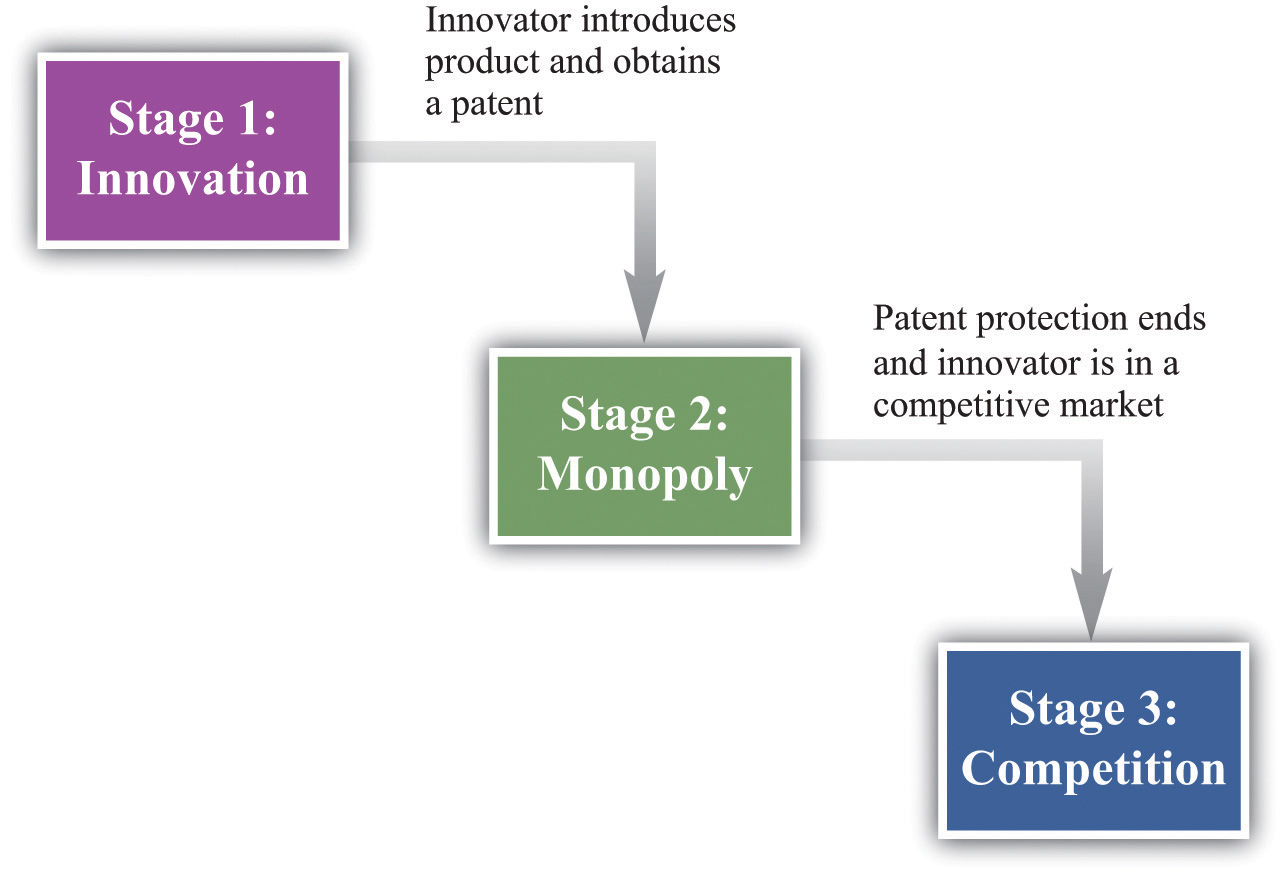
A patent is a form of IP that confers exclusive rights to the holder for creating, employing, vending, and bringing in innovation over a restricted period. In exchange for this protection, the inventor must disclose their invention in detail to the public. This encourages innovation by providing inventors with incentives while also ensuring that new knowledge becomes accessible to others.
Definition of a Patent
A patent can be defined as a set of exclusive rights granted by governments or other authorized bodies to inventors or assignees for their inventions. These rights are typically granted for 20 years from the filing date of the patent application (subject to payment of maintenance fees). The extent of the rights provided by patents differs with different national laws and international regulations.
Types of Patents
- Utility patents: Also known as “patents for invention,” utility patents protect new and useful processes, machines, articles of manufacture, compositions of matter (such as chemical compounds), or any improvements thereof.
- Design patents: Design patents protect original ornamental designs applied to manufactured products without affecting their functionality.
- Plant patents: Plant patents cover distinct and new varieties of plants that have been invented or discovered through human intervention such as breeding or genetic engineering techniques.
The Benefits of Obtaining a Patent
The primary benefits associated with obtaining a patent include:
- Incentivizing Innovation: A patent provides financial rewards by granting exclusivity over an invention’s commercialization. Encouraging inventors to invest in creating new ideas, a patent grants exclusive rights to commercialize the invention and protect intellectual property.
- Protecting Intellectual Property: A patent allows the owner to prevent others from making, using, selling, or importing their invention without permission. This protection can help maintain a competitive advantage in the market.
- Potential for Licensing and Collaboration: Patent owners may choose to license their patents to other companies or enter into partnerships that leverage their patented technology. These arrangements can generate additional revenue streams while also fostering innovation through collaboration.
For R&D teams and innovators to fully benefit from these advantages, they must understand how patents work and how best to protect their inventions throughout the entire innovation process.
A legal right to an invention or procedure, given to the inventor/creator, allowing them exclusive utilization. With this knowledge, it’s time to explore how to sell a patent.
Key Takeaway: Patents provide exclusive rights to inventors and assignees, granting them financial incentives while protecting their intellectual property. Obtaining a patent is essential for innovators looking to benefit from the competitive advantage it provides and maximize potential revenue streams through licensing or collaboration opportunities. Patents are a critical element for any R&D group hoping to attain success.
How to Sell a Patent
Let’s learn how to sell a patent. Monetizing intellectual property and generating revenue can be achieved through the sale of a patent. The process of selling a patent involves identifying potential buyers, preparing the patent for sale, and negotiating the sale price and terms.
To begin, let us dive into each step of how to sell a patent.
Identifying Potential Buyers
The first move when selling a patent is to recognize prospective purchasers who may be keen on obtaining your invention. This could include companies operating within the same industry as your patented technology or those looking to expand their product offerings by incorporating innovations.
You can start by conducting market research on competitors and other relevant players in the field using tools that centralize data sources needed for R&D teams into one platform.
- Attend industry conferences and networking events where you can connect with key decision-makers from target organizations.
- Research similar patents that have been sold recently to understand what types of companies are actively buying patents.
- Contact trade associations related to your industry for leads on interested parties or consult directories such as the Patent & Trademark Resource Centers (PTRCs).
Preparing the Patent for Sale
To make your patent more attractive to potential buyers, you must prepare it properly before initiating any negotiations:
- Demonstrate its value: Clearly articulate how owning this particular patent would benefit prospective purchasers – whether through increased revenue, cost savings, or other competitive advantages.
- Ensure legal protection: Verify that your patent is in good standing with the relevant authorities (e.g., the United States Patent and Trademark Office) and has been properly maintained to ensure enforceability.
- Create a comprehensive presentation: Develop an informative package detailing all aspects of your patent – including its technical specifications, market potential, licensing history (if any), and future opportunities for growth. This will help buyers understand the full scope of what they’re acquiring.
Negotiating the Sale Price and Terms
The final step in selling a patent involves negotiating with interested parties to arrive at mutually agreeable terms. Factors influencing these negotiations include:
- The perceived value of your invention: The more valuable it appears to prospective buyers, the higher price you can command.
- Your willingness to be flexible on payment terms: Offering options such as installment payments or royalty-based agreements may make your patent more attractive to certain buyers who are unable or unwilling to pay upfront fees.
- The level of competition among interested parties: If multiple companies express interest in purchasing your patent, this could drive up its sale price through competitive bidding dynamics.
To maximize success during negotiations, consider enlisting professional assistance from experts like intellectual property attorneys or brokers who have experience navigating complex transactions involving patents. Their expertise can prove invaluable when it comes time to close deals quickly while securing favorable outcomes for both sellers and purchasers alike.
Once you have identified possible purchasers, made the patent ready for sale, and negotiated a reasonable cost as well as conditions, it is critical to make sure that all legal matters are taken into account when selling a patent. To do this, understanding patent rights, transferring ownership legally and effectively, and ensuring compliance with applicable laws must be considered before finalizing any agreement.
Key Takeaway: Selling a patent is no small feat. It requires identifying potential buyers, preparing the patent for sale, and negotiating its price and terms. Utilizing tools to conduct market research or enlist expert help from attorneys or brokers may prove beneficial to close deals quickly while ensuring favorable outcomes on both sides of the table.
Legal Considerations About Patent Rights
As an owner of a patent, it is essential to be aware of the legal requirements associated with how to sell a patent. This article will discuss the legal elements to be aware of when selling a patent, such as transferring ownership correctly and abiding by relevant laws.
Understanding Patent Rights
As the holder of a patent, you are accorded exclusive privileges to stop others from creating, employing, or vending your innovation for a specified period (commonly 20 years) by the USPTO. The USPTO is the agency that grants you exclusive patent rights to your invention for a specified period. To ensure potential buyers understand your exclusive rights as a patent owner, it is essential to communicate them accurately.
Transferring Ownership of the Patent Rights
To sell your patent successfully, you must transfer its ownership through proper legal channels. The USPTO provides guidelines on how this should be done via their Assignment Recordation Branch. You’ll need to prepare an assignment document detailing all relevant information about the sale such as parties involved in transaction details like price/terms etc., which then needs recording at the USPTO office itself after being signed by both seller and buyer.
- Prepare Assignment Document: An assignment document contains all necessary information regarding the sale – names & addresses of sellers and buyers along with other pertinent data.
- Signatures Required: The signatures of both parties’ representatives are required to validate the document’s authenticity.
- Record Assignment with USPTO: Once completed and signed, submit the recordation branch either electronically via their website or mail a hard copy along required fee.
Failure to adhere to the outlined steps could result in an ineffective transfer of rights, potentially causing legal disputes and other problems.
Ensuring Compliance with Applicable Laws and Regulations
In addition to transferring ownership legally, you must also ensure compliance with all applicable laws and regulations when selling your patent. This includes adhering to antitrust laws, export control regulations, tax implications, and any industry-specific requirements that may apply. Consulting a patent attorney or professional familiar with these matters can help you navigate this complex landscape more effectively.
Understanding patent rights is crucial for successful sale transactions. Proper transfer procedures should be followed to avoid potential issues later on. Complying with all relevant legislation ensures a smooth process and overall experience for both parties involved.
Key Takeaway: It’s important to understand the legal implications of how to sell a patent. This includes preparing and signing an assignment document detailing all relevant information regarding the sale, recording with the USPTO office as well as adhering to any applicable laws or regulations that may apply. Ensuring a successful exchange between the parties engaged in the sale can be achieved by following all applicable rules and regulations, as well as filing with USPTO, and preparing an assignment document that contains all necessary details.
Conclusion
Learning how to sell a patent can be an intricate and drawn-out task. It is important to understand the legal considerations associated with it as well as have access to the right resources that can help guide you through this process. Ultimately, by following the necessary steps, R&D teams can confidently make an educated choice when it comes to selling their patent to get its full worth.
Unlock the potential of your R&D and innovation teams with Cypris – a research platform designed to provide rapid time-to-insights. Leverage our expertise in patent selling to maximize your return on investment and get the most out of your intellectual property.

If you’re looking to safeguard your intellectual property and ensure that others don’t profit from your creativity without due remuneration, this guide on how to patent a phrase for you. Patenting a phrase can be an essential step in protecting your intellectual property and ensuring that others cannot profit from your creativity without proper compensation.
In this blog post, we will delve into the intricacies of patenting phrases, including their benefits and requirements. We’ll guide you through the actions necessary to patent a phrase, as well as examine the cost and duration involved. Additionally, we’ll highlight common mistakes to avoid when attempting to secure protection for your unique expression.
Lastly, we’ll provide valuable resources available online or through professional services that can help simplify the process of learning how to patent a phrase.
Table of Contents
- Understanding How to Patent a Phrase
- Definition of Patenting a Phrase
- Benefits of Patenting a Phrase
- Requirements for Patenting a Phrase
- Steps on How to Patent a Phrase
- Steps Involved in the Process of Patenting a Phrase
- Cost and Time
- Common Mistakes to Avoid When Patenting a Phrase
- How to Patent a Phrase: Resources
- Professional Services
- Online Resources
- Government Agencies
- Conclusion
Understanding How to Patent a Phrase
In the world of intellectual property, protecting your unique ideas and creations is essential for maintaining a competitive edge in the market. One way to do this is by patenting a phrase that represents your brand or product.
In this section, we will explore the concept of patenting a phrase, its advantages, and the necessary criteria for doing so.
Definition of Patenting a Phrase
To patent a phrase, you need to register it as a trademark with the United States Patent and Trademark Office (USPTO). It’s important to note that phrases cannot be patented in the traditional sense like inventions, instead, they can be protected under federal trademark rules.
A trademark safeguards expressions, terms, images, or styles utilized in business to recognize and differentiate one firm’s products from those of another.
Benefits of Patenting a Phrase
- Exclusive rights: Registering your phrase as a trademark grants you exclusive rights over its use within specific industries or markets related to your business.
- Deterrent effect: A registered trademark discourages competitors from using similar phrases which could confuse consumers about their origin or affiliation with your brand.
- Easier enforcement: Owning an officially recognized trademark makes it easier for you to take legal action against infringers who attempt to profit off your hard work without permission.
- Adds value: A well-known and respected registered trademark increases consumer trust in products bearing such marks while also enhancing overall brand value.
Requirements for Patenting a Phrase
Before you can patent a phrase, it must meet certain criteria set by the USPTO. These include:
- Distinctiveness: The phrase should be unique and not commonly used in everyday speech or similar to other registered trademarks.
- No confusion with existing marks: Your proposed trademark phrase shouldn’t confuse consumers about the source of goods or services offered under that mark.
- No prohibited elements: The federal trademark rules prohibit the registration of phrases containing offensive language, government symbols, or misleading information about products’ origins.
To successfully patent your good phrase as a trademark, ensure that it meets these requirements before applying the Trademark Electronic Application System (TEAS).
Patenting a phrase is an important step in protecting intellectual property and can provide significant benefits for R&D teams. Obtaining familiarity with the process can make patenting a phrase straightforward and speedy. Next, we will discuss how to go about patenting a phrase.
Key Takeaway: Learning how to patent a phrase is essential for safeguarding intellectual property and can be accomplished by filing it as a trademark with the USPTO. The phrase must be distinctive, not confuse consumers about its origin, and have no prohibited elements to successfully register it.
Steps on How to Patent a Phrase
To protect your intellectual property and prevent others from using your unique phrase, it is essential to understand the process of patenting a phrase. This section will guide you through the steps involved in this process, as well as discuss the cost and time required for obtaining a patent on your phrase.
Steps Involved in the Process of Patenting a Phrase
- Conduct thorough research: Before applying for a patent, ensure that your phrase has not already been trademarked or patented by someone else. You can do this by searching through the United States Patent and Trademark Office (USPTO) database.
- Determine if your phrase meets federal trademark rules: To be eligible for protection under federal law, phrases must be distinctive and used in commerce. Generic or descriptive phrases are generally not eligible for protection.
- Create an account with USPTO’s Trademark Electronic Application System (TEAS): The TEAS platform allows users to submit their trademark applications online. Visit the official website at uspto.gov/teas, create an account, and follow the instructions provided.
- Select appropriate classification(s): When filing your application with TEAS, choose one or more classifications that accurately describe how you intend to use your protected phrase in everyday speech.
- Filing fee payment: Applying requires payment of fees depending on which form you select during submission: TEAS Plus ($250 per class), TEAS Standard ($350 per class), or TEAS RF ($275 per class).
- Monitor application status: After submitting your trademark application, monitor its progress through the USPTO’s online database called Trademark Status and Document Retrieval (TSDR).

Cost and Time
The cost to patent a phrase varies depending on which form you choose when filing your application with TEAS. As mentioned earlier, fees range from $250 to $350 per classification. Additionally, hiring an attorney for professional assistance can increase costs.
It may take between 6 to 12 months for the USPTO to assess and carry out a trademark application. However, this period can be altered depending on variables such as examiner workload or any legal issues that occur during the examination.
Common Mistakes to Avoid When Patenting a Phrase
- Failing to conduct thorough research before applying for a patent: This could result in wasted time and resources if someone else has already patented or trademarked your desired phrase.
- Selecting incorrect classifications: Choosing the wrong classifications can lead to delays in processing your application or even denial of registration by the USPTO.
- Neglecting maintenance requirements: Once granted federal trademark registration, you must maintain it according to specific deadlines set forth by the USPTO; failure to do so may result in the cancellation of protection rights.
By taking the steps laid out in this guide, one can effectively secure a patent for a phrase and safeguard their intellectual property. Additionally, understanding the different types of patents available will help ensure that you are adequately protecting your IP rights.
Key Takeaway: Patenting a phrase requires thorough research to ensure it is eligible for protection, applying with the USPTO’s TEAS system, and payment of fees. Additionally, one must be mindful of common mistakes such as selecting incorrect classifications or failing to meet maintenance requirements to avoid wasted time and resources.
How to Patent a Phrase: Resources
To secure a patent for your phrase, it is essential to access reliable sources that can provide guidance and ensure the protection of your intellectual property. There are various professional services, online resources, and government agencies available for assistance.
Professional Services
- Intellectual Property Attorneys: Hiring an experienced IP attorney can be invaluable in navigating the complex world of patents and trademarks. An IP lawyer can be of great aid when dealing with the intricate process of patenting a phrase, furnishing legal advice on if your expression abides by federal trademark regulations, filing applications at the USPTO, and representing you in any conflicts that could happen while registering. The American Bar Association offers a helpful resource page dedicated specifically to intellectual property law.
- Trademark Agents: A registered trademark agent specializes in preparing and submitting trademark applications on behalf of clients. While they cannot offer legal advice like an attorney, they possess extensive knowledge about federal trademark registration processes within their jurisdiction. To find qualified agents near you, consult directories such as this one from the USPTO’s Professional Directory.
Online Resources
- The USPTO Website: As mentioned earlier, applying for protection requires interacting directly with the USPTO via their website using their Trademark Electronic Application System (TEAS). The USPTO website is a treasure trove of information, providing detailed guides on trademark application procedures, fees, and resources to help you understand the process better.
- Cypris: As an R&D manager or engineer involved in product development and innovation, having access to comprehensive research platforms like Cypris can be invaluable. With its focus on rapid time-to-insights for R&D teams, Cypris centralizes data sources into one platform designed specifically for your needs. Visit the Cypris website to learn more about how this tool can assist with patenting phrases and other aspects of intellectual property management.
- Educational Resources: Numerous websites are offering educational materials related to patents and trademarks. WIPO Academy (academy.wipo.int) is a valuable resource from the World Intellectual Property Organization, offering free educational materials related to patents and trademarks. Here you’ll find courses covering various topics such as IP rights protection strategies and international registration systems.
Government Agencies
In addition to professional services and online resources mentioned above, government agencies also play an essential role in assisting individuals seeking protection for their intellectual property. Some key agencies include:
- The United States Patent & Trademark Office (USPTO): This federal agency oversees all matters related to patents and trademarks within the United States. They offer assistance through their extensive library of publications available on their website (uspto.gov), as well as their Trademark Assistance Center (TAC) which guides phone or email.
- Small Business Administration (SBA): The SBA offers resources specifically tailored for small businesses looking to protect their intellectual property. Their website (sba.gov) features a dedicated section on patents and trademarks, providing valuable information on the application process, fees, and other essential details.
- National Institute of Standards & Technology (NIST): The NIST is an agency within the U.S. Department of Commerce that promotes innovation by advancing measurement science, standards, and technology. They offer various programs aimed at helping inventors with patenting processes such as the Hollings Manufacturing Extension Partnership (nist.gov/mep). This program connects manufacturers with public-private partnerships designed to support technological advancement in manufacturing industries.
Key Takeaway: For those looking to patent a phrase, there are several reliable resources available for assistance. This includes professional services such as IP attorneys and trademark agents, online educational materials from organizations like WIPO Academy, and government agencies like the USPTO and SBA. These resources can get you well on the path to safeguarding your intellectual property in a jiffy.
Conclusion
Patenting a phrase can be an effective way to protect your intellectual property and ensure that you are the sole owner of any profits associated with it. With the right resources and guidance, patenting a phrase can be simplified to make sure innovators can confidently create their unique phrases without fear of infringement or theft.
By understanding how to patent a phrase, innovators can confidently create their unique phrases without fear of infringement or theft.
Discover the power of Cypris and get rapid insights into how to patent a phrase with our comprehensive research platform. With its streamlined data sources, you can quickly find answers to your innovation questions.

Learning how to cite a patent is essential for R&D managers, product development engineers, and other research and innovation professionals to demonstrate respect for intellectual property rights while ensuring clarity when referencing prior art or similar inventions. Properly citing patents not only demonstrates respect for intellectual property but also helps maintain clarity when referencing prior art or similar inventions in your work.
In this blog post, we will delve into the definition of a patent, its types, and benefits. We will then provide detailed guidance on how to cite a patent correctly by discussing formatting guidelines and offering examples of properly cited patents. Furthermore, we will introduce resources that can assist you with citation practices.
Table of Contents
- How to Cite a Patent in APA Style
- Inventor name(s)
- Year of Issuance
- Title of the Patent
- URL (if available)
- Accessing Patent Information Online
- U.S.Patent and Trademark Office website
- International Patent Office Search
- Shortening URLs
- Analyzing Backward and Forward Citations
- Definition of Backward Citation
- Definition Forward Citation
- Potential Time-Lag Effects when Analyzing Patent Citations
- Conclusion
How to Cite a Patent in APA Style
When working on research projects or writing articles, it is crucial to properly cite patents to give credit to the inventors and protect intellectual property rights. The American Psychological Association (APA) provides guidelines for citing patents, ensuring that all necessary information is included.
Inventor name(s)
The first element of a patent citation in APA style is the inventor’s name. List each inventor’s last name followed by their initials without periods. If there are multiple inventors, separate them with commas and use an ampersand (&) before the final author’s name.
Year of Issuance
The year when the patent was issued should be placed in parentheses after the inventor’s name. This helps readers identify how recent or dated a particular invention may be.
Title of the Patent
The title should be written in sentence case, meaning only capitalize proper nouns and words at the beginning of sentences within the title itself. Italicize the entire text and provide a concise description of what the invention entails without going into too much detail.
Patent Number
The patent number should be part of the citation. You can find the patent number with the patent office or when doing research. Enclose the patent number in parentheses.
URL (if available)
If you have access to a URL where readers can find more information about cited patents, include this link as part of your citation using the appropriate format provided by APA guidelines. Be sure to remove any hyperlinks from actual reference list entries so they do not interfere with overall formatting requirements set forth by American Psychological Association Manual 7th Edition rules governing academic citation online sources like websites databases etcetera).
An example of a complete APA-style patent citation would look like this:

By adhering to these regulations, one can guarantee that their patent citations are exact and compliant with APA style, thus making it easier for other scholars to access the referenced patents and comprehend their significance in your work.
Citing patents in APA style is an important skill for any R&D or innovation team to have, as it helps provide proper credit and recognition. Additionally, with the right tools, accessing patent information online can be a straightforward process.
Key Takeaway: We look at the APA style guidelines for how to cite a patent, which includes listing inventor names followed by a year of issuance and title in sentence case. Additionally, a URL may be included to provide more information about the patent if available. Following these rules will help ensure accurate citations that are easy for other researchers to locate and understand their relevance.
Accessing Patent Information Online
When conducting research or developing new products, it is essential to access and analyze relevant patent information. Intellectual property organizations maintain comprehensive records of their patents online, which can be accessed through various websites and databases. In this section, we will discuss how to find the necessary patent information using different resources and tips for shortening URLs when citing patents in your work.
U.S. Patent and Trademark Office website
The U.S. Patent and Trademark Office (USPTO) website provides a wealth of information on U.S. patents as well as trademark registrations. To search for specific patents or applications, you can use the PatFT (Patents Full-Text) database, which contains full-text data since 1976 along with images of each page from all issued U.S. patents dating back to 1790.
International Patent Office Search
In addition to searching national databases like USPTO’s PatFT, researchers may also need to explore international sources for similar patents filed in other countries. The Espacenet database, managed by the European Patent Office (EPO), offers free access to more than 100 million documents from over 90 countries worldwide including Europe, Asia-Pacific region nations such as Japan China South Korea India among others.
Another useful resource is the World Intellectual Property Organization’s (WIPO), PATENTSCOPE database, which covers patent applications filed under the Patent Cooperation Treaty (PCT) and various national collections.
Shortening URLs
When citing patents in your research paper or article, it is important to include the URL of the patent document if available. However, some patent databases provide long and complex URLs that may not be suitable for inclusion in a citation.
In situations where lengthy URLs are not suitable for citation, one can employ a URL shortening service such as Bitly.com to generate shorter links that are more manageable and simpler to integrate into the paper. Keep in mind that shortened URLs should still direct readers to the correct patent information without any issues.
Accessing relevant patent information online requires familiarity with different databases maintained by intellectual property organizations worldwide as well as effective strategies for managing lengthy URLs when citing patents. By leveraging these resources effectively researchers engineers product development teams alike stand a better chance of identifying key innovations within their respective fields while also ensuring proper attribution credit given where due.
Accessing patent information online is an important step in understanding the scope of existing patents and developing a comprehensive research strategy. Analyzing backward and forward citations can provide additional insight into the context surrounding each patent application, enabling researchers to make more informed decisions.
Key Takeaway: We discussed different resources available to access patent information online, as well as tips for shortening URLs when citing patents in your work. It’s a must-read for R&D and innovation teams looking to gain insights quickly and efficiently, ensuring proper attribution credit is given where due.
Analyzing Backward and Forward Citations
When conducting research on patents and learning how to cite a patent, it is essential to examine both backward citations and forward citations. These two types of patent citations provide valuable insights into the development of a particular technology or innovation.
In this section, we will discuss the definitions of backward and forward citations, their significance in understanding trends within an industry sector, as well as potential time-lag effects that may impact your analysis.
Definition of Backward Citation
A backward citation, also known as a prior art reference, refers to documents published earlier than the submission date of a new patent application. Previous intellectual property disclosed to the public, such as patents and patent applications, and articles in journals or conferences, may be cited by a patent applicant. By examining these earlier works cited by the patent applicant, researchers can gain insight into how inventions build upon existing knowledge.
Definition Forward Citation
In contrast to backward citations, forward citations are those that come after the filing period for a given patent application. They represent subsequent innovations that have built upon or referenced the original invention in question. Analyzing forward citations allows you to track developments following an initial innovation and understand its influence on future technological advancements.
Potential Time-Lag Effects when Analyzing Patent Citations
- The time between publication: When analyzing both backward and forward patent citations, it’s important to consider potential time-lag effects. The lag between publication dates could affect your overall understanding of trends within specific industries over certain periods.
- Differences in examination times: Another factor to consider is the difference in examination times between various patent offices. Some patents may be granted more quickly than others, which could impact your analysis of citation trends.
- Industry-specific factors: Certain industries may experience faster or slower rates of innovation and patenting activity. Be sure to take these industry-specific factors into account when analyzing patent citations.
A thorough understanding of both backward and forward citations can provide valuable insights into the development and influence of specific inventions within an industry sector. By considering potential time-lag effects and other relevant factors, you can ensure that your analysis accurately reflects the true nature of innovation trends.
Key Takeaway: We looked at an in-depth look at backward and forward citations, highlighting the importance of understanding both for gaining insights into innovation trends. It also stresses the need to consider potential time-lag effects when researching patents, as well as industry-specific factors that could impact analysis results. In short, a thorough grasp of these two types of patent citations can help researchers gain valuable insight into technological developments within any given sector.
Conclusion
Learning how to cite a patent is an important part of the research and innovation process. With the right tools, teams can quickly access all relevant data sources to streamline their workflow and ensure they are up-to-date on any developments related to patents.
R&D supervisors and technicians can now spend their time concentrating on creating new goods that will benefit the public in general, due to these tools bringing together these resources into one platform.
Discover the power of Cypris and simplify how you cite patents with our research platform, designed to provide rapid time to insights. Make sure your team is up-to-date on patent citations quickly and easily!