
A faster, more accurate way to explore innovation data—now available in Cypris.
For innovation teams, speed and accuracy aren’t optional—they’re critical. You need to quickly find all relevant documents, slice and dice datasets however you want, and trust that the results are complete and representative. With this in mind, we’ve upgraded how semantic search works inside Cypris.
Today, we’re launching an upgraded search infrastructure that gives users access to full, exact result sets—unlocking more powerful analysis, faster iteration, and deterministic filtering and charting.
Unlike traditional semantic or vector search engines—which make it difficult to count, filter, or chart large sets of matched documents—our new approach prioritizes transparency and performance while preserving semantic relevance.
Why we moved away from vector search
Our original implementation relied on semantic and vector search to capture the “meaning” behind user queries. But as our platform evolved, it became clear that these systems weren’t well-suited for our core use cases.
Users needed:
- Deterministic filtering (e.g., "how many results match this atom?")
- Transparent, complete result sets to power charts and dashboards
- Fast, repeatable queries that don’t change subtly over time
Modern vector search systems don’t easily support this level of transparency. They return approximate matches and abstract similarity scores, often making it hard to understand why a document was returned—or whether it’s the full picture.
So we made a decision: move away from vector search and lean into what traditional search engines do best.
A return to boolean and lexical search—with a twist
We rebuilt our search infrastructure on top of Elasticsearch’s powerful boolean and lexical search capabilities. This shift brings major advantages:
- Faster query speeds that dramatically improve iteration time
- Deterministic filtering and counts, so every chart is grounded in the full dataset
- Predictable, explainable results that users can trust
But we didn’t stop there.
To preserve the benefits of semantic understanding, we’ve rethought where that intelligence should live—not at query time, but at data ingestion.
Capturing semantic meaning at ingest time
Instead of computing document-query similarity during search, we enrich documents at the time of ingestion. Here’s how:
- Synonym expansion: We find related words and concepts not explicitly mentioned in the document and add them as fields, enabling semantic-style recall via lexical search.
- Stemming: Both queries and documents are reduced to their root forms, allowing consistent matches (e.g., “running” and “run”).
The result? You get the same functionality—semantically relevant results—without the opacity or latency tradeoffs of vector search.
What’s next: Reranking for even better relevance
We’re not done. Coming soon to Cypris is a reranking layer that boosts the most relevant results to the top of the list using lightweight vector techniques.
Here’s how it works:
- A standard lexical search retrieves the full result set.
- We take the top N results and rerank them using vector similarity, powered by Elasticsearch’s new hybrid scoring capabilities.
- You get faster queries with even better relevance—without compromising on counts or transparency.
This layered approach gives us the best of both worlds: precise filtering and fast queries, plus smarter ordering of results where it matters most.
We’re excited to bring this upgrade to our users, and we’re already seeing teams iterate faster and uncover insights more confidently. This is a foundational shift—and just the beginning of what’s to come.
Want a walkthrough of what’s changed? Reach out to our team.

Introducing our upgraded semantic search



A faster, more accurate way to explore innovation data—now available in Cypris.
For innovation teams, speed and accuracy aren’t optional—they’re critical. You need to quickly find all relevant documents, slice and dice datasets however you want, and trust that the results are complete and representative. With this in mind, we’ve upgraded how semantic search works inside Cypris.
Today, we’re launching an upgraded search infrastructure that gives users access to full, exact result sets—unlocking more powerful analysis, faster iteration, and deterministic filtering and charting.
Unlike traditional semantic or vector search engines—which make it difficult to count, filter, or chart large sets of matched documents—our new approach prioritizes transparency and performance while preserving semantic relevance.
Why we moved away from vector search
Our original implementation relied on semantic and vector search to capture the “meaning” behind user queries. But as our platform evolved, it became clear that these systems weren’t well-suited for our core use cases.
Users needed:
- Deterministic filtering (e.g., "how many results match this atom?")
- Transparent, complete result sets to power charts and dashboards
- Fast, repeatable queries that don’t change subtly over time
Modern vector search systems don’t easily support this level of transparency. They return approximate matches and abstract similarity scores, often making it hard to understand why a document was returned—or whether it’s the full picture.
So we made a decision: move away from vector search and lean into what traditional search engines do best.
A return to boolean and lexical search—with a twist
We rebuilt our search infrastructure on top of Elasticsearch’s powerful boolean and lexical search capabilities. This shift brings major advantages:
- Faster query speeds that dramatically improve iteration time
- Deterministic filtering and counts, so every chart is grounded in the full dataset
- Predictable, explainable results that users can trust
But we didn’t stop there.
To preserve the benefits of semantic understanding, we’ve rethought where that intelligence should live—not at query time, but at data ingestion.
Capturing semantic meaning at ingest time
Instead of computing document-query similarity during search, we enrich documents at the time of ingestion. Here’s how:
- Synonym expansion: We find related words and concepts not explicitly mentioned in the document and add them as fields, enabling semantic-style recall via lexical search.
- Stemming: Both queries and documents are reduced to their root forms, allowing consistent matches (e.g., “running” and “run”).
The result? You get the same functionality—semantically relevant results—without the opacity or latency tradeoffs of vector search.
What’s next: Reranking for even better relevance
We’re not done. Coming soon to Cypris is a reranking layer that boosts the most relevant results to the top of the list using lightweight vector techniques.
Here’s how it works:
- A standard lexical search retrieves the full result set.
- We take the top N results and rerank them using vector similarity, powered by Elasticsearch’s new hybrid scoring capabilities.
- You get faster queries with even better relevance—without compromising on counts or transparency.
This layered approach gives us the best of both worlds: precise filtering and fast queries, plus smarter ordering of results where it matters most.
We’re excited to bring this upgrade to our users, and we’re already seeing teams iterate faster and uncover insights more confidently. This is a foundational shift—and just the beginning of what’s to come.
Want a walkthrough of what’s changed? Reach out to our team.
Keep Reading

If you need help understanding how to get a design patent, we will discuss it in this article. A design patent protects unique ornamental aspects of your product, and obtaining one can be crucial in maintaining a competitive edge in today’s fast-paced market.
In this blog post, we will delve into conducting thorough patent searches by utilizing resources like the United States Patent and Trademark Office (USPTO) database and analyzing competing designs within your industry. We’ll also guide you through preparing an effective design patent application with tips on crafting abstracts or preambles, writing detailed descriptions of attributes, and creating clear illustrations using drawings or photographs.
Lastly, we’ll discuss navigating fees associated with different classifications as well as submission processes such as submitting necessary documents. By utilizing these instructions for how to get a design patent, you’ll be able to safeguard your inventive creations with intellectual property rights.
Table of Contents
- Conducting a Thorough Patent Search
- Utilizing the USPTO Database
- Analyzing Competing Designs in Your Industry
- Preparing Your Design Patent Applications
- Crafting an Effective Abstract or Preamble
- Writing Detailed Descriptions of Attributes
- Creating Clear Illustrations
- Navigating Fees and Submission Process
- Different Classifications and Their Respective Fees
- Submitting Necessary Documents
- Conclusion: How to Get a Design Patent
Conducting a Thorough Patent Search
Part of how to get a design patent is conducting a thorough patent search. It is essential to use the USPTO Database for Existing Patents to assess whether your invention or any comparable ones already exist. This step ensures that your invention improves upon previous designs and meets subject-matter requirements for novelty and non-obviousness.
Utilizing the USPTO Database
The USPTO offers a broad array of issued patents and published inspection applications. To perform an effective patent search, you should utilize tools such as the Patent Full-Text and Image Database (PatFT), which allows users to access full-text U.S. patents since 1976, or the Published Applications Full-Text Database (AppFT), where you can find published applications since March 2001.
- Prior Art: During your search, pay close attention to the prior art. Existing inventions that may be related to yours in some way. The prior art includes not only patented designs but also publications like articles or books discussing similar concepts.
- Classification System: The USPTO uses a classification system based on technical fields called Cooperative Patent Classification (CPC). Familiarize yourself with this system so you can efficiently navigate through relevant categories while searching for potential competitors’ intellectual property protection strategies.

Analyzing Competing Designs in Your Industry
In addition to searching the USPTO database, it’s essential to analyze competing designs in your industry. This will help you identify any potential infringement issues with design patents and ensure that your patented design is unique.
- Market Research: Conduct market research to determine which products are popular within your target audience and evaluate the visual ornamental characteristics embodied in these items.
- Competitor Analysis: Investigate competitors’ websites, product catalogs, or trade show exhibits for insight into their design strategies. Look for patterns or trends that may indicate a particular approach to how design patent protects specific features of their products.
Performing a comprehensive patent search is critical to verify that your design does not breach any pre-existing patents. It is also important to analyze competing designs in the industry for any similarities or potential issues with infringement. To move forward, it’s necessary to prepare and submit effective applications for design patents.
Key Takeaway: It is essential to conduct a comprehensive patent search on the USPTO website and analyze competing designs in your industry to ensure that your design meets requirements for novelty and non-obviousness, as well as avoid any potential infringement issues. Performing a patent search and studying related designs can provide you with an advantage over other businesses in the same field.
Preparing Your Design Patent Applications
In learning how to get a design patent, we need to learn how to apply for one. Successful applications for design patents include several essential elements to ensure that your invention is adequately protected.
The USPTO requires certain elements to grant a patent for an invention, which make it easier to comprehend the uniqueness of the design.
Crafting an Effective Abstract or Preamble
The abstract or preamble provides a brief overview of your design’s purpose and its distinguishing features. It should be concise yet informative, highlighting what sets your design apart from others in the market. An effective abstract can significantly impact how quickly and smoothly your design patent application progresses through the examination process.
Writing Detailed Descriptions of Attributes
In addition to an abstract, you’ll need to provide a thorough description of all attributes associated with your design. This section should detail each visual ornamental characteristic embodied in the product, including any patterns, textures, colors, shapes, or configurations that contribute to its overall appearance. Be sure not only to describe these features but also to explain their significance within the context of your invention.
- Novelty: Explain how each attribute differs from existing designs in the prior art.
- Non-obviousness: Describe why someone skilled in this field would not have easily come up with this combination of attributes before seeing yours.
- Suitability for Intellectual Property Protection: Demonstrate how these characteristics are integral parts of what makes your product innovative and worthy of intellectual property protection under US law.
Creating Clear Illustrations
Your design patent application must include at least seven drawings or photographs that show all sides of the object’s design. These illustrations should be clear, detailed, and accurately represent your invention in its entirety. It is essential to label each figure with a description detailing what it depicts.
Consider hiring an experienced design patent attorney or draftsman who specializes in creating these types of images for patent applications. They can help ensure that your drawings meet the USPTO’s strict requirements and effectively convey your design’s unique features.
Preparing a well-crafted design patent application involves writing an effective abstract, providing detailed descriptions of attributes, and including clear illustrations through drawings or photographs. By following these guidelines and working closely with experienced professionals when necessary, you increase your chances of securing intellectual property protection for your innovative designs.
To successfully prepare your design patent application, it is important to craft an effective abstract or preamble, write detailed descriptions of attributes and create clear illustrations through drawings or photographs. With this groundwork laid out, you are now ready to navigate the fees and submission process for obtaining a design patent.
Key Takeaway: There are key components necessary for a successful design patent application, including crafting an effective abstract or preamble, providing detailed descriptions of attributes, and creating clear illustrations through drawings or photographs. It is important to work with experienced professionals to ensure that all aspects are up to USPTO standards to secure intellectual property protection for your invention.
Navigating Fees and Submission Process
Learning how to get a design patent involves knowing several fees and steps to ensure your application is successful. It’s essential to understand the different classifications, their respective fees, and how to submit necessary documents.
Different Classifications and Their Respective Fees
The United States Patent and Trademark Office (USPTO) categorizes applicants into three classes: large businesses, small businesses, or individuals. Each classification has its own set of associated fees:
- Large Businesses: $2850
- Small Businesses: $2150
- Individuals:$1900
Fees cover various costs such as attorney fees, draftsman charges, and USPTO filings like examination fee searches that are necessary during the evaluation stages.
Submitting Necessary Documents
To apply for a design patent, you’ll need to submit an oath or declaration from the inventor(s), an Application Data Sheet containing information about them, and other relevant documents. These include an oath or declaration from the inventor(s) stating they believe themselves to be the original inventors of the claimed ornamental design along with an Application Data Sheet containing relevant information about them.
- Oath/Declaration: This document serves as a sworn statement by each inventor affirming that they have reviewed their invention’s content within submitted application materials and acknowledge a duty to disclose known prior art affecting eligibility claims made therein. You can find a sample Oath/Declaration form on the USPTO website.
- Application Data Sheet (ADS): The ADS is a standardized form used to provide essential information about inventors, such as their names, addresses, and citizenship status. It also includes details like correspondence address and application number if applicable. You can download an Application Data Sheet template from the USPTO’s site.
Once your design patent application has been submitted with all necessary documents in place, the USPTO will assign it a filing date and conduct searches to ensure its eligibility for protection. If granted, your patented design will be published on the USPTO website, providing you with valuable intellectual property protection against potential infringement cases.
Key Takeaway: It is important to learn about the fees and submission process involved in obtaining a design patent, including categorizing applicants into three classes with respective fees. It’s critical for those seeking protection for their designs to understand these steps so they can get their ducks in a row before filing.
Conclusion: How to Get a Design Patent
Learning how to get a design patent is an important step for any R&D or innovation team. Securing the intellectual property of one’s organization can bring assurance, and obtaining a design patent is an essential step for any R&D or creative squad.
By following these steps to get a design patent, avoiding common mistakes in the application process, and taking action after receiving it, teams will be able to take full advantage of their hard-earned protection.
Gain the insights you need quickly and easily with Cypris. Let us help you navigate the process of obtaining a design patent today.

Organizations need to learn how to accelerate innovation to thrive, and doing so expediently can be the key factor between success and failure. Doing this effectively requires leveraging data to gain insights quickly, automating processes for faster results, streamlining operations for increased efficiency, utilizing technology to enhance collaboration among teams, and developing a culture of continuous improvement.
In this article, we learn how to accelerate innovation to gain an edge over your competitors. We look at the innovation process and see how you and your team can make it quicker.
Table of Contents
The Benefits of Leveraging Data
How To Collect And Analyze Data
Automation for Faster Innovation
Streamline Processes to Increase Efficiency
Utilize Technology to Enhance Collaboration
How to Accelerate Innovation
Data is the key to learning how to accelerate innovation. By utilizing data to inform R&D and innovation, teams can rapidly progress toward the development of novel offerings, while also being able to make informed decisions that are more likely to yield positive results. Teams can utilize data-driven understanding to make judgments that result in more effective results.
The Benefits of Leveraging Data
Utilizing data gives R&D and innovation teams a competitive edge by providing them with deeper insights into their product development process. It helps identify areas for improvement and enables teams to focus on those areas for maximum efficiency. By monitoring industry trends with data, teams can stay abreast of product development strategies and remain competitive.
How To Collect And Analyze Data
There are several ways in which R&D and innovation teams can collect data from various sources such as surveys, customer feedback, and market research reports, depending on what kind of information they need. Once the data is acquired, it must be studied using suitable techniques such as statistical analysis programs or AI algorithms to extract valuable information.
Developing a Strategy
After collecting and analyzing the relevant data points, R&D and innovation teams should develop a strategy for utilizing this information effectively to achieve desired results faster. This could involve identifying patterns in customer behavior or creating predictive models based on historical trends to anticipate future demand for certain products or services being developed by the team’s organization.
Teams should contemplate merging these discoveries into their judgments so that they can consistently have the most current data during product creation sequences.
Data utilization to catalyze invention can be a potent instrument for R&D and innovation squads, offering priceless information that propels informed choices. Automation offers another way to speed up the process of innovation by streamlining processes and freeing up time for more creative pursuits.
Key Takeaway: Data is the backbone of innovation and can provide R&D and innovation teams with a competitive edge. By collecting data from various sources, analyzing it using appropriate tools, and integrating findings into decision-making processes, these teams can stay ahead of the curve when it comes to product development strategies. This allows them to accelerate their journey toward successful outcomes.
Automation for Faster Innovation
Automation can be a potent asset for R&D and innovation teams in the process of learning how to accelerate innovation.
Automation gives groups the capability to rapidly examine extensive amounts of data, detect patterns, and make decisions in a more rapid fashion than ever before. It can help reduce costs associated with manual processes and free up resources for more creative problem-solving, thus accelerating innovation.
The benefits of automation in R&D and innovation teams are numerous. Automation enables teams to find creative solutions at a faster rate, leading to disruptive innovations that drive business growth. It also helps streamline product development by automating tedious tasks like testing or analysis, allowing engineers to focus on emerging technologies or complex problems instead.
Automation can speed up the process of getting a product to market readiness by automating certain elements of its development, such as verifying design or conducting quality assurance tests. Finally, automation can be used in combination with artificial intelligence (AI) tools to further increase efficiency and effectiveness when tackling complex challenges.
To ensure a successful implementation of automation into your team’s workflow, you can follow these steps:
- Devise an action plan detailing which tasks will be automated.
- Set precise objectives for everyone to follow.
- Choose the most suitable technology depending on your specific needs.
- Construct an effective training program so that all members understand how the system works.
- Keep track of progress regularly throughout the project lifecycle to troubleshoot any possible issues swiftly.
Automation for a faster innovation process is a powerful tool that can help R&D and innovation teams achieve greater efficiency in their processes.
Key Takeaway: In learning how to accelerate innovation, teams should automate R&D and innovation tasks, set clear objectives for everyone involved, choose the best technology for our needs, provide proper training, and keep a close eye on progress to ensure smooth sailing. By automating tedious processes, teams can fast-track innovation while cutting costs – setting themselves up for success.
Streamline Processes to Increase Efficiency
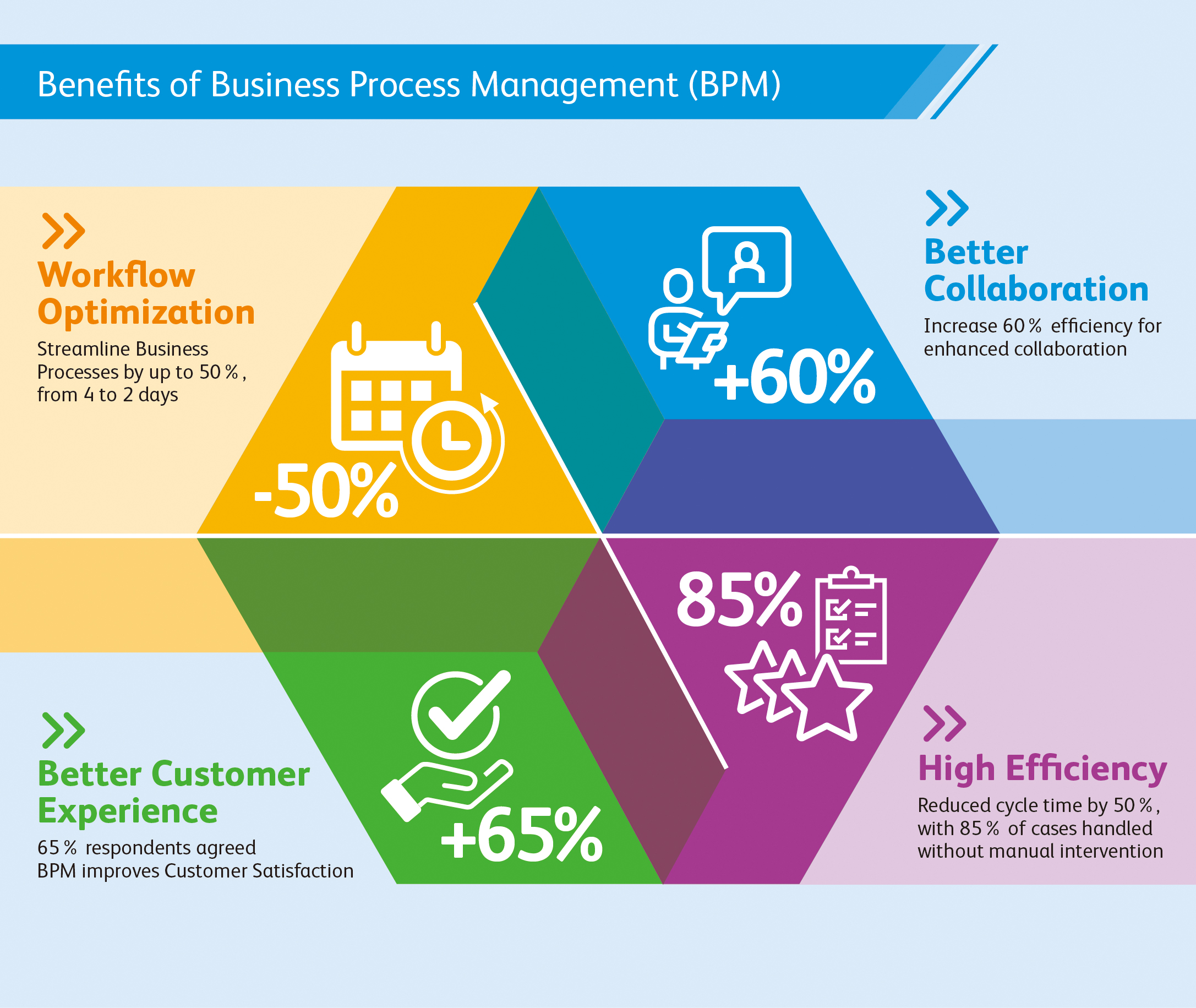
In today’s competitive environment, streamlining processes is essential in learning how to accelerate innovation. Processes that are too complex or inefficient can lead to lost time, increased costs, and missed opportunities. It’s important to identify areas of improvement in your processes so you can make them more efficient and effective.
To start streamlining processes, first, identify which areas need improvement. Analyze the existing system from start to finish, scrutinizing where enhancements or streamlining could be achieved. Consider what tasks take up the most time or resources, which steps could be eliminated without compromising quality or performance, and how automation might help simplify certain aspects of the innovation process.
(Source)
Once you’ve pinpointed the areas of your processes that need improvement, it’s time to kick them into gear for optimal efficiency. Break down each step into bite-sized pieces so they can be better managed and tracked.
Automation can also help streamline mundane tasks such as data entry or file transfers between departments, freeing up employees’ bandwidth to focus on higher-value activities instead of manually repeating tedious workflows. Furthermore, leveraging technology solutions like project management software can facilitate collaboration across different departments while keeping documents in one central location rather than scattered around various folders on multiple computers throughout the organization.
By streamlining processes, R&D and innovation teams can increase efficiency and improve their overall performance.
Key Takeaway: To maximize efficiency and stay competitive, companies should carefully assess their processes for areas that need improvement. By breaking down tasks into smaller steps, automating mundane workflows, and utilizing technology solutions such as project management software, businesses can quickly streamline their process, accelerating innovation efforts.
Utilize Technology to Enhance Collaboration
Technology is a potent instrument for research and development squads to work together in a faster way. This is critical in learning how to accelerate innovation.
There are numerous technologies available that can be used to enhance collaboration within these teams. Examples include project management tools, communication platforms, virtual meeting solutions, and data analysis software.
Project Management Tools
Project management tools allow teams to organize their tasks efficiently. These tools often come with features such as task tracking, time tracking, resource allocation, budgeting capabilities, and more. With project management tools, teams can effectively manage tasks and adhere to deadlines and budget restrictions.
Communication Platforms
Communication platforms help keep team members connected regardless of where they are located geographically or how busy their schedules may be. Platforms like Slack or Microsoft Teams facilitate speedy file-sharing and enable instantaneous conversations between colleagues who can’t be in the same room. Virtual conferencing technology offers a substitute for those who are scattered geographically or occupied with other tasks, allowing them to connect in person without having to go long distances or take up too much time from their duties.
Data Analysis Software
Data analysis software allows teams to collect data from multiple sources into one platform so that they can better understand trends over time as well as identify opportunities for improvement faster than ever before possible through manual methods alone.
By leveraging the right technology, research and innovation teams can increase collaboration and optimize their workflows. Creating an atmosphere that promotes learning and progression is essential to maximizing team effectiveness.
Key Takeaway: Technology can be a potent aid for R&D and invention squads to interact more promptly, effectively, and resourcefully. By utilizing the various technological tools available such as project management software, communication platforms, virtual meetings solutions, and data analysis systems, collaboration is improved while also streamlining processes through automation and providing real-time data for faster decision-making.
Conclusion
Learning how to accelerate innovation is essential for maintaining an edge over rivals and improving profitability. By learning how to leverage data, automate processes, streamline operations, utilize technology for collaboration, and develop a culture of continuous improvement, accelerating innovation in your organization becomes easy.
By taking advantage of these tools and resources, organizations can take their innovation capabilities to new heights while saving time and money in the process.
Discover how Cypris can help accelerate innovation by centralizing data sources and providing rapid time to insights. Unlock the potential of your R&D team with a powerful research platform designed specifically for them.

How long does a design patent last? As an R&D manager, product developer, or innovation leader, understanding when a design patent expires is crucial for protecting your intellectual property. This post examines the intricacies of design patents and their term length, providing you with the info needed to protect your intellectual property.
We will begin by providing an overview of design patents and discussing their benefits and requirements. Next, we will specifically address the question “How long does a design patent last?” while also exploring factors that can affect its duration and renewal process.
Furthermore, we will discuss infringement issues related to design patents and outline strategies for avoiding such complications. By the end of this post, you should have a comprehensive understanding of not only how long a design patent lasts but also how to protect your patented designs effectively.
Table of Contents
- The Basics of Design Patents
- Design Patents vs Utility Patents
- Examples of Inventions Eligible for Design Patent Protection
- How Long Does a Design Patent Last?
- Filing Your Design Patent Application
- Professional Drawing Costs and USPTO Fees
- Protecting Your Designs in Today’s Competitive Market
- Benefits of Design Patents
- Advice from Reputable Patent Attorneys
- Conclusion
The Basics of Design Patents
Before we answer “How long does a design patent last,” we should learn the basics of design patents. A design patent is a form of intellectual property protection that safeguards the unique appearance or “ornamental” aspects of an invention, as opposed to its functional features.
Design patents, granted by the USPTO, can be used to protect the distinctive looks of products like lamps, app icons on mobile phones, or any other novel and attractive design.
Design Patents vs Utility Patents
- Design patents: Protect the visual elements or aesthetics of a product. They do not cover how it functions or works. For example, if you create a new shape for a water bottle that has never been seen before but does not affect its functionality in any way, this would fall under design patent protection.
- Utility patents: Cover inventions with novel functionalities or improvements over existing technology. These types of patents protect how an invention works rather than just its appearance. Examples include mechanical devices like engines or electronic gadgets such as smartphones.
In some cases, both design and utility patents may be filed for the same invention if it has both unique aesthetic qualities along with innovative functional aspects.
Examples of Inventions Eligible for Design Patent Protection
- An ergonomic computer mouse with an entirely new shape designed specifically to reduce wrist strain while maintaining all necessary buttons/functions.
- A sleek smartphone case featuring intricate patterns made from sustainable materials without compromising durability/protection capabilities against drops or scratches.
Design patent basics are essential for inventors to understand to protect their inventions and ensure they receive the full protection of a design patent. With this knowledge, applicants can move on to understanding the duration and application process required for obtaining a design patent.
Design patents protect the unique appearance of inventions, like ergonomic computer mice or smartphone cases. Utility patents cover how an invention works. #Innovation #Patents #IPRights Click to Tweet
How Long Does a Design Patent Last?
How long does a design patent last? The lifespan of a design patent is an essential factor to consider when protecting your invention’s unique appearance.
These patents are granted for 15 years, after which a design patent expires. This offers you ample time to capitalize on the market exclusivity provided by this form of intellectual property protection. However, it’s crucial to file a design patent application within 12 months after publicly disclosing your creation, or you risk losing the opportunity to secure these rights.
Filing Your Design Patent Application
Filing your design patent application promptly ensures that you don’t miss out on valuable protection for your invention. The USPTO mandates that applicants submit their applications within a year of when they initially make public disclosures regarding their designs.
This deadline helps maintain fairness in granting exclusive rights while encouraging inventors not to delay filing their applications unnecessarily.
Professional Drawing Costs and USPTO Fees
- Drawing costs: A critical component of any design patent application is submitting detailed drawings illustrating different views of your invention. These illustrations must be clear, accurate, and professional-looking since they play a significant role in determining whether or not the USPTO grants your patent request. Professional draftsmen typically charge between $50-$100 per drawing depending on complexity.
- Fees based on entity size:The cost associated with filing a design patent varies according to the applicant’s status as either micro-entity, small entity, or large entity.
- Micro-entity: $50 – For individual inventors who meet specific income requirements the USPTO sets.
- Small entity: $100 – For small businesses, nonprofit organizations, and individual inventors who do not qualify as micro-entities but meet certain criteria outlined by the USPTO.
- Large entity: $200 – For large corporations or any individual applicant that does not fall under either of the other two categories.
In addition to these costs, there may be additional fees for amendments or extensions during the application process. It’s essential to factor in all potential expenses when budgeting for your design patent protection strategy. You can find more information on filing fees at the official USPTO Fee Schedule.
Filing a design patent within 12 months of public disclosure is essential to protecting your designs in today’s competitive market. To ensure the protection of your designs, it is important to seek advice from reputable patent attorneys and understand the application process and associated costs.
Key Takeaway: How long does a design patent last? Design patents provide 15 years of market exclusivity, however, it is important to apply within 12 months after public disclosure or risk losing the opportunity. Professional drawings and USPTO fees must be factored in when budgeting for a design patent strategy. These costs can range from $50-$200 depending on entity size. All this considered, “time is of the essence” when applying for a design patent.
Protecting Your Designs in Today’s Competitive Market
Now that we have answered “how long does a design patent last,” let’s look at how having a design patent benefits R&D managers and engineers.
In today’s competitive market where innovation is key to success, protecting your designs from potential copycats becomes increasingly important. R&D Managers and Engineers should all be aware of the importance of design patents in safeguarding their creations. It’s crucial not only to act promptly but also to consult with experienced attorneys specializing in intellectual property law who can guide you through each step involved in securing these rights effectively while avoiding potential pitfalls along the way.
Benefits of Design Patents
- Exclusive Rights: A design patent grants its holder exclusive rights to make, use, sell, or import the patented design within the United States for 15 years after being granted. This allows companies and inventors to protect their investments and maintain a competitive edge over others trying to replicate their designs.
- Deterrent Effect: Design patents serve as an effective deterrent against competitors attempting to copy your unique product appearance. The threat of legal action often dissuades would-be infringers from replicating your invention without permission.
- Licensing Opportunities: Patented designs can create additional revenue streams by licensing them out for use by other companies or individuals interested in incorporating those elements into their products or services.
Advice from Reputable Patent Attorneys
To ensure that you are properly protected, you must seek advice from reputable patent attorneys who specialize in intellectual property law. They will help navigate through the complexities associated with filing a design patent application, such as ensuring proper drawings are submitted and accurately describing the unique features of your invention. Additionally, they can guide the most effective strategies for enforcing your design patent rights against potential infringers.
When selecting a patent attorney or firm to represent you, consider their experience handling design patents and their success rate in obtaining these types of protections. You may also want to ask for references from previous clients who have successfully filed design patents with their assistance.
In summary, understanding the importance of protecting your designs through design patents is crucial for R&D Managers and Engineers working on innovative products. By acting promptly and seeking expert advice from experienced intellectual property attorneys, you can ensure your unique creations are well-protected within today’s competitive market landscape.
Key Takeaway: Learning about design patents is important for R&D Managers, Engineers, and Product Development Teams to protect their inventions from potential copycats. It is also important to consult with reputable patent attorneys specializing in intellectual property law who can guide you through each step involved in protecting your creations effectively.
Conclusion
How long does a design patent last? With a maximum duration of 15 years, design patents offer an effective way to secure intellectual property and the financial rewards associated with it.
This long duration makes them an effective way of protecting intellectual property and ensuring that companies can reap the rewards of their innovation without fear of infringement. However, to make sure a design patent lasts, proper research into what types of designs may be patented must be conducted before filing any applications with the USPTO.
Discover how long a design patent lasts with Cypris, the research platform built specifically for R&D and innovation teams. Our centralized data sources provide rapid time to insights that can help you protect your designs from infringement.