

💡
We identified 330 articles covering NFTs in the past 30 days that fall into 8 unique categories: lawsuits, new hires, funding, acquisitions, new partnerships, new products, earnings reports, and IPOs.
💡
Of the 330 NFT market news articles released in the past 30 days, 73 were related to lawsuits. Additional key coverage included 71 articles focused on new hires, 48 on funding, 35 on acquisitions, and 30 on new partnerships.
💡
Above, is your complete list of articles focused on lawsuits from the past 30 days.
💡
Notably, the majority of articles we flagged came from the U.S. and Great Britain.
For market news on your industry, visit ipcypris.com to get started.
If you’d like to explore recent patents filed, search through our global patent search engine for free here: https://ipcypris.com/patents/allrecords
Lawsuits dominate NFT market news


💡
We identified 330 articles covering NFTs in the past 30 days that fall into 8 unique categories: lawsuits, new hires, funding, acquisitions, new partnerships, new products, earnings reports, and IPOs.
💡
Of the 330 NFT market news articles released in the past 30 days, 73 were related to lawsuits. Additional key coverage included 71 articles focused on new hires, 48 on funding, 35 on acquisitions, and 30 on new partnerships.
💡
Above, is your complete list of articles focused on lawsuits from the past 30 days.
💡
Notably, the majority of articles we flagged came from the U.S. and Great Britain.
For market news on your industry, visit ipcypris.com to get started.
If you’d like to explore recent patents filed, search through our global patent search engine for free here: https://ipcypris.com/patents/allrecords
Keep Reading

When working with intellectual property, a patent citation generator is an indispensable tool for R&D Managers, Engineers, and Scientists. Accurate patent citations are crucial in maintaining the integrity of your research and ensuring that you give proper credit to inventors whose work has contributed to your innovation.
In this blog post, we will delve into the importance of adhering to APA-style guidelines when citing patents. We will also discuss essential information required for citing patents such as inventor names, year issued, country/region filed, and agency issuing the patent.
Furthermore, we will explore different citation styles including author-date systems and numerical systems for in-text citations. Finally, we’ll provide an example of how to properly cite an international European Patent using a patent citation generator. By understanding these aspects of patent citation generation, you can ensure accuracy and professionalism in your reference list.
Table of Contents
- Understanding Patent Citation Generators
- Importance of Accurate Patent Citations
- Adhering to APA Style Guidelines
- Essential Information for Citing Patents
- Inventor Names and Year Issued
- Country/Region Filed and Agency Issuing The Patent
- In-text Citations and Reference List Formatting
- Author-date Citation Styles vs Numerical Systems
- Citing a Patent: Example
- Conclusion
Understanding Patent Citation Generators
A patent citation generator is a valuable tool for professionals working in research and development or product innovation fields. It helps users accurately cite patents in their research papers and essays according to the APA (American Psychological Association) style guidelines, ensuring consistency across all references within your paper while adhering to academic standards set forth by institutions requiring APA formatting rules.
Importance of Accurate Patent Citations
In the world of R&D, accurate patent citations are crucial for several reasons. First, they help establish credibility by demonstrating that you have thoroughly researched existing inventions and technologies related to your work.
Second, proper citation practices allow others to easily locate cited patents when reviewing your work or building upon it. Finally, citing patents correctly can prevent potential legal issues arising from improper attribution of intellectual property rights.
Adhering to APA Style Guidelines
The APA style is widely used in academia and professional settings due to its clear structure and emphasis on author-date citations over numerical systems commonly found in other styles like IEEE. By following these guidelines when citing patents, you ensure that your reference list remains consistent with other sources cited throughout your paper such as journal articles or books.
- Credibility: Demonstrates thorough research into existing inventions and technologies related to one’s work.
- Ease of access: Allows others to review or build upon one’s work an easy way to locate cited patents.
- Legal protection: Properly attributing intellectual property rights prevents potential legal issues from improper attribution.
- Maintaining consistency: Adhering strictly to the APA format ensures uniformity across all references within a paper.
By understanding the importance of accurate patent citations and adhering to APA style guidelines, professionals in R&D can effectively showcase their knowledge while maintaining credibility and avoiding potential legal issues. To learn more about citing patents using the APA format, check out this comprehensive guide on patent citation examples.
Understanding patent citation generators is essential for ensuring accurate citations and adhering to APA style guidelines. With this knowledge in hand, it’s time to explore the information needed when citing patents such as inventor names and year issued, country/region filed, and agency issuing the patent.
Key Takeaway: It is important to accurately cite patents by APA style guidelines. This helps to ensure credibility and avoid any potential legal issues by properly attributing intellectual property rights. Additionally, it allows for consistency throughout one’s paper while allowing readers to easily locate cited patents if needed.
Essential Information for Citing Patents
In the world of research and development, it is crucial to have accurate citations for all your sources, including patents. To properly cite a patent using the APA format, you’ll need some basic information that ensures consistency across all references within your paper while adhering to academic standards set forth by institutions requiring APA formatting rules.
Inventor Names and Year Issued
The first piece of information required when citing a patent is the inventor’s name(s). This should be listed in the same order as they appear on the actual patent document. Additionally, include the year in which the patent was issued. Remember that this date may differ from any publication dates found in other types of sources like journal articles or books.
Country/Region Filed and Agency Issuing The Patent
Next, identify both the country or region where the patent was filed and which agency issued it. For a US-based invention, mention “United States” and the agency issuing it as “United States Patent Office (USPTO)”. Similarly, for European patents reference “European Patent Office (EPO)” alongside its corresponding country code such as EP (European) or DE (Germany).
- Title: Include either an official title provided by issuing authority or create one based on the description if no specific title exists.
- Patent Number: Provide a unique identifier assigned by the respective office; typically alphanumeric combination containing letters indicating jurisdiction followed by digits.
- URL (if applicable): If available, include a link to the patent’s online record or official document.
By understanding these requirements and using a reliable patent citation generator, users will be better equipped to correctly cite their sources while maintaining consistency throughout their work. Accurately citing sources can help ensure that your research is viewed as legitimate and avoids any issues associated with plagiarism or incorrect representation of data in the bibliography.
It is essential to include all the necessary information when citing a patent, such as inventor names and year issued, country/region filed, and agency issuing the patent.
Key Takeaway: We looked at essential information for accurately citing patents in APA format, including the inventor’s name and year issued, country region filed and agency issuing the patent, title of the invention, patent number, and URL (if available). Additionally, it recommends using a reliable citation generator to ensure proper referencing while avoiding potential issues related to plagiarism or misrepresentation.
In-text Citations and Reference List Formatting
When citing patents in your research, it is essential to follow the appropriate citation style guidelines. In this case, we will focus on the APA format, which emphasizes author-date citation styles over numerical systems commonly used by other organizations like IEEE.
This approach maintains consistency across all references within your paper while adhering to academic standards set forth by institutions requiring APA formatting rules.
Author-date Citation Styles vs Numerical Systems
The primary difference between author-date and numerical citation styles lies in how they present information about the source. Author-date citations include the inventor’s name(s) and year of issuance directly within the text, whereas numerical citations assign a number to each reference that corresponds with an entry in a numbered list at the end of your document.
For example:
- Author-Date Style: (Smith & Johnson, 2010)
- Numerical Style: [1]
In-text citations for patents should be based on their issue date rather than publication dates found in other types of sources like journal articles. By using an author-date system such as APA format for patent citations, you can ensure that all cited works are consistently presented throughout your paper.
Citing a Patent: Example
To properly structure a patent reference according to APA style guidelines, use this template provided below as a guide that can be adapted depending on specific formatting requirements from professors or supervisors:

By following these guidelines, you can create a consistent and accurate reference list for your research paper or essay that adheres to the APA format rules.
Key Takeaway: We explained the difference between author-date and numerical citation styles, and emphasizes that patent citations should be based on issue date rather than publication dates found in other sources. A template is provided for structuring references according to APA style guidelines.
Conclusion
Patent citation generators are a valuable tool for R&D and innovation teams. They can help save time by quickly generating citations to relevant patents that may have been missed during the research process.
Nonetheless, it is essential to be judicious when using them since wrong or incomplete data can lead to flawed results. With careful consideration of the types of patent citation generators available and an understanding of how they work, teams can make sure they get the most out of their chosen solution when researching new ideas.
Discover the power of Cypris and unlock your team’s innovation potential with our patent citation generator. Streamline research processes, save time, and gain insights faster than ever before.

As a crucial step in becoming a registered patent practitioner, understanding patent bar eligibility is essential for professionals seeking to represent inventors before the United States Patent and Trademark Office (USPTO). This comprehensive guide will provide an in-depth overview of patent bar eligibility requirements, exam preparation strategies, application processes, and continuing education necessities.
In this blog post, we will first explore the definition of patent bar eligibility and discuss its importance for aspiring patent practitioners. We’ll also delve into the specific qualification requirements outlined by USPTO’s General Requirements Bulletin.
Next, we’ll cover effective methods to prepare for the rigorous patent bar exam – from recommended study materials to proven strategies that can help you achieve a high score. Additionally, we’ll walk you through the steps involved in applying for the exam while highlighting the necessary documentation and fees associated with it.
Finally, maintaining your hard-earned status as a registered practitioner requires an ongoing commitment to professional development. We’ll outline continuing education requirements and suggest reliable sources for approved courses and programs so you can stay ahead in your career journey.
Table of Contents
- Overview of Patent Bar Eligibility
- Definition of Patent Bar Eligibility
- Requirements for Patent Bar Eligibility
- Benefits of Obtaining Patent Bar Eligibility
- 2. Exam Preparation for the Patent Bar
- Overview of the Exam Structure and Content
- Recommended Study Materials and Resources
- Strategies for Achieving a High Score on the Exam
- Application Process for Obtaining Patent Bar Eligibility
- Steps Involved in Applying for the Patent Bar Exam
- Required Documentation and Fees Associated with Applying for the Exam
- Deadlines and Timelines
- Continuing Education Requirements After Obtaining Patent Bar Eligibility
- Overview of Continuing Education Requirements
- Approved Continuing Education Courses and Programs
- Strategies for Meeting Continuing Education Requirements
- Conclusion
Overview of Patent Bar Eligibility
In this section, we will discuss what patent bar eligibility entails, its requirements, and the benefits it offers.
Definition of Patent Bar Eligibility
Patent bar eligibility refers to an individual’s qualification to practice before the USPTO as a registered patent agent or attorney. To become eligible, one must pass the USPTO Registration Examination commonly known as the “patent bar exam.” This exam assesses your knowledge on U.S. patent laws and regulations as well as your ability to advise clients effectively on securing patents for their inventions.
Requirements for Patent Bar Eligibility
To be eligible for taking the patent bar exam, candidates must meet certain educational and ethical requirements set by USPTO:
- Educational Requirements: Candidates should possess either a bachelor’s degree in engineering or science from an accredited institution or have equivalent technical experience that demonstrates scientific expertise.
- Ethical Requirements: Applicants must demonstrate good moral character through background checks conducted by USPTO during the application process.
- Citizenship Status: The candidate should be a U.S. citizen or permanent resident alien with authorization from the Department of Homeland Security allowing them to work within the United States without restrictions related specifically towards practicing law before federal agencies such as USPTO.
Benefits of Obtaining Patent Bar Eligibility
Becoming eligible to practice before the USPTO offers several advantages for R&D professionals, including:
- Expanded Career Opportunities: Patent bar eligibility opens up new career paths as a patent agent or attorney, allowing you to work in law firms, corporations, universities, and government agencies.
- Increase in Professional Credibility: Being able to represent clients before the USPTO is a valuable skill that enhances your professional reputation within the industry.
- Better Understanding of Intellectual Property (IP) Rights: As a registered practitioner with USPTO, you will have an in-depth understanding of IP rights which can be beneficial when working on innovative projects at your organization or advising clients on their inventions.
In order to obtain patent bar eligibility and enjoy these benefits, it’s essential for candidates to prepare well for the exam. In the next section of this blog post series, we’ll discuss strategies and resources available for effective exam preparation.
Obtaining patent bar eligibility is an important step for those seeking to practice in the field of intellectual property law. Exam preparation and familiarization with study materials are essential components for achieving a high score on the exam, which will be discussed further in the next heading.
Key Takeaway: Obtaining patent bar eligibility is a crucial step for R&D professionals who want to represent inventors before the USPTO. Candidates must meet certain educational and ethical requirements set by USPTO, as well as be U.S citizens or permanent resident aliens with appropriate authorization in order to take the exam and gain its associated benefits such as expanded career opportunities, increased professional credibility, and a better understanding of IP rights.
2. Exam Preparation for the Patent Bar
To become eligible for the patent bar, one must pass a demanding examination that evaluates their familiarity with patent law and procedures. Preparing well for this exam is crucial to achieving success and obtaining your eligibility. In this part, we’ll look at the test framework and material suggested study aids and resources, as well as techniques for achieving a top grade on the assessment.
Overview of the Exam Structure and Content
The USPTO administers the Registration Examination, also known as the patent bar exam. The test consists of 100 multiple-choice questions covering various aspects of patent law, including statutes, regulations, rules governing practice before the USPTO in patent matters, and ethics requirements related to representing clients.
- Duration: The total time allotted for completing all sections is six hours.
- Type: Computer-based testing format with two sessions – morning session (50 questions) & afternoon session (50 questions).
- Passing Score: A scaled score of at least 70% is required to pass.
Recommended Study Materials and Resources
To prepare effectively for the patent bar exam, it’s essential to have access to comprehensive study materials that cover all relevant topics tested on the examination. Some recommended resources include:
- MPEP: The primary resource used during preparation should be the Manual of Patent Examining Procedure (MPEP), which is the official USPTO publication containing guidelines for patent examiners and practitioners. It can be accessed online or purchased in print.
- Study Guides: Various commercial study guides are available that provide a comprehensive overview of the material covered on the exam, such as PLI’s Patent Office Exam Course or OmniPrep’s Patent Bar Review Course.
- Practice Exams: Taking practice exams is an excellent way to familiarize yourself with the test format and identify areas where you may need additional review. The USPTO provides some sample questions on its website, while other resources like Wysebridge offer full-length practice tests.
- Past Exams: Studying past exams can also help you understand what types of questions will appear on your test day. Past exams are available through various sources, including PatBar.com and PES-System.com.
Strategies for Achieving a High Score on the Exam
Beyond simply studying materials and taking practice tests, there are several strategies that can improve your chances of success when sitting for the patent bar examination:
- Create a study schedule: Allocate sufficient time to cover all relevant topics thoroughly before your exam date. This includes reviewing MPEP chapters multiple times, completing numerous practice questions, and identifying any weak areas needing improvement.
- Familiarize yourself with MPEP navigation: Since you’ll have access to an electronic version of MPEP during the exam itself, it’s crucial to become proficient at quickly locating information within this resource under timed conditions.
- Focus on high-yield topics: Some areas of patent law are more heavily tested than others, so prioritize your study efforts accordingly. For example, chapters related to patentability and the application process tend to be emphasized more frequently.
- Develop test-taking strategies: Learn how to manage your time effectively during the exam by practicing techniques such as skipping difficult questions initially and returning to them later if time permits.
By following these guidelines for exam preparation, you’ll be well-equipped with the knowledge and skills necessary for success on the patent bar examination and obtaining eligibility status in your field.
Studying for the patent bar exam requires dedication and discipline, but with a thorough understanding of the content and resources available to help you prepare, success is achievable. Moving on from preparation to application, it’s important to be aware of all steps involved in obtaining eligibility for taking the exam.
Key Takeaway: We looked at the patent bar exam, including its structure and content, recommended study materials and resources, as well as strategies for achieving a high score. To ace this tough test, it’s important to create a comprehensive study schedule that covers all relevant topics thoroughly; become familiar with MPEP navigation; focus on high-yield topics; and develop effective test-taking techniques.
Application Process for Obtaining Patent Bar Eligibility
In this section, we will go over the procedure for applying to take the patent bar exam, the needed paperwork and expenses connected with submitting an application for the test, as well as due dates and timelines that should be kept in mind when organizing your request.
Steps Involved in Applying for the Patent Bar Exam
- Determine eligibility: Before you can apply for the patent bar exam, ensure that you meet all of the USPTO’s General Requirements Bulletin (GRB) qualification requirements. This includes having appropriate scientific qualifications such as a degree or work experience in fields like genetic engineering or computer science.
- Gather necessary documents: You will need to provide official transcripts from your educational institutions, proof of citizenship or permanent residency status (if applicable), and any other relevant documentation that demonstrates your technical background.
- Create an account on USPTO’s website: To begin your application process, create an account on the United States Patent and Trademark Office (USPTO) website. This is where you’ll submit all required information and pay associated fees.
- Complete the online application form: Fill out all sections of USPTO’s online application form accurately and thoroughly. Be sure to include details about how you meet each requirement outlined by GRB guidelines.
- Paying examination fee: The final step is paying the examination fee which varies depending upon whether the applicant is a large entity or a small/micro-entity.
- Submit application: After completing all necessary steps, submit your application to the USPTO for review. You will receive a confirmation email upon successful submission.
Required Documentation and Fees Associated with Applying for the Exam
The following documents are typically required when applying for patent bar eligibility:
- Official transcripts from all educational institutions attended
- Evidence of U.S. citizenship or permanent residency status (if applicable)
- Affidavit or declaration supporting any work experience that is being used to satisfy scientific qualifications requirements
- Past examination results (if you have previously taken the exam)
In addition to submitting these documents, applicants must also pay an examination fee. The USPTO Fee Schedule page provides detailed information about the fees that vary depending on whether you qualify as a large entity, small entity, or micro-entity. The USPTO Fee Schedule page contains comprehensive information regarding the fees that are applicable, depending on an applicant’s entity status.
Deadlines and Timelines
The patent bar exam is offered year-round through computer-based testing centers across the United States. However, there may be specific deadlines associated with registering at certain locations due to limited availability. It’s important to plan ahead and register early if possible.
If your application is approved by USPTO, you will receive an Authorization To Test (ATT) letter via email which allows you six months from the date of issuance within which the applicant needs to take their scheduled exam.
It’s essential that applicants stay organized throughout this process so they can successfully obtain patent bar eligibility and begin their journey as patent practitioners, representing inventors in the complex world of intellectual property.
Obtaining patent bar eligibility is a complex process, but with the right guidance and resources, it can be navigated successfully. Continuing education requirements are also an important part of maintaining this status; these will now be discussed in more detail.
Key Takeaway: Submitting the patent bar exam application necessitates fulfilling USPTO prerequisites and having the necessary paperwork ready; to ensure smooth processing. Once everything is squared away, submit your application online along with the associated fees and wait for an Authorization To Test (ATT) letter before taking the exam within six months.
Continuing Education Requirements After Obtaining Patent Bar Eligibility
Once you have successfully passed the patent bar exam and obtained your eligibility, it is essential to stay updated with the latest developments in patent law and practice. Once you have obtained your patent bar eligibility, it is necessary to stay abreast of the latest developments in patent law and practice by fulfilling USPTO-set continuing education requirements. In this section, we will discuss these requirements, sources of approved courses and programs, as well as strategies for meeting them.
Overview of Continuing Education Requirements
To maintain your patent bar eligibility status, you must complete a certain number of Continuing Legal Education (CLE) credits. These CLE credits are required to ensure that registered practitioners remain competent in their field by staying informed about changes in laws or regulations related to patents.
The USPTO requires 24 hours of CLE every two years, including at least three hours dedicated specifically to ethics training.
Approved Continuing Education Courses and Programs
- American Intellectual Property Law Association (AIPLA): The AIPLA offers various CLE programs, both online and in-person events covering a wide range of topics relevant to intellectual property professionals.
- Practising Law Institute (PLI): The PLI provides an extensive selection of patent-related CLE courses, including live webcasts, on-demand programs, seminars, and more.
- Intellectual Property Owners Association (IPO): The IPO offers webinars and conferences that provide CLE credits, focusing on various aspects of intellectual property law and practice.
- Local Bar Associations: Many state or local bar associations also offer patent-related CLE courses. Check with your respective association for available programs in your area.
Strategies for Meeting Continuing Education Requirements
To ensure you meet the continuing education requirements without any hassle, consider adopting the following strategies:
- Create a plan: Develop a schedule to complete the required CLE credits within the two-year period. This will help you avoid last-minute stress and ensure timely completion of all necessary coursework.
- Select relevant courses: Choose courses that are not only approved by USPTO but also align with your professional interests or areas where you need improvement. This will make learning more enjoyable and beneficial to your career growth.
- Mix online and offline options: Utilize both online resources like webinars as well as in-person seminars or conferences to diversify your learning experience while meeting CLE requirements efficiently
Staying up-to-date with patent laws and regulations is crucial for maintaining patent bar eligibility status. By understanding the continuing education requirements set forth by USPTO, selecting appropriate sources of approved courses, and implementing effective strategies for meeting these requirements, you can ensure a successful and rewarding career in the field of patent law.
Key Takeaway: It’s essential to stay on top of the latest developments in this field by completing CLE credits every two years. By taking courses approved by USPTO and strategically mixing online and offline learning options while prioritizing ethics training, you can keep your head above water without any trouble.
Conclusion
Obtaining patent bar eligibility is a challenging process that requires significant effort and dedication. However, the rewards of becoming eligible to practice before the USPTO can be well worth it for those interested in advancing their career in research and innovation.
Studying hard for the exam, submitting all necessary documentation correctly during the application process, and staying up-to-date with continuing education requirements after passing the exam will help ensure you remain qualified as an attorney or agent to represent clients at the USPTO.
Discover how Cypris can help your R&D and innovation teams quickly gain insights into patent bar eligibility with our comprehensive data sources platform. Leverage the power of technology to make informed decisions faster than ever before.

What is innovation consulting? Innovation consulting is a powerful tool for organizations looking to unlock their full potential. It can offer teams a way to gain fresh perspectives and uncover potential avenues that may have been overlooked, enabling them to create new products or services at a faster rate.
In this article, we answer: what is innovation consulting? By utilizing a knowledgeable consultant, organizations can leverage innovation consulting services to remain competitive in the ever-evolving marketplace. So let’s take a look at what it is and how it can help your organization.
Table of Contents
What is Innovation Consulting?
Who Can Benefit from Innovation Consulting?
Product Dev Engineers and Managers
How Does an Organization Benefit from Innovation Consulting?
Identifying Opportunities for Growth and Expansion
Crafting Effective Plans to Achieve Goals
What Are the Different Types of Innovation Consulting Services?
Strategic Planning and Execution
What is Innovation Consulting?
What is innovation consulting? Innovation consulting is a specialized service that assists companies and organizations in discovering fresh possibilities, devising pioneering products/services, and forming tactics to promote expansion. It involves working with clients to understand their business goals, assess technological capabilities, and develop an actionable plan for achieving those objectives.
Innovation consultants bring an outside perspective to the table. They are experienced professionals who have extensive experience in helping businesses innovate, grow, and thrive.
Innovation consulting strives to uncover inventive answers that enable a business to stay ahead of its rivals. By leveraging data-driven insights from market research or design thinking processes such as design sprints, consultants can provide fresh perspectives that enable businesses to capitalize on untapped potential or jump-start stalled innovation efforts. A good innovation consultant understands how technology trends can impact business models while also having a keen eye for spotting emerging opportunities.
Innovation consultants can bring a wealth of benefits to the table, such as providing an impartial perspective on current operations and opportunities for growth. From uncovering new paths to success through market research or design sprints, they possess the know-how necessary to develop innovative ideas while helping create effective marketing campaigns tailored toward different markets and channels.
Furthermore, innovation consultants offer executives crucial guidance in strategizing initiatives that align with organizational objectives before committing resources or time. They essentially act as a sounding board for their ideas. All this makes them invaluable assets when it comes to assisting companies in transforming themselves into truly dynamic enterprises capable of staying ahead of the competition.
Innovation consulting offers a valuable resource to research and development teams, allowing them access to the information they need for making sound decisions. By leveraging innovation consulting services, R&D teams can gain a competitive edge over their peers by gaining insights into new technologies faster than ever before.
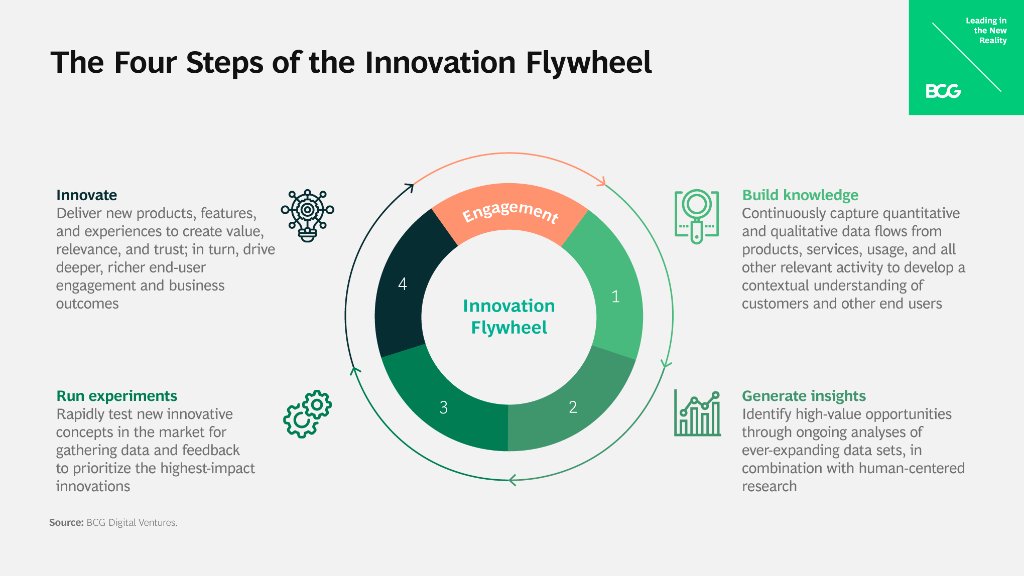
(Source)
Who Can Benefit from Innovation Consulting?
What is innovation consulting? Innovation consulting firms can assist in recognizing expansion prospects, constructing approaches to attain aims and objectives, optimizing efficacy and productivity at work, as well as utilizing the most recent technologies and trends. All of these benefits make it an invaluable resource for any organization looking to stay ahead of its competition.
R&D Managers and Engineers
R&D managers and engineers are prime candidates to benefit from innovation consulting services. With the help of an experienced consultant, they can gain insights into new technologies that could improve their products or processes, helping them stay competitive in today’s rapidly changing market.
Moreover, with the help of analytical techniques, they can more accurately discern customer requirements to generate expeditious and effective solutions that satisfy those demands.
Product Dev Engineers and Managers
Product dev engineers and managers also have much to gain from working with an innovation consultant. Strategic planning can enable product development personnel to create plans that use resources economically and minimize any potential risks when rolling out new products or services promptly.
Furthermore, finding reputable innovation consulting firms can provide valuable feedback on existing processes which will allow product development teams to streamline operations for greater efficiency without sacrificing quality standards or customer satisfaction levels.
Lead or Senior Scientists
Scientists in lead or senior roles are especially well-suited to reap the benefits of what innovation consulting has to offer. By taking advantage of data-driven research methods, they can quickly uncover correlations between variables which could potentially open up revolutionary discoveries.
Innovation consulting can be a useful aid for R&D and innovation groups to make the most of their capacity, offering advice on how best to utilize existing resources.
What is innovation consulting? Innovation consulting firms can assist in recognizing expansion prospects, constructing approaches to attain aims and objectives, optimizing efficacy and productivity at work, as well as utilizing the most recent technologies and trends. Click To Tweet
How Does an Organization Benefit from Innovation Consulting?
What is innovation consulting? Innovation consulting can aid organizations in uncovering avenues for growth, building strategies to reach objectives, and enhancing productivity. By leveraging data-driven insights, innovation consultants can help organizations uncover hidden potential within their operations.
Identifying Opportunities for Growth and Expansion
Innovation consulting helps businesses assess current market trends to determine areas of opportunity that could be leveraged for growth. Consultants are well-versed in a variety of industry best practices which allows them to provide expert guidance on new markets or products that could prove beneficial for an organization’s expansion.
Additionally, they can use data analytics tools such as predictive modeling or machine learning algorithms to uncover untapped customer segments or business niches that have yet to be explored by competitors.
Crafting Effective Plans to Achieve Goals
An experienced consultant will collaborate with an organization’s executive team to craft effective plans customized for achieving desired goals. By scrutinizing past performance records combined with researching current market trends, consultants can design creative solutions that guarantee success within a given time frame.
Enhancing Efficiency
Leveraging advanced technologies such as AI-powered chatbots can significantly improve customer service capabilities while simultaneously cutting expenses related to manual labor tasks typically handled by personnel. This type of automation is often overlooked but plays a major role in staying ahead of the competition in today’s ever-evolving landscape.
Organizations benefit from innovation consulting in many ways, such as identifying opportunities for growth and expansion, developing strategies to achieve goals and objectives, and enhancing efficiency and productivity. Organizations can learn how to take advantage of the current range of innovation consulting services to achieve their desired results.
Key Takeaway: Innovation consultants provide organizations with the strategies and tools needed to identify growth opportunities, develop plans for success, and maximize efficiency. By leveraging AI-based chatbots and other advanced technologies, companies can maintain a competitive edge in an ever-evolving environment by using data-driven insights.
What Are the Different Types of Innovation Consulting Services?
What is innovation consulting? Innovation consulting assists businesses in formulating approaches and tactics to boost productivity, efficiency, and expansion.
There are four main types of innovation consulting services: strategic planning and execution services, process improvement services, market analysis and insights, and technology solutions services.
Strategic Planning and Execution
Strategic planning and execution services involve helping organizations create long-term plans for success by assessing the current state of their operations as well as external factors such as customer trends or competitive landscapes. The consultant will then help the organization develop actionable steps toward achieving its goals. This type of service also includes implementation support to ensure that the plan is executed properly.
Process Improvement Services
Process improvement services focus on streamlining existing processes to maximize efficiency while minimizing costs. A consultant can help identify areas where there are opportunities for improvement such as reducing waste or automating manual tasks with technology solutions. They may also suggest new methods or approaches that could lead to greater efficiency in certain areas of operations.
Market Analysis and Insights
Market analysis and insights services provide valuable data about customers’ needs, preferences, and buying habits which can be used to inform product development decisions or marketing campaigns targeting specific audiences. Utilizing AI and ML, consultants can swiftly process large datasets to enable businesses to make decisions with greater speed and accuracy.
Technology Solutions
Technology solutions services offer expertise in various technologies such as cloud computing platforms or software applications that enable organizations to operate more efficiently by automating manual tasks or providing real-time access to data across multiple locations simultaneously. By leveraging these technologies, companies can gain an edge over competitors who have not yet adopted them.
Consultants specializing in this area will be able to provide advice on how best to utilize existing tech infrastructure while suggesting ways it could be improved upon with newer advancements.
Innovation consulting services are an invaluable asset to organizations that wish to stay ahead of the curve in terms of technological advancements and market trends. Organizations seeking to leverage the benefits of innovation consulting should ensure that their chosen consultant is well-versed in the field, possesses an understanding of current tech and market developments, can analyze data effectively, and communicate efficiently.
Key Takeaway: Innovation consulting is a specialized form of aid that assists companies to devise tactics and approaches to enhance productivity, effectiveness, and development. It includes strategic planning services for long-term success as well as process improvement services to optimize operations. Additionally, it offers market analysis and insights services using AI and ML algorithms and technology solutions expertise with the latest advancements in cloud computing platforms or software applications.
Conclusion
What is innovation consulting? Innovation consulting is a critical asset for businesses aiming to reach their full potential and stay one step ahead of the competition. With the right consultant, companies can take advantage of cutting-edge strategies that will help them reach new heights in efficiency and profitability.
By taking into account the different types of services offered by consultants as well as what qualities they should look for when hiring one, organizations are better equipped to leverage innovation consulting to drive success within their business operations.
Unlock the potential of your R&D and innovation teams with Cypris. Our research platform provides rapid time to insights, centralizing data sources into one convenient platform for maximum efficiency.