

💡
We identified 330 articles covering NFTs in the past 30 days that fall into 8 unique categories: lawsuits, new hires, funding, acquisitions, new partnerships, new products, earnings reports, and IPOs.
💡
Of the 330 NFT market news articles released in the past 30 days, 73 were related to lawsuits. Additional key coverage included 71 articles focused on new hires, 48 on funding, 35 on acquisitions, and 30 on new partnerships.
💡
Above, is your complete list of articles focused on lawsuits from the past 30 days.
💡
Notably, the majority of articles we flagged came from the U.S. and Great Britain.
For market news on your industry, visit ipcypris.com to get started.
If you’d like to explore recent patents filed, search through our global patent search engine for free here: https://ipcypris.com/patents/allrecords
Lawsuits dominate NFT market news


💡
We identified 330 articles covering NFTs in the past 30 days that fall into 8 unique categories: lawsuits, new hires, funding, acquisitions, new partnerships, new products, earnings reports, and IPOs.
💡
Of the 330 NFT market news articles released in the past 30 days, 73 were related to lawsuits. Additional key coverage included 71 articles focused on new hires, 48 on funding, 35 on acquisitions, and 30 on new partnerships.
💡
Above, is your complete list of articles focused on lawsuits from the past 30 days.
💡
Notably, the majority of articles we flagged came from the U.S. and Great Britain.
For market news on your industry, visit ipcypris.com to get started.
If you’d like to explore recent patents filed, search through our global patent search engine for free here: https://ipcypris.com/patents/allrecords
Keep Reading

How do patents act as an incentive to technological innovation? This question continues to be the subject of much discussion. From economic incentives to international perspectives, there are various factors at play when looking into how patents can drive or hinder progress in technology development.
In this blog post, we’ll investigate the nature of patents, their potential to promote innovation, and their influence on international markets. We’ll also look at different countries’ approaches to using patents as an incentive for furthering technological advancement. By examining these elements together we hope to answer: how do patents act as an incentive to technological innovation?
Table of Contents
How Do Patents Act as an Incentive to Technological Innovation?
The Economic Impact of Patents on Technological Innovation
Cost/Benefit Analysis of Patents for Innovators
Effects on Competition and Market Dynamics
What Is a Patent?
A patent is a type of intellectual property that gives exclusive authority to an inventor or their designee for a particular span. It gives the holder the right to prevent others from making, using, selling, offering for sale, or importing an invention without permission. Patents are typically granted by governments and can be enforced in court if necessary.
Types of Patents
There are three types of patents: utility patents, design patents, and plant patents. Utility patents protect inventions that have a functional purpose such as machines, processes, and compositions of matter while design patents protect new ornamental designs applied to articles of manufacture like furniture or jewelry. Plant patents cover newly discovered varieties of plants created through non-naturally occurring breeding techniques such as hybridization or genetic engineering.
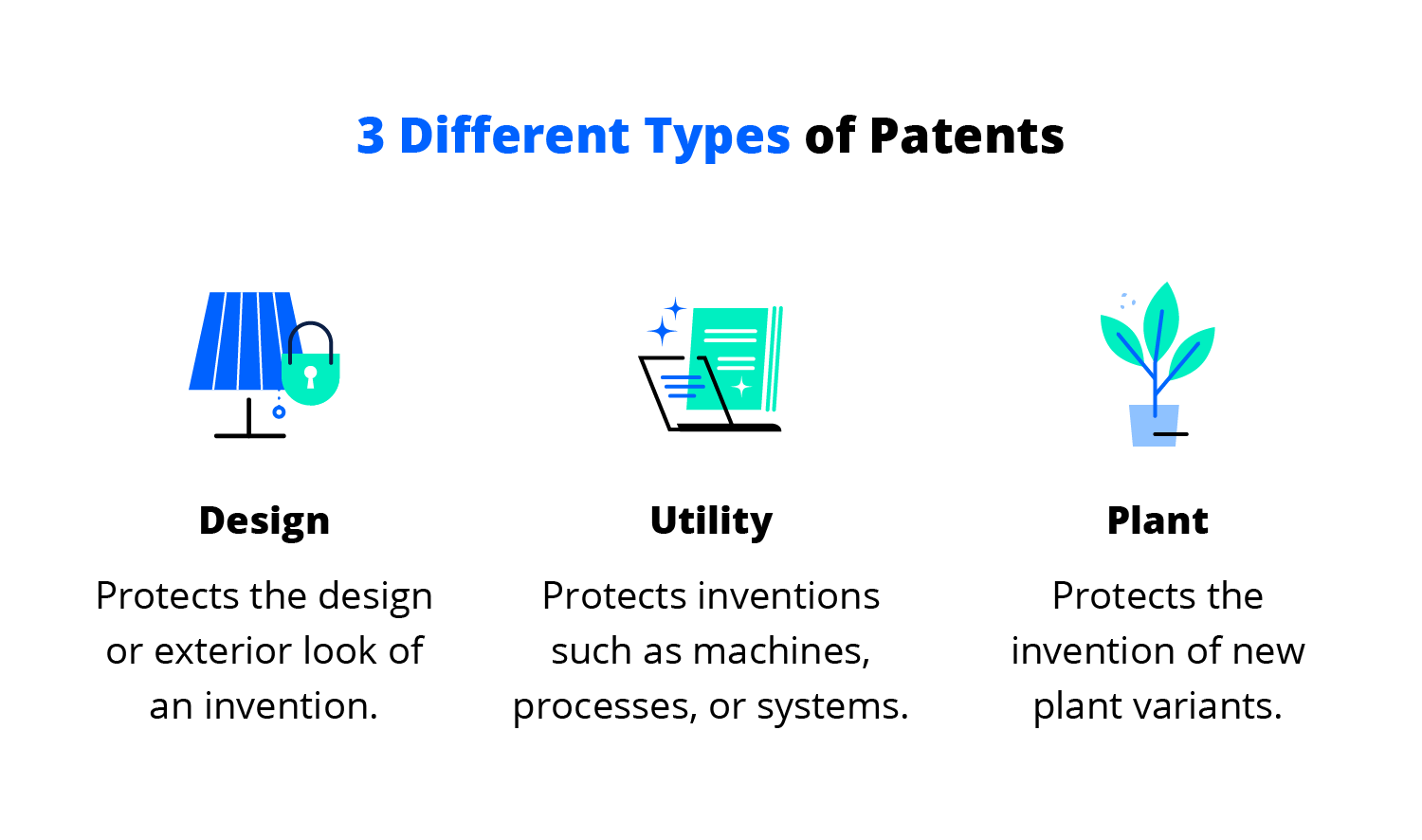
(Source)
The Patent System
The initial step of the patent process is to apply with a relevant government entity (e.g., USPTO). The application must include detailed descriptions of how the invention works and why it is novel compared to existing technology/products on the market at that time.
After being reviewed by examiners who determine whether all requirements have been met, a patent may be issued that grants exclusive rights over the patented inventions for up to 20 years in most countries including USA and Europe depending on jurisdiction laws governing them respectively. If any infringements occur during this period then legal action can be taken against those responsible by asserting one’s patent rights in court proceedings if necessary.
How do patents act as an incentive to technological innovation? Patents grant exclusive rights to an inventor or assignee for a limited period. Patents can be seen as a stimulant for tech advancement and they have the potential to sway investment decisions.
Patents provide a reward to inventors and their assignees for a certain duration by granting exclusive rights. #patentrights #innovation Click to Tweet
How Do Patents Act as an Incentive to Technological Innovation?
How do patents act as an incentive to technological innovation? Patents have an essential role in technological innovation. By providing innovators with exclusive rights to their inventions, patents help encourage and incentivize the development of new technologies.
R&D investments of a considerable magnitude are especially reliant on patents for success. Patents can provide a competitive edge by preventing competitors from copying or infringing on an invention, while also allowing inventors to recoup some of their R&D costs through licensing fees or royalties.
However, there are challenges associated with patents as well. The patent process itself can be lengthy and costly, which may discourage small businesses from pursuing them.
Additionally, overly broad patents that cover too much ground can stifle competition and slow down innovation within a given industry by creating monopolies or limiting access to certain technologies. Governments and regulatory bodies need to ensure that patent laws don’t create barriers to entry for new companies looking to enter the market with innovative products or services.
Investors are heavily incentivized to take risks on potentially groundbreaking ideas when they know their investments will be rewarded with exclusive rights over any inventions resulting from them. However, overly restrictive patent regimes could lead investors away from investing in certain areas due to the risk of infringement claims brought by larger companies that already possess numerous related patents, thus diminishing returns.
Overall, properly managed patent systems are essential components of a healthy ecosystem for technological innovation; they provide incentives for individuals and organizations alike while protecting intellectual property rights at the same time. Policymakers must strive to create a harmonious equilibrium between incentivizing R&D investment and guaranteeing fair competition in all fields, so as not to hinder the progress of improved technologies and better products/services for everyone.
Patents may bring both beneficial and adverse consequences, yet they remain a key factor in encouraging technological progress. To grasp the implications of patents on innovation, a cost/benefit evaluation for patent holders as well as its consequence on competition and marketplace behavior should be assessed.
Key Takeaway: Patents act as a powerful incentive for technological innovation, offering exclusive rights and the potential to recoup R&D costs. However, overly broad patents or excessively restrictive regimes can stifle competition and slow down progress. Governments must strike a balance between incentivizing investment in R&D and ensuring fair play across all sectors.
The Economic Impact of Patents on Technological Innovation
How do patents act as an incentive to technological innovation? Patents serve as a form of intellectual property protection that can potentially benefit innovators, but there are associated costs to consider. Yet, the costs of acquiring and sustaining patents can also have a bearing on an invention’s financial prosperity.
Cost/Benefit Analysis of Patents for Innovators
Obtaining patent protection is often costly and time-consuming, but it can be worth it if done correctly. Patenting can provide innovators with exclusive rights to exploit their inventions commercially, allowing them to recoup some or all of their development costs.
It also creates a barrier to entry for competitors, protecting innovators from being undercut by imitators. Obtaining a patent may boost the esteem of an invention in the eyes of prospective investors or purchasers.
Effects on Competition and Market Dynamics
On the other hand, patents may limit competition within markets by creating barriers for new entrants who lack access to patented technologies or resources needed to develop competing products or services. This could lead to higher costs, due to a decrease in rivalry and reduced inspiration for more investment into R&D.
Additionally, patents may create legal disputes between companies over alleged infringement which can result in expensive litigation fees even when no actual infringement has occurred.
Key Takeaway: Patents can be a double-edged sword for innovators, offering the potential of exclusive rights and protection from competitors but also carrying high costs in terms of time and money. Although patents may increase the perceived value or create barriers to entry, they could also limit competition within markets by creating obstacles for new entrants, leading to higher prices with fewer incentives for R&D investment.
Conclusion
How do patents act as an incentive to technological innovation? these legal instruments can be a potent weapon for creators. Patents may furnish a variety of advantages, including warding off rivals, augmenting R&D investment, giving consumers access to creative goods and services, and stimulating competition.
However, there are also potential challenges with patenting technology such as high costs associated with obtaining or defending a patent, difficulties enforcing international patents across borders, or overly broad claims which could stifle competition.
Ultimately, it is evident that patents serve as a stimulus for technological progress. By offering inventors exclusive rights over their inventions, and providing financial incentives for successful products or services, patents can encourage technological innovation.
Patents afford firms the ability to reap rewards from their inventions by granting them exclusive authority over certain goods or services. The economic impact of these incentives has been significant; however, different countries have adopted varying approaches toward patent protection which can influence how effective they are at promoting technological innovation overall.
Discover how Cypris can help your R&D and innovation teams unlock the power of patents to drive technological innovation. Leverage our research platform for rapid time-to-insights, and maximize your team’s potential with patent analysis today.

What are the steps of scientific innovation? The process of scientific innovation can be complex and daunting. But, with the proper steps in place, one can move forward to create a successful product or technology.
From defining the problem to commercialization and implementation, understanding these key stages of scientific innovation is essential for any R&D team looking to innovate effectively. By following the five steps we will outline here, teams can ensure they are taking all necessary actions on their path from idea generation through final launch. So let’s discover together: what are the steps of scientific innovation?
Table of Contents
Assigning Roles and Responsibilities
Commercialization and Implementation
Conclusion: What Are the Steps of Scientific Innovation?
Defining the Problem
What are the steps of scientific innovation? The first step is to define the problem, which is also the first step in the scientific method.
Defining the problem is an essential step for any R&D and innovation team. Identifying the need helps teams understand what areas require improvement or development, as well as which solutions will be most effective in addressing these needs.
Investigating potential solutions entails examining current technologies and trends to decide how they can be implemented to resolve a given issue. Setting goals and objectives provides clarity on desired outcomes, enabling teams to measure progress and success over time.
When identifying the need, teams need to consider customer feedback, industry trends, market demands, and technological advancements when determining what problems should be addressed first. It’s also beneficial for teams to use research tools such as surveys or interviews with stakeholders to gain insights into potential pain points that could benefit from further exploration or development.
Researching solutions requires a deep dive into current technology offerings and available resources within an organization’s network of partners or vendors. Teams should look at competitors’ products or services to identify gaps that could potentially lead them toward creating innovative new products or services of their own. Additionally, researching industry trends allows organizations to stay ahead of emerging opportunities while avoiding pitfalls associated with outdated approaches that may no longer yield positive results due to changing markets or customer preferences.
Once the problem has been clearly defined, teams can begin to explore solutions and generate ideas for innovation. To do this effectively, brainstorming strategies must be employed to evaluate potential concepts and refine them into viable products or services.
Key Takeaway: R&D and innovation teams need to identify needs, research solutions, and set goals to successfully innovate. To do so effectively they must consider customer feedback, industry trends, market demands, and technological advancements before delving into competitor offerings or leveraging their network of partners and vendors. By establishing clear objectives with specific metrics linked back to identified needs progress can be measured over time for successful results.
Generating Ideas
What are the steps of scientific innovation? Generating ideas for research and projects is a vital part of the innovation process.
Brainstorming is an effective way to generate multiple potential solutions quickly. Gathering a team of diversely-minded individuals is key to successful brainstorming, as it can help generate creative solutions.
(Source)
To ensure a safe space for open discussion, it is essential to establish that all ideas should be voiced without fear of criticism or judgment. To ensure that the most innovative ideas are discussed, it’s helpful to set ground rules like no idea is too small or silly before beginning the session. Additionally, setting a time limit helps keep the conversation focused on generating as many ideas as possible within that timeframe.
It is essential for those with a vested interest to consider the financial viability, expansiveness, and implications of each potential solution before making any decisions. Anticipating any issues that may arise during implementation is critical for a successful outcome. Thus it’s important to think ahead and address any red flags before moving forward.
Brainstorming and stakeholder input are essential for successful research and innovation projects. Set ground rules, assess cost-effectiveness, and anticipate potential issues to get the best outcome. #ResearchInnovation #IdeaGeneration Click to Tweet
Developing a Plan of Action
What are the steps of scientific innovation? Innovation requires developing a plan of action. It involves establishing a timeline, allocating resources and budgeting, and assigning roles and responsibilities.
Create a Timeline
To ensure the successful completion of the project, it is essential to create a timeline with deadlines for each task. Start by breaking down the project into smaller tasks with specific deadlines for each task.
Think about what should be done to finish each job, plus any hindrances that may come up while doing so. Once you have identified these items, create an overall timeline that outlines when each step should be completed by. Utilizing tools such as Gantt charts can help keep everyone involved in the project organized and on track with their respective tasks.
Allocating Resources
Allocating resources is also important when developing a plan of action for your research or innovation team’s project. This includes identifying what materials are needed, who will provide them, how much they cost, and where they need to be sourced from.
Additionally, it’s wise to consider which personnel are best suited for different parts of the job at hand, such as those who have experience in coding, designing experiments, collecting data, or commercialization. By doing this upfront planning, you’ll ensure that your team has everything it needs before beginning work on its project.
Assigning Roles and Responsibilities
Finally, assigning roles and responsibilities ensures that every member knows exactly what their role entails so there’s no confusion throughout the assignment. To do this effectively, start by creating detailed descriptions outlining duties associated with various positions like a lead researcher or product developer engineer.
Then assign individuals accordingly based on skill set capabilities while keeping an eye out for areas where collaboration between members might benefit outcomes even further than working alone would achieve.
By following these steps when developing a plan of action, you will increase efficiency throughout your R&D or innovation team’s projects while saving time and money in the process. Creating a timeline, budgeting resources, designating duties, and allocating roles are essential to attaining maximum efficiency while saving time and funds. Doing this upfront planning ensures that your team has everything it needs before beginning work on its project which will result in more successful outcomes.
Innovation requires constructing a blueprint of activity, to make sure the project stays on course and within the budget. To further refine the process, testing, and experimentation are necessary to evaluate results and make adjustments as needed.
Key Takeaway: An effective plan of action for an R&D or innovation project should include setting a timeline, allocating resources, and budgeting appropriately, as well as assigning roles and responsibilities. Putting in the groundwork upfront to ensure your team has everything it needs before getting started will pay off dividends later down the line.
Testing and Experimentation
What are the steps of scientific innovation? Testing and experimentation are essential steps in the R&D process. Experiments help to validate hypotheses, identify areas of improvement, and provide data-driven insights into product development.
When designing experiments and prototypes, it is important to consider factors such as scalability, cost efficiency, reliability, accuracy, speed of implementation, and results analysis.
Prototyping
Prototypes should be designed with the end goal in mind.
What will you measure? What kind of data do you need to collect? How long does each experiment take?
Will there be any safety concerns or hazards associated with testing?
These questions should all be answered before beginning an experiment or prototype design. Testing the prototype’s operation and practicality can be done after its development.
Data Collection and Analysis
Data collection is also a key component when testing a prototype. Collecting accurate data helps inform decisions about potential changes or improvements that could be made during the refinement process.
Analyzing results from tests is critical for making adjustments as necessary based on feedback from users or other stakeholders involved in the project. A variety of methods can be used to analyze test results including statistical analysis tools such as:
- Regression models.
- Machine learning algorithms.
- Qualitative surveys.
- Interviews.
- Focus groups.
- Field trials.
By evaluating user feedback alongside performance metrics such as time-to-market or customer satisfaction ratings, teams can make informed decisions regarding product enhancements or changes needed before launch.
Testing and experimentation are invaluable components within the R&D cycle which allow teams to validate ideas while gathering valuable insights into how products perform under various conditions. This leads to successful commercialization outcomes through iterative cycles of refinement and optimization over time.
Key Takeaway: R&D relies on experimentation and assessment to confirm suppositions and acquire useful data regarding product performance. By collecting accurate data, analyzing results from tests, as well as user feedback through qualitative surveys or interviews among other methods.
Commercialization and Implementation
What are the steps of scientific innovation? Commercialization and implementation of a research or innovation project are essential parts of any innovative process.
Commercialization and implementation require careful planning, execution, and assessment to ensure success. Identifying potential markets for the product or service is key to launching it successfully. This involves researching current trends in the industry, understanding customer needs and preferences, analyzing competition, and assessing market opportunities.
Once potential target markets have been identified, a business plan must be formulated that accounts for all relevant factors like cost structure, income sources, desired consumers, and pricing approach.
Finally, a launch strategy should be developed that outlines tactics for introducing the product or service to its intended audience while also taking into account any risks associated with its introduction.
R&D managers and engineers must be diligent in having an innovative process to ensure the successful commercialization of their projects.
R&D teams need to plan, execute & assess carefully when commercializing their projects. Research trends, understand customer needs & create a business model for success. #innovation #research Click to Tweet
Conclusion: What Are the Steps of Scientific Innovation?
What are the steps of scientific innovation? The scientific method is a complex and often iterative process. It requires an in-depth understanding of the problem at hand, creative thinking to generate ideas, careful planning for implementation, and testing through experimentation before commercialization can take place.
By utilizing research platforms that provide access to data sources quickly, teams can accelerate their journey toward successful innovations with greater speed and accuracy than ever before.
Unlock the power of R&D and innovation teams with Cypris. Our platform provides rapid time to insights, allowing you to centralize data sources for maximum efficiency.

Are you struggling to learn how to prioritize innovation ideas in your organization? Deciding which ideas should be pursued and which should wait can be a challenging task. Fortunately, there is an effective way of doing this that will help streamline the process and ensure success.
In this blog post, we’ll explore how to identify the right ideas for prioritization, develop an evaluation framework, leverage technology for efficiency gains, build an innovation culture within your team, and measure success when it comes time to implement them. Let’s learn how to prioritize innovation ideas!
Table of Contents
How to Prioritize Innovation Ideas
Developing an Evaluation Framework
Defining Criteria for Evaluation
Creating an Action Plan for Implementation
Leveraging Technology to Streamline the Process
Automated Idea Management Systems
Building an Innovation Culture in Your Organization
Measuring the Success of Prioritized Ideas
Tracking Progress and Performance Metrics
How to Prioritize Innovation Ideas
Prioritizing innovation ideas is essential for R&D and innovation teams. It is imperative to distribute resources productively so that ventures have an optimal chance of success. To identify the right ideas to prioritize, it’s important to assess the potential impact, evaluate the feasibility, and understand resource requirements.
Assess Potential Impact
Assessing potential impact involves considering how successful an idea might be if implemented. Factors such as customer demand or market opportunity should be taken into account when assessing an idea’s potential return on investment (ROI). Moreover, analyzing the expenditure of time and resources required can assist in deciding whether a project is worth pursuing.
Evaluate Feasibility
Evaluating feasibility requires looking at both technical and non-technical elements of a project before committing resources towards its development. Technical factors include understanding any existing technology constraints or dependencies that may limit progress. At the same time, non-technical considerations involve analyzing available skill sets within your team or organization which could affect implementation timelines.
It is important to prioritize the right ideas for innovation, as this will ensure successful outcomes. Developing an evaluation framework can help you make informed decisions and guide your team in implementing them effectively.
Key Takeaway: In learning how to prioritize innovation ideas, teams need to consider a combination of ROI, technical feasibility, and resource availability assessments. Taking into account customer demand, market opportunity, and skillsets within your team or organization will help you cut through the noise and make informed decisions about which projects are worth investing in.
Developing an Evaluation Framework
Developing an evaluation framework is a critical step in idea prioritization. It helps teams prioritize ideas and decide which ones to pursue. Organizations can maximize their chances of success by defining criteria for evaluation, establishing a scoring system, and creating an action plan for implementation.
Defining Criteria for Evaluation
Defining the criteria for evaluation is essential to make informed decisions about which ideas should be pursued. Teams should identify what matters most when evaluating new concepts – such as potential impact, feasibility, resources required, or customer needs – and create clear guidelines on how each will be measured.
This will help ensure that all stakeholders are aligned on the criteria used when assessing projects.
Establishing a Scoring System
Establishing a scoring system allows teams to quantify their evaluations and compare different ideas objectively against one another. Each criterion should have its weight depending on its importance relative to other factors being considered.
This score can then be used to rank projects from highest priority down through least important priorities The scoring system should also take into account any external factors that may affect the outcome of a project such as industry trends or competitive landscape analysis.
Creating an Action Plan for Implementation
Having an action plan ensures that teams can move forward with their chosen idea efficiently and effectively. It should outline specific tasks that need completing to bring them to fruition successfully within given timelines and budget constraints if applicable.
An action plan should include steps such as:
- Research and development activities.
- Product design and testing.
- Marketing strategy development.
- Production planning and scheduling.
With this, everyone involved knows exactly what needs to be done at each stage of the process before launch day arrives.
Developing an evaluation framework is essential in learning how to prioritize innovation ideas, as it provides the necessary structure to ensure ideas are properly assessed and evaluated. Leveraging technology can further streamline this process by utilizing data analytics tools, automating idea management systems, and implementing collaboration platforms.
Key Takeaway: By defining criteria for evaluation, establishing a scoring system, and creating an action plan for implementation, organizations can ensure their chosen innovation ideas are pursued in the most effective way possible. It’s all about getting your ducks in a row to guarantee success.
Leveraging Technology to Streamline the Process
The use of technology can be an invaluable asset for streamlining the process of prioritizing innovative ideas. Data analytics tools, automated idea management systems, and collaboration platforms are all powerful tools that can help to make idea prioritization more efficient and effective.
Data Analytics Tools
Data analytics tools provide R&D teams with insights into which ideas have the most potential for success. By analyzing data points such as customer feedback, market trends, and industry benchmarks, these tools can identify opportunities that may otherwise go unnoticed. Based on data-driven insights, R&D teams can prioritize projects accordingly.
Automated Idea Management Systems
Automated idea management systems enable teams in capturing, organizing, and prioritizing ideas in one central location. These systems can keep tabs on each idea, from its start to completion, so the team is aware of where resources are going at any given moment.
(Source)
In addition, automated idea management systems often include features such as voting capabilities or gamification elements which further facilitate team collaboration and engagement when it comes to selecting new initiatives or assessing existing ones.
Collaboration Platforms
Collaboration platforms offer distributed teams the opportunity to collaborate seamlessly across multiple locations without compromising productivity or quality control. With real-time updates on task progress and integrated communication channels such as chat rooms or video conferencing, these platforms provide teams with the flexibility needed to remain agile in today’s fast-paced environment while allowing them to effectively collaborate.
By leveraging technology to streamline idea prioritization, organizations can gain a competitive edge in the innovation race. To further capitalize on this advantage, companies must build an innovative culture within their organization by encouraging creativity and risk-taking, fostering open communication and collaboration, and promoting knowledge sharing and learning.
Key Takeaway: Using data analytics tools, automated idea management systems, and collaboration platforms to their fullest potential can help R&D teams prioritize ideas with maximum efficiency. These powerful technologies enable teams to make informed decisions quickly, track progress accurately and collaborate across multiple locations without compromising productivity or quality control.
Building an Innovation Culture in Your Organization
Organizations that benefit from idea prioritization must create an environment that encourages creativity and risk-taking. To do this, it’s important to foster open communication and collaboration between teams, as well as promote knowledge sharing and learning. This will help ensure that ideas are discussed openly and new perspectives are considered.
Encouraging creativity starts with providing employees with the freedom to explore their ideas without fear of failure or criticism. By allowing employees to take risks in a safe space, organizations can create an atmosphere where creative thinking is rewarded instead of punished for mistakes made along the way. It also helps if leadership models this behavior by taking calculated risks themselves, so others feel empowered to do the same.
To cultivate an innovative atmosphere within the organization, it is essential to foster open communication between all departments. Encourage R&D managers and engineers, product development personnel, and scientists at all levels to come together regularly for problem-solving sessions or brainstorming ideas for potential commercialization opportunities.
By having everyone’s input on board, teams can leverage different perspectives when prioritizing ideas or tackling challenges they may be facing in their workflows.
Key Takeaway: Organizations should foster a setting that boosts imaginative thought and chances taking by endorsing open dialogue, exchanging of knowledge, and joint issue solving. By fostering a safe space for employees to explore their ideas without fear of failure or criticism, organizations can foster innovation while encouraging leaders to take calculated risks as well.
Measuring the Success of Prioritized Ideas
In learning how to prioritize innovation ideas, a crucial step is measuring the success of their implementation. Tracking progress and performance metrics, analyzing results, adjusting strategies accordingly, celebrating achievements, and learning from failures are all key components of idea prioritization.
Tracking Progress and Performance Metrics
Tracking progress and performance metrics can help you understand how well your team is doing on their current project or initiative. This could include measuring completion rate against deadlines, assessing customer feedback on products or services, or tracking financial performance related to a particular idea. By monitoring the relevant data points over some time, you can determine if your concept is having its desired effect.
Analyzing Results
Analyzing results allows teams to identify areas for improvement in their projects as well as opportunities for growth and expansion. It’s important to look at data from multiple sources – such as customer surveys, financial reports, and market research studies – when analyzing so that decisions are based on accurate information rather than assumptions or guesswork.
Teams must adjust strategies accordingly based on these findings. Otherwise, any efforts may be wasted if they continue down the wrong path without making necessary changes along the way.
Celebrating Achievements
Celebrating achievements should also be part of the evaluation process since it encourages team morale and motivation while providing recognition for the hard work done by individuals within the organization who have contributed towards successful outcomes.
It is also essential not to evade failure. Rather, use them as chances for growth that can lead to further advances in upcoming undertakings carried out by the team. Going forward into new ventures with confidence knowing what works best given certain scenarios will help ensure success.
Key Takeaway: Analyzing performance metrics and adjusting strategies accordingly is key to assessing the success of innovation ideas. It’s essential to recognize successes and glean lessons from missteps to remain at the forefront, providing teams with a substantial store of wisdom for upcoming projects.
Conclusion
Learning how to prioritize innovation ideas is essential for any organization that wants to stay ahead of the competition. By taking the time to identify and evaluate potential projects, develop an evaluation framework, and leverage technology to streamline processes, organizations can ensure their ideas are successful.
Additionally, prioritizing innovation within your team will help foster creativity, and measuring success with key performance indicators allows teams to track progress in real-time. With these strategies in place, you’ll be well on your way toward achieving maximum ROI from all innovative initiatives.
Discover how Cypris can help your R&D and innovation teams prioritize their ideas quickly with our centralized data platform. Take advantage of the insights you gain to make faster, smarter decisions for your business.