

Resources
Guides, research, and perspectives on R&D intelligence, IP strategy, and the future of AI enabled innovation.

Executive Summary
In 2024, US patent infringement jury verdicts totaled $4.19 billion across 72 cases. Twelve individual verdicts exceeded $100million. The largest single award—$857 million in General Access Solutions v.Cellco Partnership (Verizon)—exceeded the annual R&D budget of many mid-market technology companies. In the first half of 2025 alone, total damages reached an additional $1.91 billion.
The consequences of incomplete patent intelligence are not abstract. In what has become one of the most instructive IP disputes in recent history, Masimo’s pulse oximetry patents triggered a US import ban on certain Apple Watch models, forcing Apple to disable its blood oxygen feature across an entire product line, halt domestic sales of affected models, invest in a hardware redesign, and ultimately face a $634 million jury verdict in November 2025. Apple—a company with one of the most sophisticated intellectual property organizations on earth—spent years in litigation over technology it might have designed around during development.
For organizations with fewer resources than Apple, the risk calculus is starker. A mid-size materials company, a university spinout, or a defense contractor developing next-generation battery technology cannot absorb a nine-figure verdict or a multi-year injunction. For these organizations, the patent landscape analysis conducted during the development phase is the primary risk mitigation mechanism. The quality of that analysis is not a matter of convenience. It is a matter of survival.
And yet, a growing number of R&D and IP teams are conducting that analysis using general-purpose AI tools—ChatGPT, Claude, Microsoft Co-Pilot—that were never designed for patent intelligence and are structurally incapable of delivering it.
This report presents the findings of a controlled comparison study in which identical patent landscape queries were submitted to four AI-powered tools: Cypris (a purpose-built R&D intelligence platform),ChatGPT (OpenAI), Claude (Anthropic), and Microsoft Co-Pilot. Two technology domains were tested: solid-state lithium-sulfur battery electrolytes using garnet-type LLZO ceramic materials (freedom-to-operate analysis), and bio-based polyamide synthesis from castor oil derivatives (competitive intelligence).
The results reveal a significant and structurally persistent gap. In Test 1, Cypris identified over 40 active US patents and published applications with granular FTO risk assessments. Claude identified 12. ChatGPT identified 7, several with fabricated attribution. Co-Pilot identified 4. Among the patents surfaced exclusively by Cypris were filings rated as “Very High” FTO risk that directly claim the technology architecture described in the query. In Test 2, Cypris cited over 100 individual patent filings with full attribution to substantiate its competitive landscape rankings. No general-purpose model cited a single patent number.
The most active sectors for patent enforcement—semiconductors, AI, biopharma, and advanced materials—are the same sectors where R&D teams are most likely to adopt AI tools for intelligence workflows. The findings of this report have direct implications for any organization using general-purpose AI to inform patent strategy, competitive intelligence, or R&D investment decisions.

1. Methodology
A single patent landscape query was submitted verbatim to each tool on March 27, 2026. No follow-up prompts, clarifications, or iterative refinements were provided. Each tool received one opportunity to respond, mirroring the workflow of a practitioner running an initial landscape scan.
1.1 Query
Identify all active US patents and published applications filed in the last 5 years related to solid-state lithium-sulfur battery electrolytes using garnet-type ceramic materials. For each, provide the assignee, filing date, key claims, and current legal status. Highlight any patents that could pose freedom-to-operate risks for a company developing a Li₇La₃Zr₂O₁₂(LLZO)-based composite electrolyte with a polymer interlayer.
1.2 Tools Evaluated

1.3 Evaluation Criteria
Each response was assessed across six dimensions: (1) number of relevant patents identified, (2) accuracy of assignee attribution,(3) completeness of filing metadata (dates, legal status), (4) depth of claim analysis relative to the proposed technology, (5) quality of FTO risk stratification, and (6) presence of actionable design-around or strategic guidance.
2. Findings
2.1 Coverage Gap
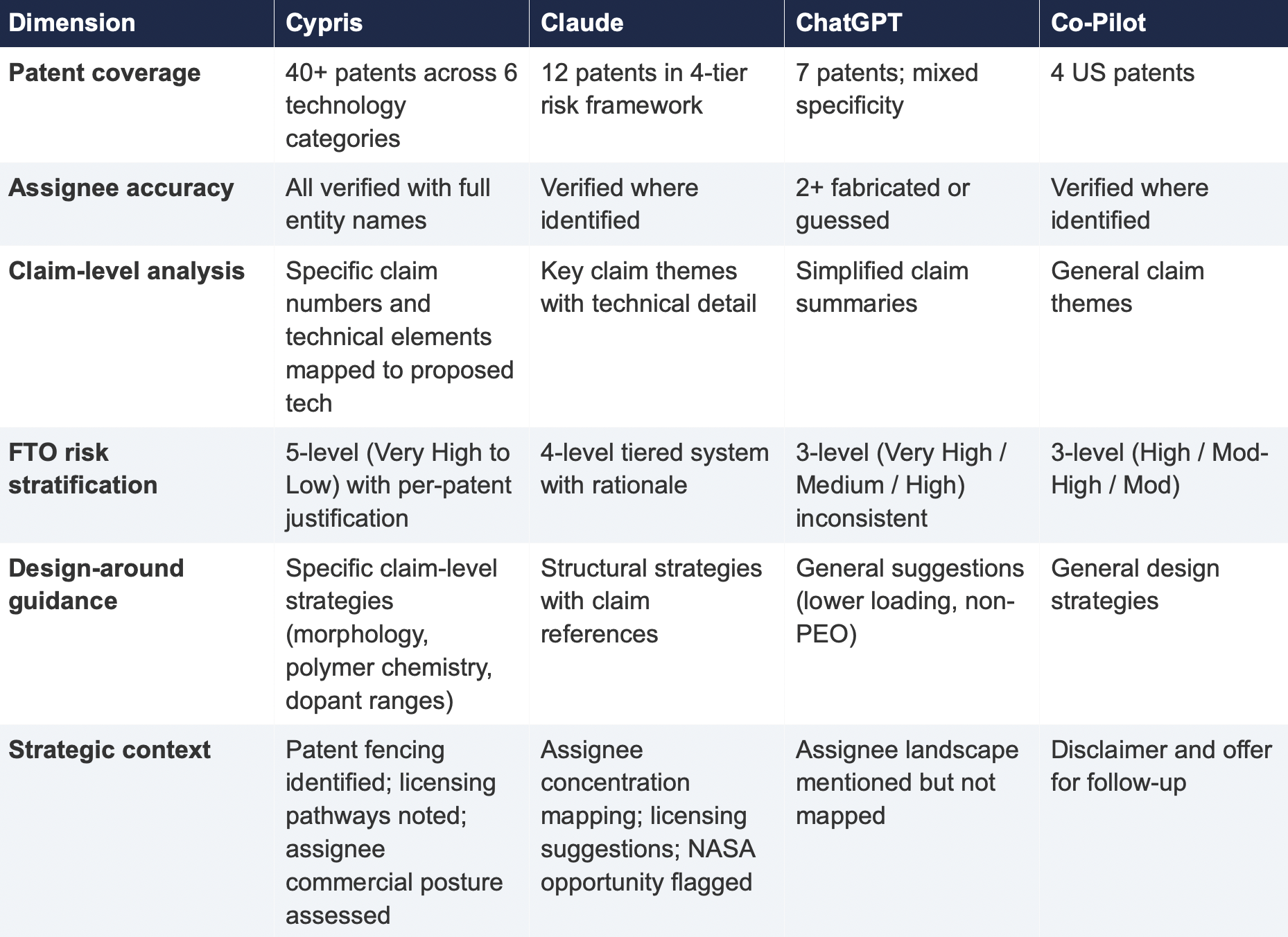
The most significant finding is the scale of the coverage differential. Cypris identified over 40 active US patents and published applications spanning LLZO-polymer composite electrolytes, garnet interface modification, polymer interlayer architectures, lithium-sulfur specific filings, and adjacent ceramic composite patents. The results were organized by technology category with per-patent FTO risk ratings.
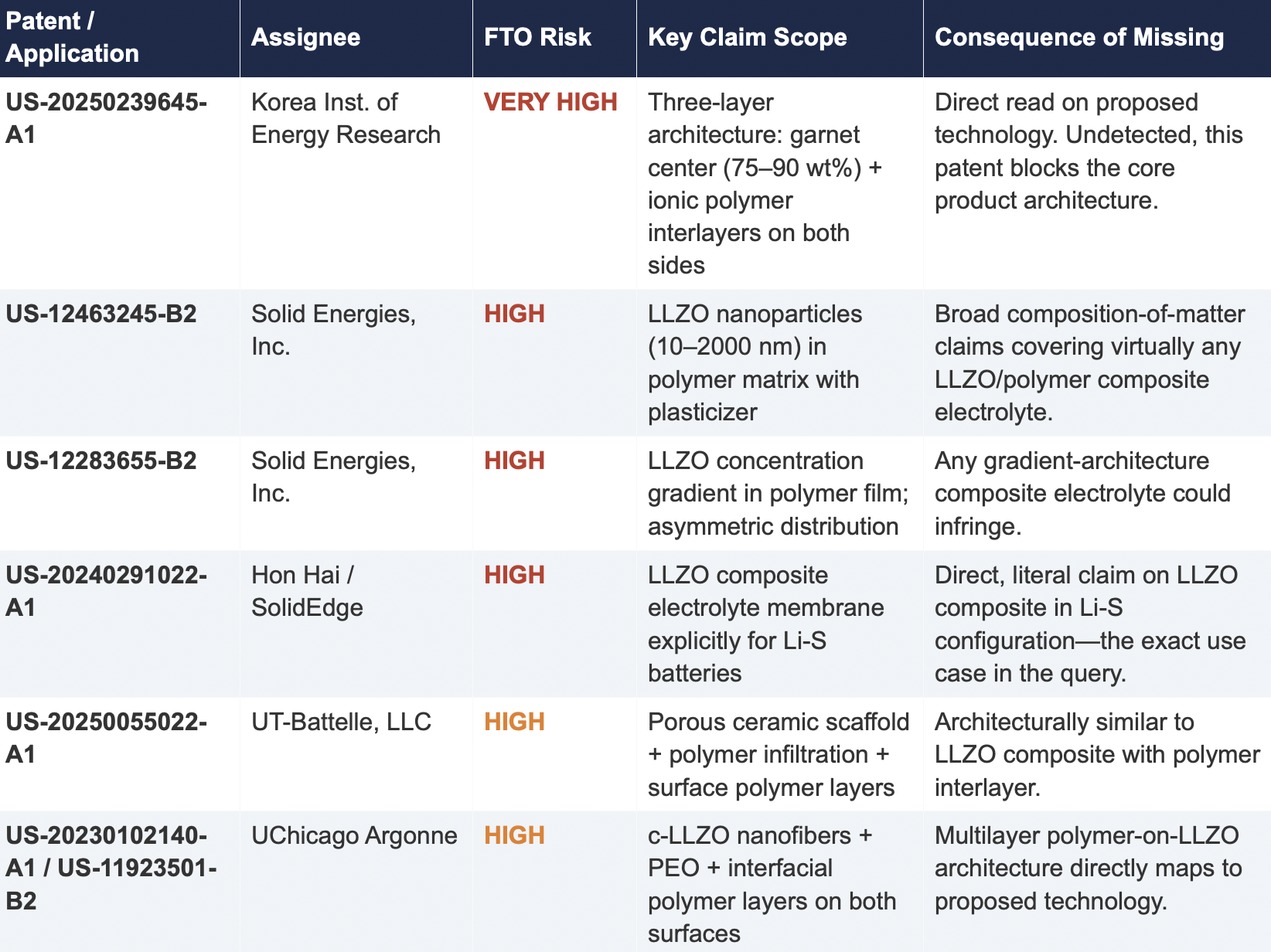
Claude identified 12 patents organized in a four-tier risk framework. Its analysis was structurally sound and correctly flagged the two highest-risk filings (Solid Energies US 11,967,678 and the LLZO nanofiber multilayer US 11,923,501). It also identified the University ofMaryland/ Wachsman portfolio as a concentration risk and noted the NASA SABERS portfolio as a licensing opportunity. However, it missed the majority of the landscape, including the entire Corning portfolio, GM's interlayer patents, theKorea Institute of Energy Research three-layer architecture, and the HonHai/SolidEdge lithium-sulfur specific filing.
ChatGPT identified 7 patents, but the quality of attribution was inconsistent. It listed assignees as "Likely DOE /national lab ecosystem" and "Likely startup / defense contractor cluster" for two filings—language that indicates the model was inferring rather than retrieving assignee data. In a freedom-to-operate context, an unverified assignee attribution is functionally equivalent to no attribution, as it cannot support a licensing inquiry or risk assessment.
Co-Pilot identified 4 US patents. Its output was the most limited in scope, missing the Solid Energies portfolio entirely, theUMD/ Wachsman portfolio, Gelion/ Johnson Matthey, NASA SABERS, and all Li-S specific LLZO filings.
2.2 Critical Patents Missed by Public Models
The following table presents patents identified exclusively by Cypris that were rated as High or Very High FTO risk for the proposed technology architecture. None were surfaced by any general-purpose model.
2.3 Patent Fencing: The Solid Energies Portfolio
Cypris identified a coordinated patent fencing strategy by Solid Energies, Inc. that no general-purpose model detected at scale. Solid Energies holds at least four granted US patents and one published application covering LLZO-polymer composite electrolytes across compositions(US-12463245-B2), gradient architectures (US-12283655-B2), electrode integration (US-12463249-B2), and manufacturing processes (US-20230035720-A1). Claude identified one Solid Energies patent (US 11,967,678) and correctly rated it as the highest-priority FTO concern but did not surface the broader portfolio. ChatGPT and Co-Pilot identified zero Solid Energies filings.
The practical significance is that a company relying on any individual patent hit would underestimate the scope of Solid Energies' IP position. The fencing strategy—covering the composition, the architecture, the electrode integration, and the manufacturing method—means that identifying a single design-around for one patent does not resolve the FTO exposure from the portfolio as a whole. This is the kind of strategic insight that requires seeing the full picture, which no general-purpose model delivered
2.4 Assignee Attribution Quality
ChatGPT's response included at least two instances of fabricated or unverifiable assignee attributions. For US 11,367,895 B1, the listed assignee was "Likely startup / defense contractor cluster." For US 2021/0202983 A1, the assignee was described as "Likely DOE / national lab ecosystem." In both cases, the model appears to have inferred the assignee from contextual patterns in its training data rather than retrieving the information from patent records.
In any operational IP workflow, assignee identity is foundational. It determines licensing strategy, litigation risk, and competitive positioning. A fabricated assignee is more dangerous than a missing one because it creates an illusion of completeness that discourages further investigation. An R&D team receiving this output might reasonably conclude that the landscape analysis is finished when it is not.
3. Structural Limitations of General-Purpose Models for Patent Intelligence
3.1 Training Data Is Not Patent Data
Large language models are trained on web-scraped text. Their knowledge of the patent record is derived from whatever fragments appeared in their training corpus: blog posts mentioning filings, news articles about litigation, snippets of Google Patents pages that were crawlable at the time of data collection. They do not have systematic, structured access to the USPTO database. They cannot query patent classification codes, parse claim language against a specific technology architecture, or verify whether a patent has been assigned, abandoned, or subjected to terminal disclaimer since their training data was collected.
This is not a limitation that improves with scale. A larger training corpus does not produce systematic patent coverage; it produces a larger but still arbitrary sampling of the patent record. The result is that general-purpose models will consistently surface well-known patents from heavily discussed assignees (QuantumScape, for example, appeared in most responses) while missing commercially significant filings from less publicly visible entities (Solid Energies, Korea Institute of EnergyResearch, Shenzhen Solid Advanced Materials).
3.2 The Web Is Closing to Model Scrapers
The data access problem is structural and worsening. As of mid-2025, Cloudflare reported that among the top 10,000 web domains, the majority now fully disallow AI crawlers such as GPTBot andClaudeBot via robots.txt. The trend has accelerated from partial restrictions to outright blocks, and the crawl-to-referral ratios reveal the underlying tension: OpenAI's crawlers access approximately1,700 pages for every referral they return to publishers; Anthropic's ratio exceeds 73,000 to 1.
Patent databases, scientific publishers, and IP analytics platforms are among the most restrictive content categories. A Duke University study in 2025 found that several categories of AI-related crawlers never request robots.txt files at all. The practical consequence is that the knowledge gap between what a general-purpose model "knows" about the patent landscape and what actually exists in the patent record is widening with each training cycle. A landscape query that a general-purpose model partially answered in 2023 may return less useful information in 2026.
3.3 General-Purpose Models Lack Ontological Frameworks for Patent Analysis
A freedom-to-operate analysis is not a summarization task. It requires understanding claim scope, prosecution history, continuation and divisional chains, assignee normalization (a single company may appear under multiple entity names across patent records), priority dates versus filing dates versus publication dates, and the relationship between dependent and independent claims. It requires mapping the specific technical features of a proposed product against independent claim language—not keyword matching.
General-purpose models do not have these frameworks. They pattern-match against training data and produce outputs that adopt the format and tone of patent analysis without the underlying data infrastructure. The format is correct. The confidence is high. The coverage is incomplete in ways that are not visible to the user.
4. Comparative Output Quality
The following table summarizes the qualitative characteristics of each tool's response across the dimensions most relevant to an operational IP workflow.
5. Implications for R&D and IP Organizations
5.1 The Confidence Problem
The central risk identified by this study is not that general-purpose models produce bad outputs—it is that they produce incomplete outputs with high confidence. Each model delivered its results in a professional format with structured analysis, risk ratings, and strategic recommendations. At no point did any model indicate the boundaries of its knowledge or flag that its results represented a fraction of the available patent record. A practitioner receiving one of these outputs would have no signal that the analysis was incomplete unless they independently validated it against a comprehensive datasource.
This creates an asymmetric risk profile: the better the format and tone of the output, the less likely the user is to question its completeness. In a corporate environment where AI outputs are increasingly treated as first-pass analysis, this dynamic incentivizes under-investigation at precisely the moment when thoroughness is most critical.
5.2 The Diversification Illusion
It might be assumed that running the same query through multiple general-purpose models provides validation through diversity of sources. This study suggests otherwise. While the four tools returned different subsets of patents, all operated under the same structural constraints: training data rather than live patent databases, web-scraped content rather than structured IP records, and general-purpose reasoning rather than patent-specific ontological frameworks. Running the same query through three constrained tools does not produce triangulation; it produces three partial views of the same incomplete picture.
5.3 The Appropriate Use Boundary
General-purpose language models are effective tools for a wide range of tasks: drafting communications, summarizing documents, generating code, and exploratory research. The finding of this study is not that these tools lack value but that their value boundary does not extend to decisions that carry existential commercial risk.
Patent landscape analysis, freedom-to-operate assessment, and competitive intelligence that informs R&D investment decisions fall outside that boundary. These are workflows where the completeness and verifiability of the underlying data are not merely desirable but are the primary determinant of whether the analysis has value. A patent landscape that captures 10% of the relevant filings, regardless of how well-formatted or confidently presented, is a liability rather than an asset.
6. Test 2: Competitive Intelligence — Bio-Based Polyamide Patent Landscape
To assess whether the findings from Test 1 were specific to a single technology domain or reflected a broader structural pattern, a second query was submitted to all four tools. This query shifted from freedom-to-operate analysis to competitive intelligence, asking each tool to identify the top 10organizations by patent filing volume in bio-based polyamide synthesis from castor oil derivatives over the past three years, with summaries of technical approach, co-assignee relationships, and portfolio trajectory.
6.1 Query

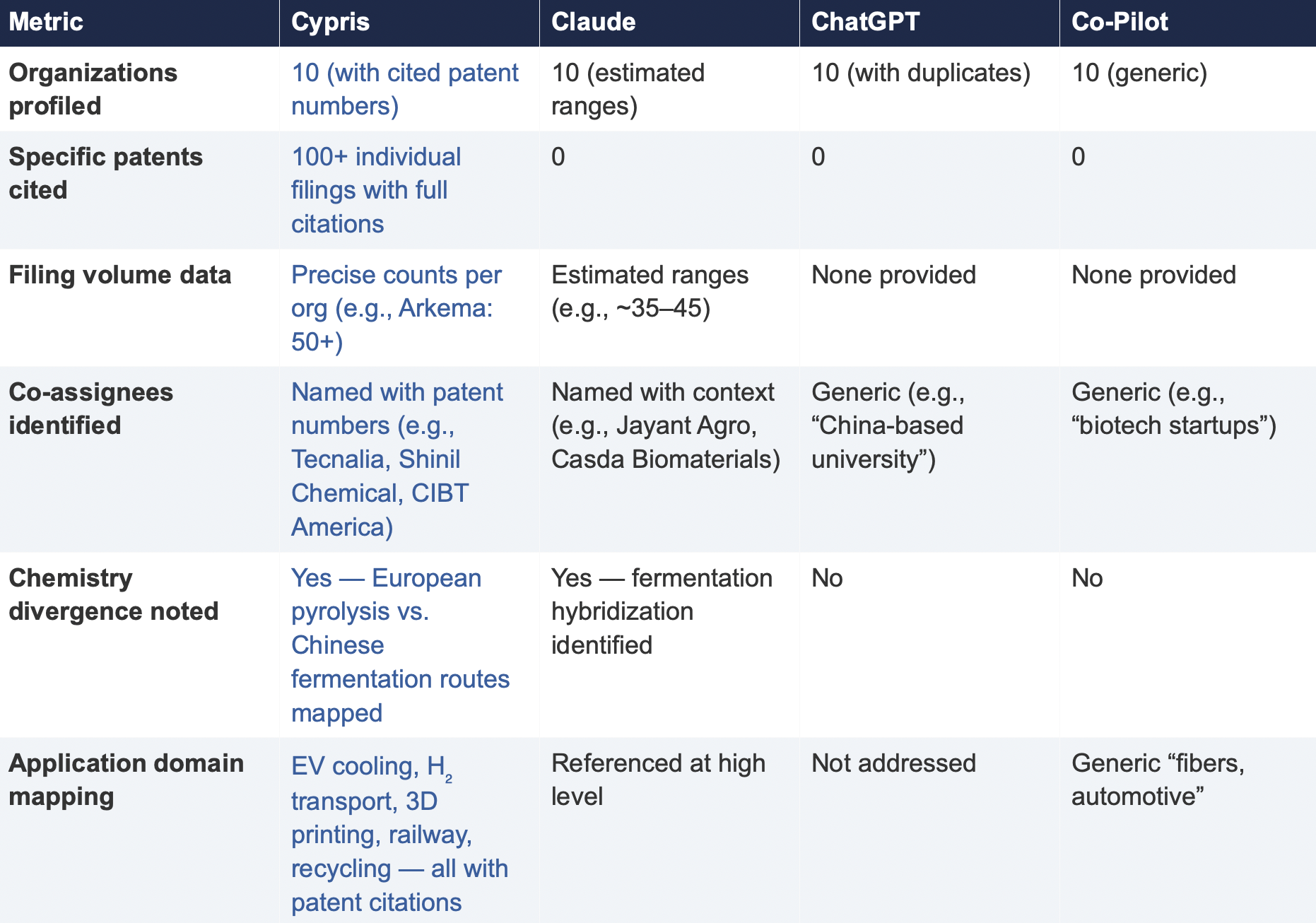
6.2 Summary of Results
6.3 Key Differentiators
Verifiability
The most consequential difference in Test 2 was the presence or absence of verifiable evidence. Cypris cited over 100 individual patent filings with full patent numbers, assignee names, and publication dates. Every claim about an organization’s technical focus, co-assignee relationships, and filing trajectory was anchored to specific documents that a practitioner could independently verify in USPTO, Espacenet, or WIPO PATENT SCOPE. No general-purpose model cited a single patent number. Claude produced the most structured and analytically useful output among the public models, with estimated filing ranges, product names, and strategic observations that were directionally plausible. However, without underlying patent citations, every claim in the response requires independent verification before it can inform a business decision. ChatGPT and Co-Pilot offered thinner profiles with no filing counts and no patent-level specificity.
Data Integrity
ChatGPT’s response contained a structural error that would mislead a practitioner: it listed CathayBiotech as organization #5 and then listed “Cathay Affiliate Cluster” as a separate organization at #9, effectively double-counting a single entity. It repeated this pattern with Toray at #4 and “Toray(Additional Programs)” at #10. In a competitive intelligence context where the ranking itself is the deliverable, this kind of error distorts the landscape and could lead to misallocation of competitive monitoring resources.
Organizations Missed
Cypris identified Kingfa Sci. & Tech. (8–10 filings with a differentiated furan diacid-based polyamide platform) and Zhejiang NHU (4–6 filings focused on continuous polymerization process technology)as emerging players that no general-purpose model surfaced. Both represent potential competitive threats or partnership opportunities that would be invisible to a team relying on public AI tools.Conversely, ChatGPT included organizations such as ANTA and Jiangsu Taiji that appear to be downstream users rather than significant patent filers in synthesis, suggesting the model was conflating commercial activity with IP activity.
Strategic Depth
Cypris’s cross-cutting observations identified a fundamental chemistry divergence in the landscape:European incumbents (Arkema, Evonik, EMS) rely on traditional castor oil pyrolysis to 11-aminoundecanoic acid or sebacic acid, while Chinese entrants (Cathay Biotech, Kingfa) are developing alternative bio-based routes through fermentation and furandicarboxylic acid chemistry.This represents a potential long-term disruption to the castor oil supply chain dependency thatWestern players have built their IP strategies around. Claude identified a similar theme at a higher level of abstraction. Neither ChatGPT nor Co-Pilot noted the divergence.
6.4 Test 2 Conclusion
Test 2 confirms that the coverage and verifiability gaps observed in Test 1 are not domain-specific.In a competitive intelligence context—where the deliverable is a ranked landscape of organizationalIP activity—the same structural limitations apply. General-purpose models can produce plausible-looking top-10 lists with reasonable organizational names, but they cannot anchor those lists to verifiable patent data, they cannot provide precise filing volumes, and they cannot identify emerging players whose patent activity is visible in structured databases but absent from the web-scraped content that general-purpose models rely on.
7. Conclusion
This comparative analysis, spanning two distinct technology domains and two distinct analytical workflows—freedom-to-operate assessment and competitive intelligence—demonstrates that the gap between purpose-built R&D intelligence platforms and general-purpose language models is not marginal, not domain-specific, and not transient. It is structural and consequential.
In Test 1 (LLZO garnet electrolytes for Li-S batteries), the purpose-built platform identified more than three times as many patents as the best-performing general-purpose model and ten times as many as the lowest-performing one. Among the patents identified exclusively by the purpose-built platform were filings rated as Very High FTO risk that directly claim the proposed technology architecture. InTest 2 (bio-based polyamide competitive landscape), the purpose-built platform cited over 100individual patent filings to substantiate its organizational rankings; no general-purpose model cited as ingle patent number.
The structural drivers of this gap—reliance on training data rather than live patent feeds, the accelerating closure of web content to AI scrapers, and the absence of patent-specific analytical frameworks—are not transient. They are inherent to the architecture of general-purpose models and will persist regardless of increases in model capability or training data volume.
For R&D and IP leaders, the practical implication is clear: general-purpose AI tools should be used for general-purpose tasks. Patent intelligence, competitive landscaping, and freedom-to-operate analysis require purpose-built systems with direct access to structured patent data, domain-specific analytical frameworks, and the ability to surface what a general-purpose model cannot—not because it chooses not to, but because it structurally cannot access the data.
The question for every organization making R&D investment decisions today is whether the tools informing those decisions have access to the evidence base those decisions require. This study suggests that for the majority of general-purpose AI tools currently in use, the answer is no.
About This Report
This report was produced by Cypris (IP Web, Inc.), an AI-powered R&D intelligence platform serving corporate innovation, IP, and R&D teams at organizations including NASA, Johnson & Johnson, theUS Air Force, and Los Alamos National Laboratory. Cypris aggregates over 500 million data points from patents, scientific literature, grants, corporate filings, and news to deliver structured intelligence for technology scouting, competitive analysis, and IP strategy.
The comparative tests described in this report were conducted on March 27, 2026. All outputs are preserved in their original form. Patent data cited from the Cypris reports has been verified against USPTO Patent Center and WIPO PATENT SCOPE records as of the same date. To conduct a similar analysis for your technology domain, contact info@cypris.ai or visit cypris.ai.
The Patent Intelligence Gap - A Comparative Analysis of Verticalized AI-Patent Tools vs. General-Purpose Language Models for R&D Decision-Making
Blogs

How do patents act as an incentive to technological innovation? This question continues to be the subject of much discussion. From economic incentives to international perspectives, there are various factors at play when looking into how patents can drive or hinder progress in technology development.
In this blog post, we’ll investigate the nature of patents, their potential to promote innovation, and their influence on international markets. We’ll also look at different countries’ approaches to using patents as an incentive for furthering technological advancement. By examining these elements together we hope to answer: how do patents act as an incentive to technological innovation?
Table of Contents
How Do Patents Act as an Incentive to Technological Innovation?
The Economic Impact of Patents on Technological Innovation
Cost/Benefit Analysis of Patents for Innovators
Effects on Competition and Market Dynamics
What Is a Patent?
A patent is a type of intellectual property that gives exclusive authority to an inventor or their designee for a particular span. It gives the holder the right to prevent others from making, using, selling, offering for sale, or importing an invention without permission. Patents are typically granted by governments and can be enforced in court if necessary.
Types of Patents
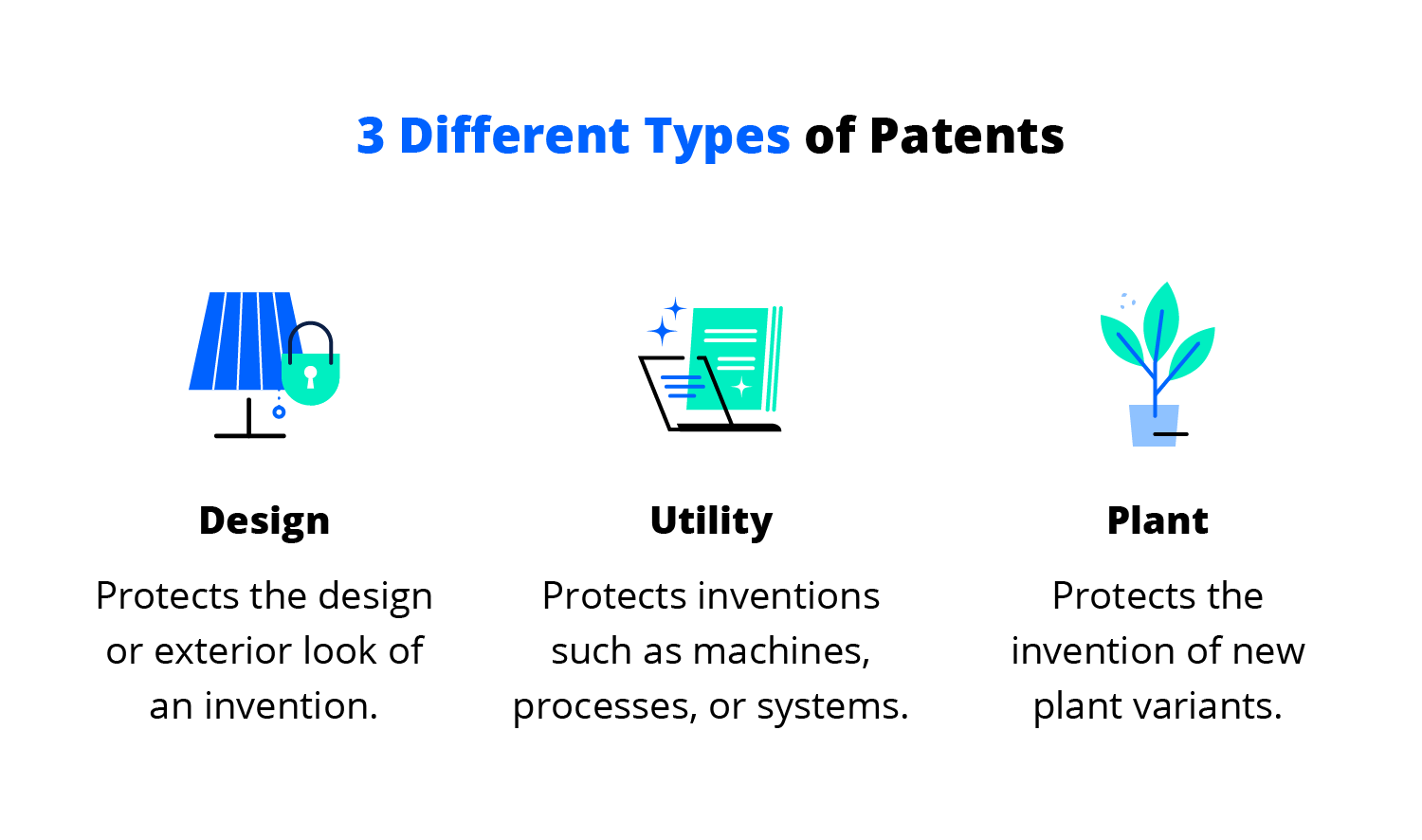
There are three types of patents: utility patents, design patents, and plant patents. Utility patents protect inventions that have a functional purpose such as machines, processes, and compositions of matter while design patents protect new ornamental designs applied to articles of manufacture like furniture or jewelry. Plant patents cover newly discovered varieties of plants created through non-naturally occurring breeding techniques such as hybridization or genetic engineering.
(Source)
The Patent System
The initial step of the patent process is to apply with a relevant government entity (e.g., USPTO). The application must include detailed descriptions of how the invention works and why it is novel compared to existing technology/products on the market at that time.
After being reviewed by examiners who determine whether all requirements have been met, a patent may be issued that grants exclusive rights over the patented inventions for up to 20 years in most countries including USA and Europe depending on jurisdiction laws governing them respectively. If any infringements occur during this period then legal action can be taken against those responsible by asserting one’s patent rights in court proceedings if necessary.
How do patents act as an incentive to technological innovation? Patents grant exclusive rights to an inventor or assignee for a limited period. Patents can be seen as a stimulant for tech advancement and they have the potential to sway investment decisions.
Patents provide a reward to inventors and their assignees for a certain duration by granting exclusive rights. #patentrights #innovation Click to Tweet
How Do Patents Act as an Incentive to Technological Innovation?
How do patents act as an incentive to technological innovation? Patents have an essential role in technological innovation. By providing innovators with exclusive rights to their inventions, patents help encourage and incentivize the development of new technologies.
R&D investments of a considerable magnitude are especially reliant on patents for success. Patents can provide a competitive edge by preventing competitors from copying or infringing on an invention, while also allowing inventors to recoup some of their R&D costs through licensing fees or royalties.
However, there are challenges associated with patents as well. The patent process itself can be lengthy and costly, which may discourage small businesses from pursuing them.
Additionally, overly broad patents that cover too much ground can stifle competition and slow down innovation within a given industry by creating monopolies or limiting access to certain technologies. Governments and regulatory bodies need to ensure that patent laws don’t create barriers to entry for new companies looking to enter the market with innovative products or services.
Investors are heavily incentivized to take risks on potentially groundbreaking ideas when they know their investments will be rewarded with exclusive rights over any inventions resulting from them. However, overly restrictive patent regimes could lead investors away from investing in certain areas due to the risk of infringement claims brought by larger companies that already possess numerous related patents, thus diminishing returns.
Overall, properly managed patent systems are essential components of a healthy ecosystem for technological innovation; they provide incentives for individuals and organizations alike while protecting intellectual property rights at the same time. Policymakers must strive to create a harmonious equilibrium between incentivizing R&D investment and guaranteeing fair competition in all fields, so as not to hinder the progress of improved technologies and better products/services for everyone.
Patents may bring both beneficial and adverse consequences, yet they remain a key factor in encouraging technological progress. To grasp the implications of patents on innovation, a cost/benefit evaluation for patent holders as well as its consequence on competition and marketplace behavior should be assessed.
Key Takeaway: Patents act as a powerful incentive for technological innovation, offering exclusive rights and the potential to recoup R&D costs. However, overly broad patents or excessively restrictive regimes can stifle competition and slow down progress. Governments must strike a balance between incentivizing investment in R&D and ensuring fair play across all sectors.
The Economic Impact of Patents on Technological Innovation
How do patents act as an incentive to technological innovation? Patents serve as a form of intellectual property protection that can potentially benefit innovators, but there are associated costs to consider. Yet, the costs of acquiring and sustaining patents can also have a bearing on an invention’s financial prosperity.
Cost/Benefit Analysis of Patents for Innovators
Obtaining patent protection is often costly and time-consuming, but it can be worth it if done correctly. Patenting can provide innovators with exclusive rights to exploit their inventions commercially, allowing them to recoup some or all of their development costs.
It also creates a barrier to entry for competitors, protecting innovators from being undercut by imitators. Obtaining a patent may boost the esteem of an invention in the eyes of prospective investors or purchasers.
Effects on Competition and Market Dynamics
On the other hand, patents may limit competition within markets by creating barriers for new entrants who lack access to patented technologies or resources needed to develop competing products or services. This could lead to higher costs, due to a decrease in rivalry and reduced inspiration for more investment into R&D.
Additionally, patents may create legal disputes between companies over alleged infringement which can result in expensive litigation fees even when no actual infringement has occurred.
Key Takeaway: Patents can be a double-edged sword for innovators, offering the potential of exclusive rights and protection from competitors but also carrying high costs in terms of time and money. Although patents may increase the perceived value or create barriers to entry, they could also limit competition within markets by creating obstacles for new entrants, leading to higher prices with fewer incentives for R&D investment.
Conclusion
How do patents act as an incentive to technological innovation? these legal instruments can be a potent weapon for creators. Patents may furnish a variety of advantages, including warding off rivals, augmenting R&D investment, giving consumers access to creative goods and services, and stimulating competition.
However, there are also potential challenges with patenting technology such as high costs associated with obtaining or defending a patent, difficulties enforcing international patents across borders, or overly broad claims which could stifle competition.
Ultimately, it is evident that patents serve as a stimulus for technological progress. By offering inventors exclusive rights over their inventions, and providing financial incentives for successful products or services, patents can encourage technological innovation.
Patents afford firms the ability to reap rewards from their inventions by granting them exclusive authority over certain goods or services. The economic impact of these incentives has been significant; however, different countries have adopted varying approaches toward patent protection which can influence how effective they are at promoting technological innovation overall.
Discover how Cypris can help your R&D and innovation teams unlock the power of patents to drive technological innovation. Leverage our research platform for rapid time-to-insights, and maximize your team’s potential with patent analysis today.

What are the steps of scientific innovation? The process of scientific innovation can be complex and daunting. But, with the proper steps in place, one can move forward to create a successful product or technology.
From defining the problem to commercialization and implementation, understanding these key stages of scientific innovation is essential for any R&D team looking to innovate effectively. By following the five steps we will outline here, teams can ensure they are taking all necessary actions on their path from idea generation through final launch. So let’s discover together: what are the steps of scientific innovation?
Table of Contents
Assigning Roles and Responsibilities
Commercialization and Implementation
Conclusion: What Are the Steps of Scientific Innovation?
Defining the Problem
What are the steps of scientific innovation? The first step is to define the problem, which is also the first step in the scientific method.
Defining the problem is an essential step for any R&D and innovation team. Identifying the need helps teams understand what areas require improvement or development, as well as which solutions will be most effective in addressing these needs.
Investigating potential solutions entails examining current technologies and trends to decide how they can be implemented to resolve a given issue. Setting goals and objectives provides clarity on desired outcomes, enabling teams to measure progress and success over time.
When identifying the need, teams need to consider customer feedback, industry trends, market demands, and technological advancements when determining what problems should be addressed first. It’s also beneficial for teams to use research tools such as surveys or interviews with stakeholders to gain insights into potential pain points that could benefit from further exploration or development.
Researching solutions requires a deep dive into current technology offerings and available resources within an organization’s network of partners or vendors. Teams should look at competitors’ products or services to identify gaps that could potentially lead them toward creating innovative new products or services of their own. Additionally, researching industry trends allows organizations to stay ahead of emerging opportunities while avoiding pitfalls associated with outdated approaches that may no longer yield positive results due to changing markets or customer preferences.
Once the problem has been clearly defined, teams can begin to explore solutions and generate ideas for innovation. To do this effectively, brainstorming strategies must be employed to evaluate potential concepts and refine them into viable products or services.
Key Takeaway: R&D and innovation teams need to identify needs, research solutions, and set goals to successfully innovate. To do so effectively they must consider customer feedback, industry trends, market demands, and technological advancements before delving into competitor offerings or leveraging their network of partners and vendors. By establishing clear objectives with specific metrics linked back to identified needs progress can be measured over time for successful results.
Generating Ideas
What are the steps of scientific innovation? Generating ideas for research and projects is a vital part of the innovation process.
Brainstorming is an effective way to generate multiple potential solutions quickly. Gathering a team of diversely-minded individuals is key to successful brainstorming, as it can help generate creative solutions.
(Source)
To ensure a safe space for open discussion, it is essential to establish that all ideas should be voiced without fear of criticism or judgment. To ensure that the most innovative ideas are discussed, it’s helpful to set ground rules like no idea is too small or silly before beginning the session. Additionally, setting a time limit helps keep the conversation focused on generating as many ideas as possible within that timeframe.
It is essential for those with a vested interest to consider the financial viability, expansiveness, and implications of each potential solution before making any decisions. Anticipating any issues that may arise during implementation is critical for a successful outcome. Thus it’s important to think ahead and address any red flags before moving forward.
Brainstorming and stakeholder input are essential for successful research and innovation projects. Set ground rules, assess cost-effectiveness, and anticipate potential issues to get the best outcome. #ResearchInnovation #IdeaGeneration Click to Tweet
Developing a Plan of Action
What are the steps of scientific innovation? Innovation requires developing a plan of action. It involves establishing a timeline, allocating resources and budgeting, and assigning roles and responsibilities.
Create a Timeline
To ensure the successful completion of the project, it is essential to create a timeline with deadlines for each task. Start by breaking down the project into smaller tasks with specific deadlines for each task.
Think about what should be done to finish each job, plus any hindrances that may come up while doing so. Once you have identified these items, create an overall timeline that outlines when each step should be completed by. Utilizing tools such as Gantt charts can help keep everyone involved in the project organized and on track with their respective tasks.
Allocating Resources
Allocating resources is also important when developing a plan of action for your research or innovation team’s project. This includes identifying what materials are needed, who will provide them, how much they cost, and where they need to be sourced from.
Additionally, it’s wise to consider which personnel are best suited for different parts of the job at hand, such as those who have experience in coding, designing experiments, collecting data, or commercialization. By doing this upfront planning, you’ll ensure that your team has everything it needs before beginning work on its project.
Assigning Roles and Responsibilities
Finally, assigning roles and responsibilities ensures that every member knows exactly what their role entails so there’s no confusion throughout the assignment. To do this effectively, start by creating detailed descriptions outlining duties associated with various positions like a lead researcher or product developer engineer.
Then assign individuals accordingly based on skill set capabilities while keeping an eye out for areas where collaboration between members might benefit outcomes even further than working alone would achieve.
By following these steps when developing a plan of action, you will increase efficiency throughout your R&D or innovation team’s projects while saving time and money in the process. Creating a timeline, budgeting resources, designating duties, and allocating roles are essential to attaining maximum efficiency while saving time and funds. Doing this upfront planning ensures that your team has everything it needs before beginning work on its project which will result in more successful outcomes.
Innovation requires constructing a blueprint of activity, to make sure the project stays on course and within the budget. To further refine the process, testing, and experimentation are necessary to evaluate results and make adjustments as needed.
Key Takeaway: An effective plan of action for an R&D or innovation project should include setting a timeline, allocating resources, and budgeting appropriately, as well as assigning roles and responsibilities. Putting in the groundwork upfront to ensure your team has everything it needs before getting started will pay off dividends later down the line.
Testing and Experimentation
What are the steps of scientific innovation? Testing and experimentation are essential steps in the R&D process. Experiments help to validate hypotheses, identify areas of improvement, and provide data-driven insights into product development.
When designing experiments and prototypes, it is important to consider factors such as scalability, cost efficiency, reliability, accuracy, speed of implementation, and results analysis.
Prototyping
Prototypes should be designed with the end goal in mind.
What will you measure? What kind of data do you need to collect? How long does each experiment take?
Will there be any safety concerns or hazards associated with testing?
These questions should all be answered before beginning an experiment or prototype design. Testing the prototype’s operation and practicality can be done after its development.
Data Collection and Analysis
Data collection is also a key component when testing a prototype. Collecting accurate data helps inform decisions about potential changes or improvements that could be made during the refinement process.
Analyzing results from tests is critical for making adjustments as necessary based on feedback from users or other stakeholders involved in the project. A variety of methods can be used to analyze test results including statistical analysis tools such as:
- Regression models.
- Machine learning algorithms.
- Qualitative surveys.
- Interviews.
- Focus groups.
- Field trials.
By evaluating user feedback alongside performance metrics such as time-to-market or customer satisfaction ratings, teams can make informed decisions regarding product enhancements or changes needed before launch.
Testing and experimentation are invaluable components within the R&D cycle which allow teams to validate ideas while gathering valuable insights into how products perform under various conditions. This leads to successful commercialization outcomes through iterative cycles of refinement and optimization over time.
Key Takeaway: R&D relies on experimentation and assessment to confirm suppositions and acquire useful data regarding product performance. By collecting accurate data, analyzing results from tests, as well as user feedback through qualitative surveys or interviews among other methods.
Commercialization and Implementation
What are the steps of scientific innovation? Commercialization and implementation of a research or innovation project are essential parts of any innovative process.
Commercialization and implementation require careful planning, execution, and assessment to ensure success. Identifying potential markets for the product or service is key to launching it successfully. This involves researching current trends in the industry, understanding customer needs and preferences, analyzing competition, and assessing market opportunities.
Once potential target markets have been identified, a business plan must be formulated that accounts for all relevant factors like cost structure, income sources, desired consumers, and pricing approach.
Finally, a launch strategy should be developed that outlines tactics for introducing the product or service to its intended audience while also taking into account any risks associated with its introduction.
R&D managers and engineers must be diligent in having an innovative process to ensure the successful commercialization of their projects.
R&D teams need to plan, execute & assess carefully when commercializing their projects. Research trends, understand customer needs & create a business model for success. #innovation #research Click to Tweet
Conclusion: What Are the Steps of Scientific Innovation?
What are the steps of scientific innovation? The scientific method is a complex and often iterative process. It requires an in-depth understanding of the problem at hand, creative thinking to generate ideas, careful planning for implementation, and testing through experimentation before commercialization can take place.
By utilizing research platforms that provide access to data sources quickly, teams can accelerate their journey toward successful innovations with greater speed and accuracy than ever before.
Unlock the power of R&D and innovation teams with Cypris. Our platform provides rapid time to insights, allowing you to centralize data sources for maximum efficiency.

Are you struggling to learn how to prioritize innovation ideas in your organization? Deciding which ideas should be pursued and which should wait can be a challenging task. Fortunately, there is an effective way of doing this that will help streamline the process and ensure success.
In this blog post, we’ll explore how to identify the right ideas for prioritization, develop an evaluation framework, leverage technology for efficiency gains, build an innovation culture within your team, and measure success when it comes time to implement them. Let’s learn how to prioritize innovation ideas!
Table of Contents
How to Prioritize Innovation Ideas
Developing an Evaluation Framework
Defining Criteria for Evaluation
Creating an Action Plan for Implementation
Leveraging Technology to Streamline the Process
Automated Idea Management Systems
Building an Innovation Culture in Your Organization
Measuring the Success of Prioritized Ideas
Tracking Progress and Performance Metrics
How to Prioritize Innovation Ideas
Prioritizing innovation ideas is essential for R&D and innovation teams. It is imperative to distribute resources productively so that ventures have an optimal chance of success. To identify the right ideas to prioritize, it’s important to assess the potential impact, evaluate the feasibility, and understand resource requirements.
Assess Potential Impact
Assessing potential impact involves considering how successful an idea might be if implemented. Factors such as customer demand or market opportunity should be taken into account when assessing an idea’s potential return on investment (ROI). Moreover, analyzing the expenditure of time and resources required can assist in deciding whether a project is worth pursuing.
Evaluate Feasibility
Evaluating feasibility requires looking at both technical and non-technical elements of a project before committing resources towards its development. Technical factors include understanding any existing technology constraints or dependencies that may limit progress. At the same time, non-technical considerations involve analyzing available skill sets within your team or organization which could affect implementation timelines.
It is important to prioritize the right ideas for innovation, as this will ensure successful outcomes. Developing an evaluation framework can help you make informed decisions and guide your team in implementing them effectively.
Key Takeaway: In learning how to prioritize innovation ideas, teams need to consider a combination of ROI, technical feasibility, and resource availability assessments. Taking into account customer demand, market opportunity, and skillsets within your team or organization will help you cut through the noise and make informed decisions about which projects are worth investing in.
Developing an Evaluation Framework
Developing an evaluation framework is a critical step in idea prioritization. It helps teams prioritize ideas and decide which ones to pursue. Organizations can maximize their chances of success by defining criteria for evaluation, establishing a scoring system, and creating an action plan for implementation.
Defining Criteria for Evaluation
Defining the criteria for evaluation is essential to make informed decisions about which ideas should be pursued. Teams should identify what matters most when evaluating new concepts – such as potential impact, feasibility, resources required, or customer needs – and create clear guidelines on how each will be measured.
This will help ensure that all stakeholders are aligned on the criteria used when assessing projects.
Establishing a Scoring System
Establishing a scoring system allows teams to quantify their evaluations and compare different ideas objectively against one another. Each criterion should have its weight depending on its importance relative to other factors being considered.
This score can then be used to rank projects from highest priority down through least important priorities The scoring system should also take into account any external factors that may affect the outcome of a project such as industry trends or competitive landscape analysis.
Creating an Action Plan for Implementation
Having an action plan ensures that teams can move forward with their chosen idea efficiently and effectively. It should outline specific tasks that need completing to bring them to fruition successfully within given timelines and budget constraints if applicable.
An action plan should include steps such as:
- Research and development activities.
- Product design and testing.
- Marketing strategy development.
- Production planning and scheduling.
With this, everyone involved knows exactly what needs to be done at each stage of the process before launch day arrives.
Developing an evaluation framework is essential in learning how to prioritize innovation ideas, as it provides the necessary structure to ensure ideas are properly assessed and evaluated. Leveraging technology can further streamline this process by utilizing data analytics tools, automating idea management systems, and implementing collaboration platforms.
Key Takeaway: By defining criteria for evaluation, establishing a scoring system, and creating an action plan for implementation, organizations can ensure their chosen innovation ideas are pursued in the most effective way possible. It’s all about getting your ducks in a row to guarantee success.
Leveraging Technology to Streamline the Process
The use of technology can be an invaluable asset for streamlining the process of prioritizing innovative ideas. Data analytics tools, automated idea management systems, and collaboration platforms are all powerful tools that can help to make idea prioritization more efficient and effective.
Data Analytics Tools
Data analytics tools provide R&D teams with insights into which ideas have the most potential for success. By analyzing data points such as customer feedback, market trends, and industry benchmarks, these tools can identify opportunities that may otherwise go unnoticed. Based on data-driven insights, R&D teams can prioritize projects accordingly.
Automated Idea Management Systems
Automated idea management systems enable teams in capturing, organizing, and prioritizing ideas in one central location. These systems can keep tabs on each idea, from its start to completion, so the team is aware of where resources are going at any given moment.
(Source)
In addition, automated idea management systems often include features such as voting capabilities or gamification elements which further facilitate team collaboration and engagement when it comes to selecting new initiatives or assessing existing ones.
Collaboration Platforms
Collaboration platforms offer distributed teams the opportunity to collaborate seamlessly across multiple locations without compromising productivity or quality control. With real-time updates on task progress and integrated communication channels such as chat rooms or video conferencing, these platforms provide teams with the flexibility needed to remain agile in today’s fast-paced environment while allowing them to effectively collaborate.
By leveraging technology to streamline idea prioritization, organizations can gain a competitive edge in the innovation race. To further capitalize on this advantage, companies must build an innovative culture within their organization by encouraging creativity and risk-taking, fostering open communication and collaboration, and promoting knowledge sharing and learning.
Key Takeaway: Using data analytics tools, automated idea management systems, and collaboration platforms to their fullest potential can help R&D teams prioritize ideas with maximum efficiency. These powerful technologies enable teams to make informed decisions quickly, track progress accurately and collaborate across multiple locations without compromising productivity or quality control.
Building an Innovation Culture in Your Organization
Organizations that benefit from idea prioritization must create an environment that encourages creativity and risk-taking. To do this, it’s important to foster open communication and collaboration between teams, as well as promote knowledge sharing and learning. This will help ensure that ideas are discussed openly and new perspectives are considered.
Encouraging creativity starts with providing employees with the freedom to explore their ideas without fear of failure or criticism. By allowing employees to take risks in a safe space, organizations can create an atmosphere where creative thinking is rewarded instead of punished for mistakes made along the way. It also helps if leadership models this behavior by taking calculated risks themselves, so others feel empowered to do the same.
To cultivate an innovative atmosphere within the organization, it is essential to foster open communication between all departments. Encourage R&D managers and engineers, product development personnel, and scientists at all levels to come together regularly for problem-solving sessions or brainstorming ideas for potential commercialization opportunities.
By having everyone’s input on board, teams can leverage different perspectives when prioritizing ideas or tackling challenges they may be facing in their workflows.
Key Takeaway: Organizations should foster a setting that boosts imaginative thought and chances taking by endorsing open dialogue, exchanging of knowledge, and joint issue solving. By fostering a safe space for employees to explore their ideas without fear of failure or criticism, organizations can foster innovation while encouraging leaders to take calculated risks as well.
Measuring the Success of Prioritized Ideas
In learning how to prioritize innovation ideas, a crucial step is measuring the success of their implementation. Tracking progress and performance metrics, analyzing results, adjusting strategies accordingly, celebrating achievements, and learning from failures are all key components of idea prioritization.
Tracking Progress and Performance Metrics
Tracking progress and performance metrics can help you understand how well your team is doing on their current project or initiative. This could include measuring completion rate against deadlines, assessing customer feedback on products or services, or tracking financial performance related to a particular idea. By monitoring the relevant data points over some time, you can determine if your concept is having its desired effect.
Analyzing Results
Analyzing results allows teams to identify areas for improvement in their projects as well as opportunities for growth and expansion. It’s important to look at data from multiple sources – such as customer surveys, financial reports, and market research studies – when analyzing so that decisions are based on accurate information rather than assumptions or guesswork.
Teams must adjust strategies accordingly based on these findings. Otherwise, any efforts may be wasted if they continue down the wrong path without making necessary changes along the way.
Celebrating Achievements
Celebrating achievements should also be part of the evaluation process since it encourages team morale and motivation while providing recognition for the hard work done by individuals within the organization who have contributed towards successful outcomes.
It is also essential not to evade failure. Rather, use them as chances for growth that can lead to further advances in upcoming undertakings carried out by the team. Going forward into new ventures with confidence knowing what works best given certain scenarios will help ensure success.
Key Takeaway: Analyzing performance metrics and adjusting strategies accordingly is key to assessing the success of innovation ideas. It’s essential to recognize successes and glean lessons from missteps to remain at the forefront, providing teams with a substantial store of wisdom for upcoming projects.
Conclusion
Learning how to prioritize innovation ideas is essential for any organization that wants to stay ahead of the competition. By taking the time to identify and evaluate potential projects, develop an evaluation framework, and leverage technology to streamline processes, organizations can ensure their ideas are successful.
Additionally, prioritizing innovation within your team will help foster creativity, and measuring success with key performance indicators allows teams to track progress in real-time. With these strategies in place, you’ll be well on your way toward achieving maximum ROI from all innovative initiatives.
Discover how Cypris can help your R&D and innovation teams prioritize their ideas quickly with our centralized data platform. Take advantage of the insights you gain to make faster, smarter decisions for your business.
Reports

This Cypris research brief maps the full ecosystem and value chain of electric vehicle battery systems and advanced battery materials, tracing the pathway from raw material extraction through precursor and active material production, cell component manufacturing, battery cell production, pack assembly, vehicle integration, and end-of-life recycling. The brief defines each segment's functional role, identifies key players across upstream, midstream, and downstream layers, and analyzes the structural forces — including critical mineral supply volatility, geographic concentration, OEM vertical integration strategies, recycling-driven circularity, and solid-state battery development — that are reshaping where value concentrates and where supply-chain risk resides.

This Cypris research brief maps the ecosystem and value chain of the specialty polymers and high-performance materials industry, covering the full pathway from raw material and monomer suppliers through polymer manufacturers, compounders, additive suppliers, specialty distributors, converters, and end-use OEMs across aerospace, automotive, electronics, medical, energy, and industrial markets. Beyond the segment-by-segment breakdown and player landscape, the brief analyzes the structural forces shaping the ecosystem — including vertical integration strategies, supplier concentration and consolidation patterns, geographic clustering, circularity constraints, and shifting end-market demand — with a central thesis that leverage in this ecosystem concentrates wherever technical specialization overlaps with requalification burden.

Cypris Research Services' inaugural Innovation Outlook examines how AI-driven data center demand is reshaping U.S. power infrastructure — and why hyperscalers have stopped waiting for the grid to catch up. The report synthesizes commercial activity, market sizing, technology trends, and patent-based competitive positioning into a single ecosystem view of behind-the-meter generation, sizing the U.S. opportunity at $35.8B and tracking 56 GW of contracted bypass capacity already in the pipeline. It identifies where the defensible whitespace actually sits — and it's not where most of the market is currently looking.
Webinars
.png)

Most IP organizations are making high-stakes capital allocation decisions with incomplete visibility – relying primarily on patent data as a proxy for innovation. That approach is not optimal. Patents alone cannot reveal technology trajectories, capital flows, or commercial viability.
A more effective model requires integrating patents with scientific literature, grant funding, market activity, and competitive intelligence. This means that for a complete picture, IP and R&D teams need infrastructure that connects fragmented data into a unified, decision-ready intelligence layer.
AI is accelerating that shift. The value is no longer simply in retrieving documents faster; it’s in extracting signal from noise. Modern AI systems can contextualize disparate datasets, identify patterns, and generate strategic narratives – transforming raw information into actionable insight.
Join us on Thursday, April 23, at 12 PM ET for a discussion on how unified AI platforms are redefining decision-making across IP and R&D teams. Moderated by Gene Quinn, panelists Marlene Valderrama and Amir Achourie will examine how integrating technical, scientific, and market data collapses traditional silos – enabling more aligned strategy, sharper investment decisions, and measurable business impact.
Register here: https://ipwatchdog.com/cypris-april-23-2026/
.png)
In this session, we break down how AI is reshaping the R&D lifecycle, from faster discovery to more informed decision-making. See how an intelligence layer approach enables teams to move beyond fragmented tools toward a unified, scalable system for innovation.
In this session, we explore how modern AI systems are reshaping knowledge management in R&D. From structuring internal data to unlocking external intelligence, see how leading teams are building scalable foundations that improve collaboration, efficiency, and long-term innovation outcomes.
.avif)