How to Use Boolean Search Logic in Cypris
Boolean search logic lets you combine keywords with simple operators—AND, OR, and NOT—to quickly narrow or expand your search results. With a few tricks, you can search like a pro and find exactly what you need in Cypris.
What Is Boolean Logic?
Boolean logic is a way to tell our search engine exactly what you’re looking for by combining words and phrases with special operators. Think of it as giving Cypris step-by-step instructions for filtering results.
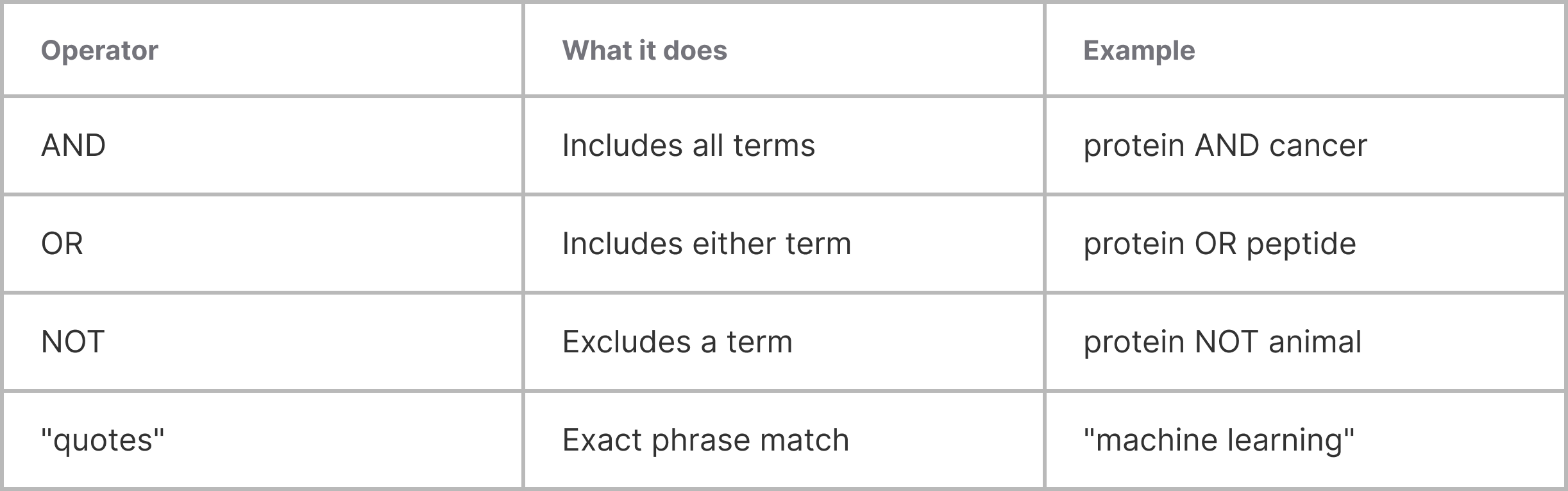
The Key Operators
1. AND
Use AND to require that all terms must appear in your results.
Example: battery AND recycling
Finds results that mention both “battery” and “recycling” together.
2. OR
Use OR to include results with any of your listed terms.
Example: battery OR capacitor
Finds results that mention either “battery” or “capacitor” (or both).
3. NOT
Use NOT to exclude certain terms.
Example: battery NOT lithium
Finds results that mention “battery” but filter out anything about “lithium.”
Advanced Tips
Use Quotation Marks for Exact Phrases
Put quotes around phrases to search for those exact words, in that exact order.
Example: "solid state battery"
Finds results where those three words appear together.
Combine Operators for Precision
Mix and match operators for targeted results.
Example: (battery OR capacitor) AND recycling NOT lithium
Finds results mentioning either “battery” or “capacitor” that also mention “recycling,” but removes any that mention “lithium.”
Parentheses for Complex Searches
Group terms and control the order of logic with parentheses.
Example: (solar OR wind) AND (storage OR battery)
Finds results about either “solar” or “wind,” combined with “storage” or “battery.”
Quick Reference
Want More Advanced Search?
For even more advanced and customizable search options, try the Cypris Query Builder—just click the button at the far right of the search bar. The Query Builder lets you build complex searches with a user-friendly interface, no Boolean knowledge required.
Learn more about using the Query Builder here: https://www.cypris.ai/help-center/articles/introducing-advanced-search-on-cypris
Need More Help?
If you’re ever stuck or want help crafting a complex search, reach out to our support team or use the help chat in the corner—we’re here to help you get the most out of Cypris.


Register here
Subscribe to receive the latest blog posts to your inbox every week.